EasyManua.ls Logo

Optimus STA-795 - Tuning to a Radio Station; Manual Tuning; Search Tuning

Optimus STA-795
20 pages
Print Icon
To Next Page IconTo Next Page
To Previous Page IconTo Previous Page
Loading...
TUNING
TO
A
RADIO
STATION
You
can
use
manual,
search,
or
memory
tuning
to
select
a
radio
station.
Notes:
stereo
appears
on
the
display
when
the
sig¬
nal
is
stereo.
To
improve
the
reception
of
weak
FM
sta¬
tions,
press
FM
MONO
so
that
the
FM
MONO
indicator
comes
on.
For
more
information,
see
“Adjusting
the
Sound.”
Manual
Tuning
The
search
mode
tunes
to
only
strong
stations,
so
you
might
need
to
use
manual
tuning
for
weak
or
distant
stations.
Follow
these
steps
to
manually
tune
to
a
radio
station.
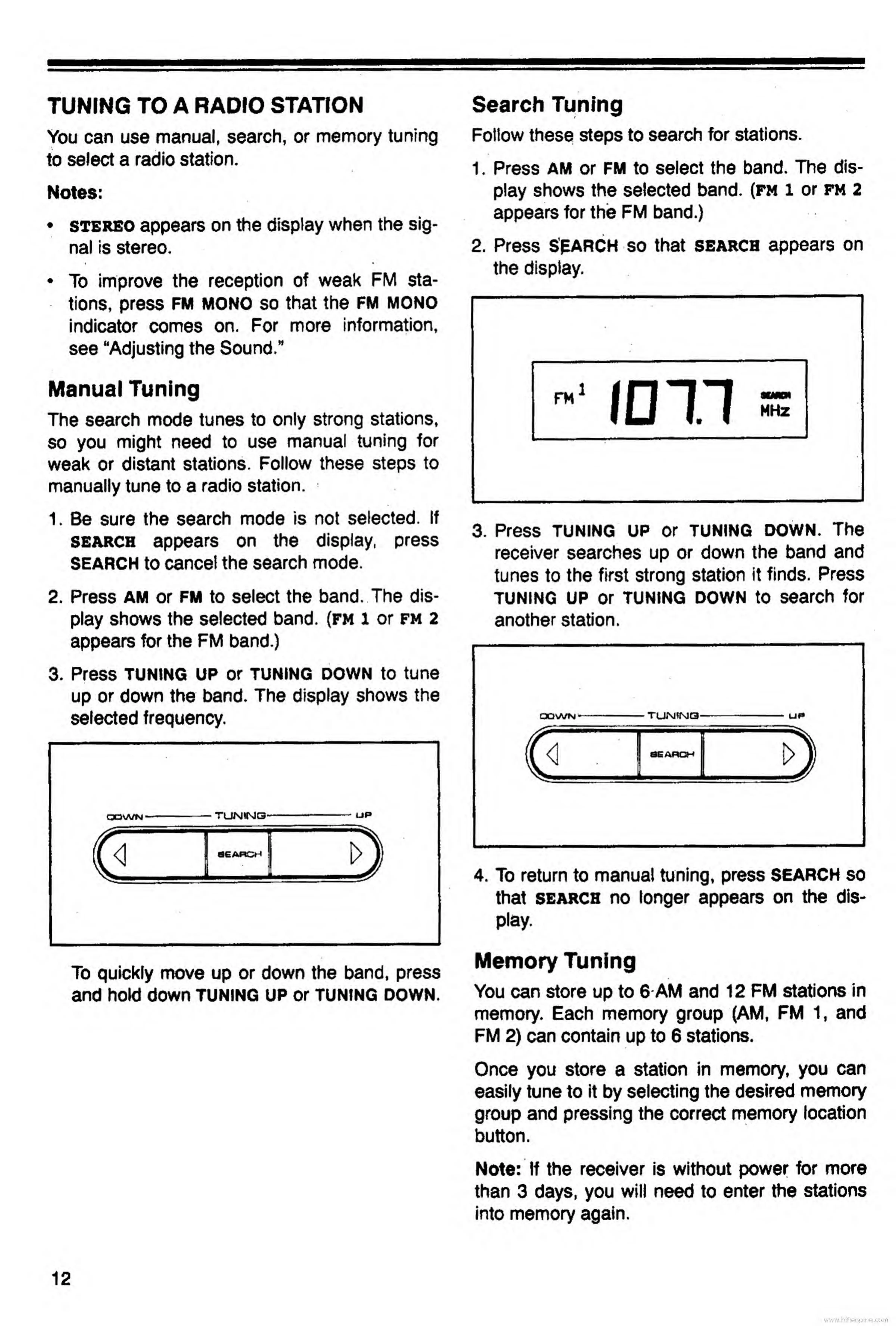
1.
Be
sure
the
search
mode
is
not
selected.
If
search
appears
on
the
display,
press
SEARCH
to
cancel
the
search
mode.
2.
Press
am
or
FM
to
select
the
band.
The
dis¬
play
shows
the
selected
band,
(fm
1
or
fm
2
appears
for
the
FM
band.)
3.
Press
TUNING
UP
or
TUNING
DOWN
to
tune
up
or
down
the
band.
The
display
shows
the
selected
frequency.
To
quickly
move
up
or
down
the
band,
press
and
hold
down
tuning
up
or
tuning
down.
Search
Tuning
Follow
these
steps
to
search
for
stations.
1.
Press
AM
or
FM
to
select
the
band.
The
dis¬
play
shows
the
selected
band,
(fm
l
or
fm
2
appears
for
the
FM
band.)
2.
Press
SEARCH
so
that
search
appears
on
the
display.
3.
Press
TUNING
UP
or
TUNING
DOWN.
The
receiver
searches
up
or
down
the
band
and
tunes
to
the
first
strong
station
it
finds.
Press
tuning
UP
or
TUNING
DOWN
to
search
for
another
station.
4.
To
return
to
manual
tuning,
press
SEARCH
so
that
search
no
longer
appears
on
the
dis¬
play.
Memory
Tuning
You
can
store
up
to
6
AM
and
12
FM
stations
in
memory.
Each
memory
group
(AM,
FM
1,
and
FM
2)
can
contain
up
to
6
stations.
Once
you
store
a
station
in
memory,
you
can
easily
tune
to
it
by
selecting
the
desired
memory
group
and
pressing
the
correct
memory
location
%
button.
Note:
If
the
receiver
is
without
power
for
more
than
3
days,
you
will
need
to
enter
the
stations
into
memory
again.
www.hifiengine.

Related product manuals