EasyManua.ls Logo

Optimus STA-795 - Recording a Tape; Using Headphones; Output Power Meter; Built-In Protection Circuits

Optimus STA-795
20 pages
Print Icon
To Next Page IconTo Next Page
To Previous Page IconTo Previous Page
Loading...
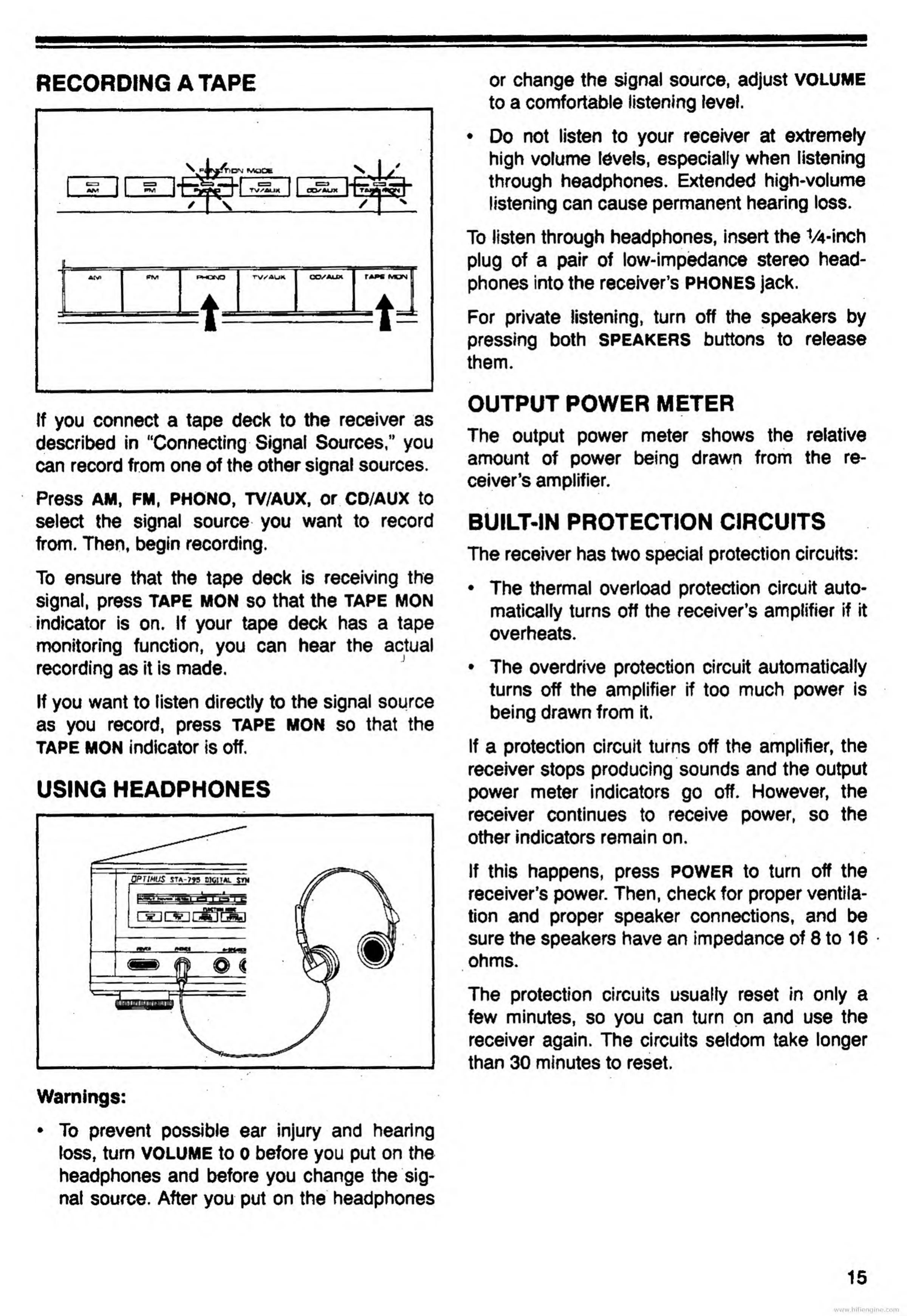
RECORDING
A
TAPE
If
you
connect
a
tape
deck
to
the
receiver
as
described
in
“Connecting
Signal
Sources,"
you
can
record
from
one
of
the
other
signal
sources.
Press
AM,
FM,
PHONO,
TV/AUX,
Or
CD/AUX
to
select
the
signal
source
you
want
to
record
from.
Then,
begin
recording.
To
ensure
that
the
tape
deck
is
receiving
the
signal,
press
tape
mon
so
that
the
tape
mon
indicator
is
on.
If
your
tape
deck
has
a
tape
monitoring
function,
you
can
hear
the
actual
recording
as
it
is
made.
If
you
want
to
listen
directly
to
the
signal
source
as
you
record,
press
TAPE
mon
so
that
the
TAPE
MON
indicator
is
off.
USING
HEADPHONES
Warnings:
To
prevent
possible
ear
injury
and
hearing
loss,
turn
VOLUME
to
0
before
you
put
on
the
headphones
and
before
you
change
the
sig¬
nal
source.
After
you
put
on
the
headphones
or
change
the
signal
source,
adjust
volume
to
a
comfortable
listening
level.
Do
not
listen
to
your
receiver
at
extremely
high
volume
levels,
especially
when
listening
through
headphones.
Extended
high-volume
listening
can
cause
permanent
hearing
loss.
To
listen
through
headphones,
insert
the
V4-inch
plug
of
a
pair
of
low-impedance
stereo
head¬
phones
into
the
receiver’s
PHONES
jack.
For
private
listening,
turn
off
the
speakers
by
pressing
both
speakers
buttons
to
release
them.
OUTPUT
POWER
METER
The
output
power
meter
shows
the
relative
amount
of
power
being
drawn
from
the
re¬
ceiver’s
amplifier.
BUILT-IN
PROTECTION
CIRCUITS
#
The
receiver
has
two
special
protection
circuits:
The
thermal
overload
protection
circuit
auto¬
matically
turns
off
the
receiver’s
amplifier
if
it
overheats.
The
overdrive
protection
circuit
automatically
turns
off
the
amplifier
if
too
much
power
is
being
drawn
from
it.
If
a
protection
circuit
turns
off
the
amplifier,
the
receiver
stops
producing
sounds
and
the
output
power
meter
indicators
go
off.
However,
the
receiver
continues
to
receive
power,
so
the
other
indicators
remain
on.
If
this
happens,
press
power
to
turn
off
the
receiver’s
power.
Then,
check
for
proper
ventila¬
tion
and
proper
speaker
connections,
and
be
sure
the
speakers
have
an
impedance
of
8
to
16
ohms.
The
protection
circuits
usually
reset
in
only
a
few
minutes,
so
you
can
turn
on
and
use
the
receiver
again.
The
circuits
seldom
take
longer
than
30
minutes
to
reset.
www.hifiengine.com

Related product manuals