EasyManua.ls Logo

Optimus STA-795 - Connecting Signal Sources; Connecting a Turntable; Connecting a Tape Deck; Connecting Other Signal Sources

Optimus STA-795
20 pages
Print Icon
To Next Page IconTo Next Page
To Previous Page IconTo Previous Page
Loading...
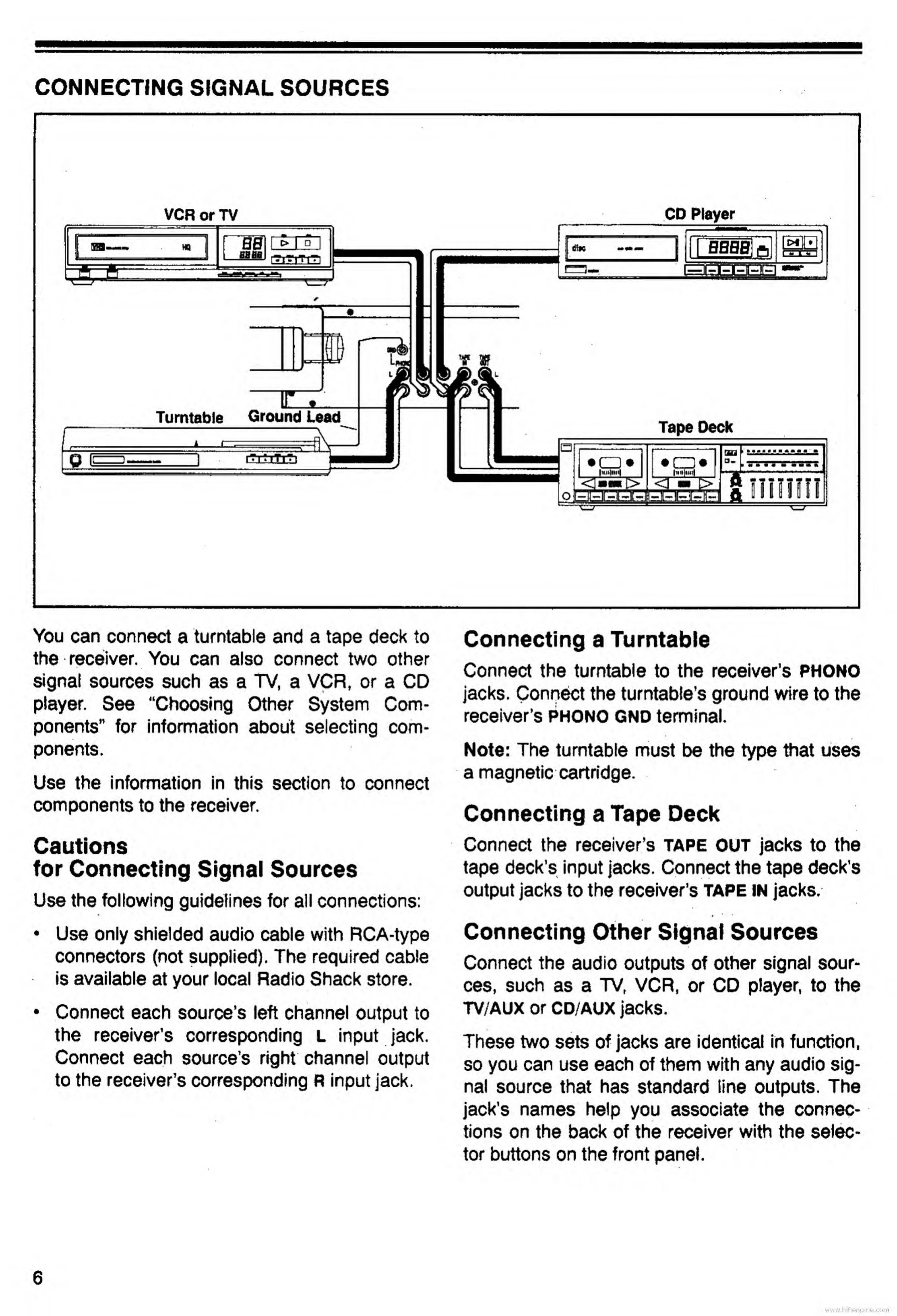
CONNECTING
SIGNAL
SOURCES
VCR
or
TV
CD
Player
You
can
connect
a
turntable
and
a
tape
deck
to
the
receiver.
You
can
also
connect
two
other
signal
sources
such
as
a
TV,
a
VCR,
or
a
CD
player.
See
“Choosing
Other
System
Com¬
ponents"
for
information
about
selecting
com¬
ponents.
Use
the
information
in
this
section
to
connect
components
to
the
receiver.
Cautions
for
Connecting
Signal
Sources
Use
the
following
guidelines
for
all
connections:
Use
only
shielded
audio
cable
with
RCA-type
connectors
(not
supplied).
The
required
cable
is
available
at
your
local
Radio
Shack
store.
Connect
each
source’s
left
channel
output
to
the
receiver’s
corresponding
L
input
jack.
Connect
each
source’s
right
channel
output
to
the
receiver’s
corresponding
R
input
jack.
Connecting
a
Turntable
Connect
the
turntable
to
the
receiver’s
PHONO
jacks.
Connect
the
turntable’s
ground
wire
to
the
receiver’s
PHONO
GND
terminal.
Note:
The
turntable
must
be
the
type
that
uses
a
magnetic
cartridge.
Connecting
a
Tape
Deck
Connect
the
receiver’s
tape
OUT
jacks
to
the
tape
deck’s
input
jacks.
Connect
the
tape
deck’s
output
jacks
to
the
receiver’s
tape
in
jacks.
Connecting
Other
Signal
Sources
Connect
the
audio
outputs
of
other
signal
sour¬
ces,
such
as
a
TV,
VCR,
or
CD
player,
to
the
TV/AUX
or
cd/aux
jacks.
These
two
sets
of
jacks
are
identical
in
function,
so
you
can
use
each
of
them
with
any
audio
sig¬
nal
source
that
has
standard
line
outputs.
The
jack’s
names
help
you
associate
the
connec¬
tions
on
the
back
of
the
receiver
with
the
selec¬
tor
buttons
on
the
front
panel.
www.hifiengine.

Related product manuals