EasyManua.ls Logo

Optimus STA-795 - Speaker Connections

Optimus STA-795
20 pages
Print Icon
To Next Page IconTo Next Page
To Previous Page IconTo Previous Page
Loading...
Speaker
Connections
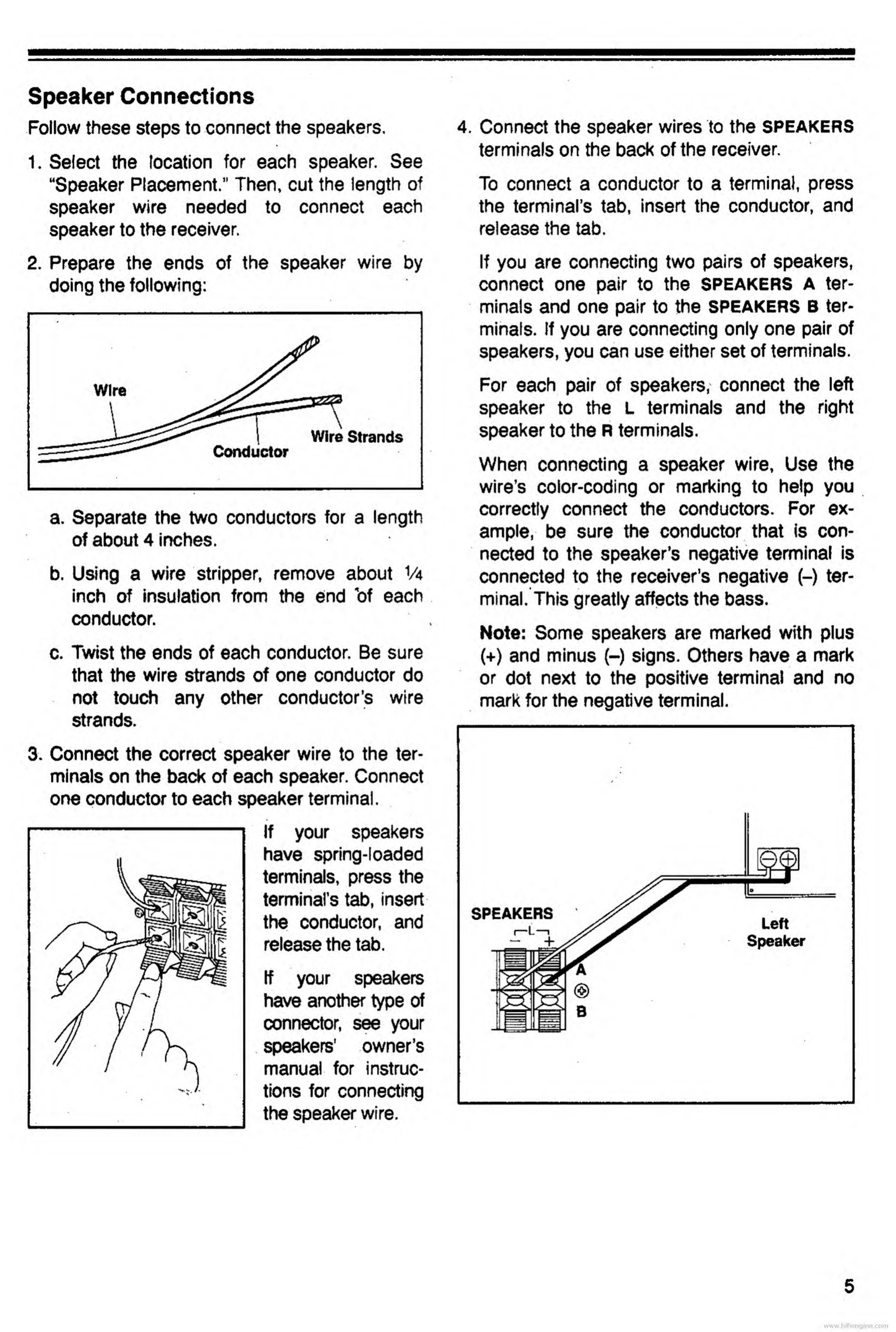
Follow
these
steps
to
connect
the
speakers.
%
1.
S
elect
the
location
for
each
speaker.
See
“Speaker
Placement.’’
Then,
cut
the
length
of
speaker
wire
needed
to
connect
each
speaker
to
the
receiver.
2.
P
repare
the
ends
of
the
speaker
wire
by
doing
the
following:
a.
S
eparate
the
two
conductors
for
a
length
of
about
4
inches.
b.
Using
a
wire
stripper,
remove
about
Va
inch
of
insulation
from
the
end
bf
each
conductor.
c.
Twist
the
ends
of
each
conductor.
Be
sure
that
the
wire
strands
of
one
conductor
do
not
touch
any
other
conductor’s
wire
strands.
3.
C
onnect
the
correct
speaker
wire
to
the
ter¬
minals
on
the
back
of
each
speaker.
Connect
one
conductor
to
each
speaker
terminal.
If
your
speakers
have
spring-loaded
terminals,
press
the
terminal’s
tab,
insert
the
conductor,
and
release
the
tab.
If
your
speakers
have
another
type
of
connector,
see
your
speakers’
owner’s
manual
for
instruc¬
tions
for
connecting
the
speaker
wire.
4.
C
onnect
the
speaker
wires
to
the
SPEAKERS
terminals
on
the
back
of
the
receiver.
To
connect
a
conductor
to
a
terminal,
press
the
terminal’s
tab,
insert
the
conductor,
and
release
the
tab.
If
you
are
connecting
two
pairs
of
speakers,
connect
one
pair
to
the
SPEAKERS
A
ter¬
minals
and
one
pair
to
the
SPEAKERS
B
ter¬
minals.
If
you
are
connecting
only
one
pair
of
speakers,
you
can
use
either
set
of
terminals.
For
each
pair
of
speakers,
connect
the
left
speaker
to
the
L
terminals
and
the
right
speaker
to
the
R
terminals.
When
connecting
a
speaker
wire,
Use
the
wire’s
color-coding
or
marking
to
help
you
correctly
connect
the
conductors.
For
ex¬
ample,
be
sure
the
conductor
that
is
con¬
nected
to
the
speaker’s
negative
terminal
is
connected
to
the
receiver’s
negative
(-)
ter¬
minal.
This
greatly
affects
the
bass.
Note:
Some
speakers
are
marked
with
plus
(+)
and
minus
(-)
signs.
Others
have
a
mark
or
dot
next
to
the
positive
terminal
and
no
mark
for
the
negative
terminal.
www.hifiengine.com

Related product manuals