EasyManua.ls Logo

Optimus STA-795 - Connecting Antennas; External AM Antenna

Optimus STA-795
20 pages
Print Icon
To Next Page IconTo Next Page
To Previous Page IconTo Previous Page
Loading...
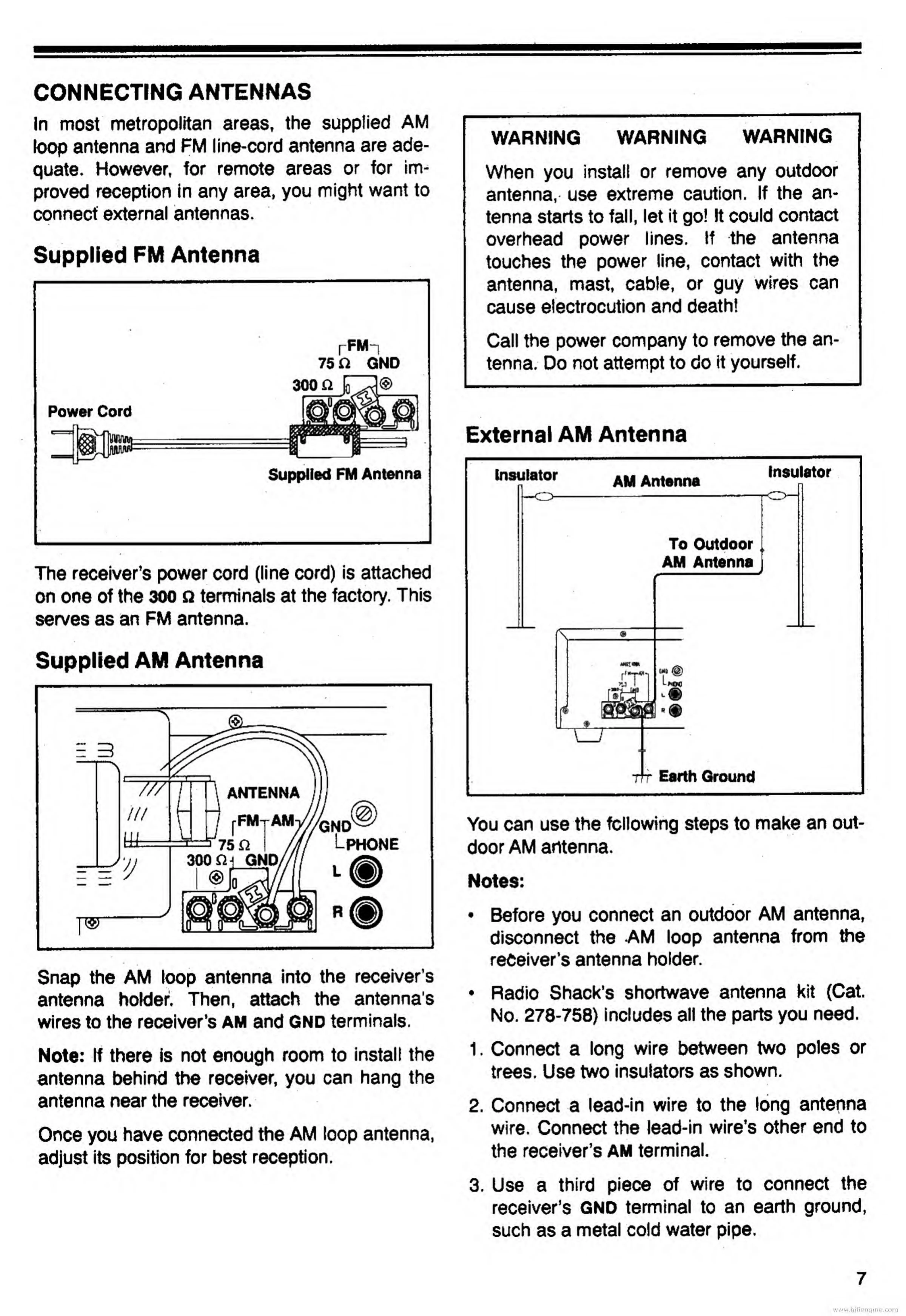
CONNECTING
ANTENNAS
In
most
metropolitan
areas,
the
supplied
AM
loop
antenna
and
FM
line-cord
antenna
are
ade¬
quate.
However,
for
remote
areas
or
for
im¬
proved
reception
in
any
area,
you
might
want
to
connect
external
antennas.
Supplied
FM
Antenna
r
FM
“i
75
GND
Supplied
FM
Antenna
The
receiver’s
power
cord
(line
cord)
is
attached
on
one
of
the
300
n
terminals
at
the
factory.
This
serves
as
an
FM
antenna.
Supplied
AM
Antenna
Snap
the
AM
loop
antenna
into
the
receiver’s
antenna
holder.
Then,
attach
the
antenna's
wires
to
the
receiver’s
AM
and
GND
terminals.
Note:
If
there
is
not
enough
room
to
install
the
antenna
behind
the
receiver,
you
can
hang
the
antenna
near
the
receiver.
Once
you
have
connected
the
AM
loop
antenna,
adjust
its
position
for
best
reception.
WARNING
WARNING
WARNING
When
you
install
or
remove
any
outdoor
antenna,
use
extreme
caution.
If
the
an¬
tenna
starts
to
fall,
let
it
go!
It
could
contact
overhead
power
lines.
If
the
antenna
touches
the
power
line,
contact
with
the
antenna,
mast,
cable,
or
guy
wires
can
cause
electrocution
and
death!
Call
the
power
company
to
remove
the
an¬
tenna.
Do
not
attempt
to
do
it
yourself.
External
AM
Antenna
You
can
use
the
following
steps
to
make
an
out¬
door
AM
antenna.
Notes:
Before
you
connect
an
o
disconnect
the
AM
loop
antonna
hnlHar
Radio
Shack’s
shortwave
antenna
kit
(Cat.
No.
278-758)
includes
all
the
parts
you
need.
1.
C
onnect
a
long
wire
between
two
poles
or
trees.
Use
two
insulators
as
shown.
2.
C
onnect
a
lead-in
wire
to
the
long
antenna
wire.
Connect
the
lead-in
wire’s
other
end
to
the
receiver’s
AM
terminal.
3.
U
s
e
a
third
piece
of
wire
to
connect
the
receiver’s
GND
terminal
to
an
earth
ground,
such
as
a
metal
cold
water
pipe.
www.hifiengine.com

Related product manuals