EasyManua.ls Logo

Optimus STA-795 - Memory Tuning

Optimus STA-795
20 pages
Print Icon
To Next Page IconTo Next Page
To Previous Page IconTo Previous Page
Loading...
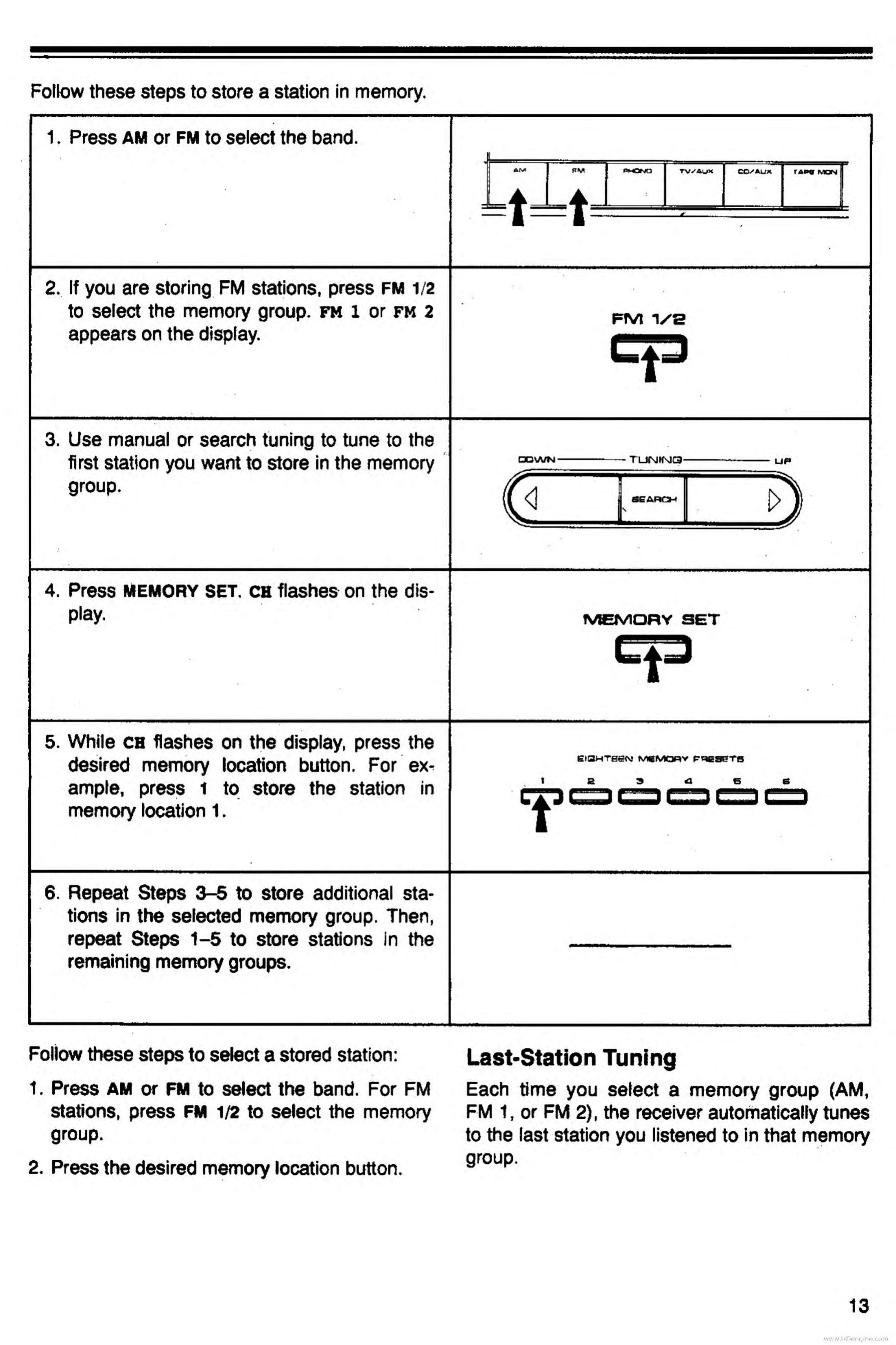
Follow
these
steps
to
store
a
station
in
memory.
1.
P
ress
AM
or
fm
to
select
the
band.
2.
I
f
you
are
storing
FM
stations,
press
FM
1/2
to
select
the
memory
group,
fm
1
or
fm
2
appears
on
the
display.
fm
i/s
3.
U
se
manual
or
search
tuning
to
tune
to
the
first
station
you
want
to
store
in
the
memory
group.
4.
Press
MEMORY
SET.
ch
flashes
on
the
dis¬
play.
OWN
TUIMKMQ
UP
MEMORY
SET
t
5.
While
ch
flashes
on
the
display,
press
the
desired
memory
location
button.
For
ex¬
ample,
press
to
store
the
station
in
memory
location
1.
EIQHTBEN
MCMQRV
P^CSErTfl
t
6.
Repeat
Steps
3-5
to
store
additional
sta¬
tions
in
the
selected
memory
group.
Then,
repeat
Steps
1-5
to
store
stations
in
the
*
remaining
memory
groups.
Follow
these
steps
to
select
a
stored
station:
1.
Press
AM
or
FM
to
select
the
band.
For
FM
stations,
press
FM
1/2
to
select
the
memory
group.
2.
Press
the
desired
memory
location
button.
Last-Station
Tuning
Each
time
you
select
a
memory
group
(AM,
FM
1,
or
FM
2),
the
receiver
automatically
tunes
to
the
last
station
you
listened
to
in
that
memory
group.
13
www.hifiengine.com

Related product manuals