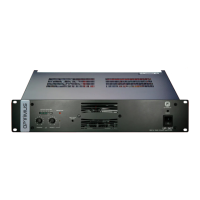
Fuse
OUTPUTS
050V
FAIL
SURETY
PAGING
70V
100V
16
Ω
8
Ω
4
Ω
24V
FAN
POWER
SUPPLY
230V
50/60 Hz
INPUT/OUTPUT CONTACTS
1
234
5
6
7
89
PRIORITY
CTRL. INPUT
GND
PRIORITY
INPUT
PRIORITY
OUTPUT
PROGRAM
INPUT
PROGRAM
OUTPUT
ON OFF
POWER AMPLIFIER
240W RMS(312W IHF)
UP-247
Engineered in EU (Spain)
Made inChina
OPTIMUS S.A.
PRI-PRO RJ CONNECTION
6. PRIORITY
8.
METAL
SHIELD
GND
(WHEN BALANCED)
7
8
6
5
3
2
1
DIPSWITCH CONFIGURATION
ON OFF
PRI-PRO
LINK
SHIELD-GND
LINK
7. Priorityctrl. in
6. AudioC
5. AudioH
4. Priorityin
8. Priorityctrl. out
3. Priorityout
2. Programin
1. Programout
SURVEILLANCE
SURVEILLANCE RJ CONNECTION
1. OSC IN
2. NC
3. OSC OUT 1
4. PROTECT
5. OSC OUT 2
6. PRI OUT
7. +24VDC OUTPUT
8.
METAL
SHIELD
GND
24V
FAIL
OUTPUTS
0 50V 70V 100V
4
Ω
8
Ω
16
Ω
SURETY PAGING
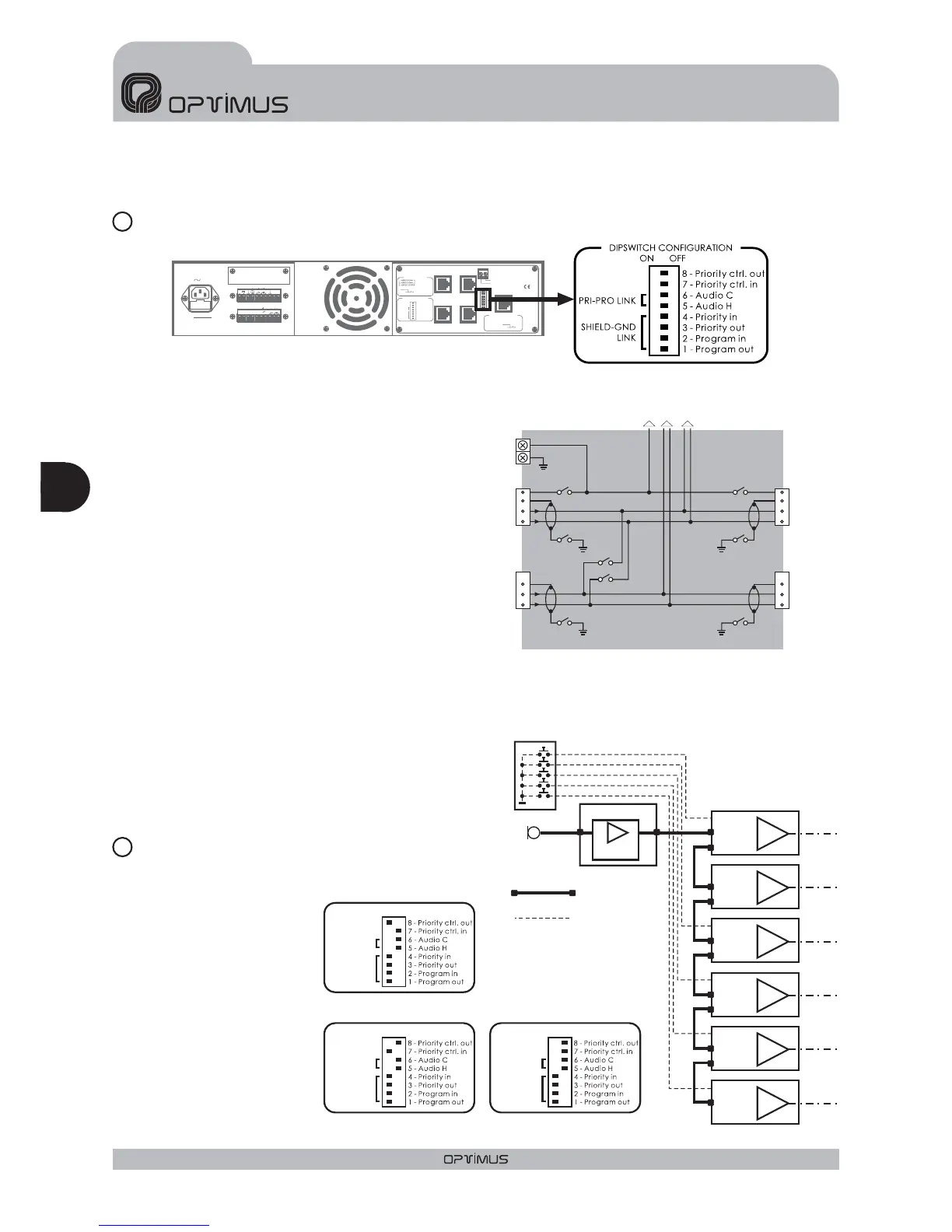
DIPSWITCH
PRIORITY CONTROL OUT (dipswitch no.8)
PRIORITY CONTROL IN (dipswitch no.7)
PRI-PRO LINK (dipswitches no.5 y 6)
SHIELD - GND LINK (dipswitches no.1,2,3 y 4)
PRIORITY CONTROL STRIP
In the OFF position, the priority contact of the
RJ45 PRIORITY OUTPUT connector is disabled.
In the OFF position, the priority contact of the
RJ45 PRIORITY INPUT connector is disabled.
These two dipswitches link internally the audio
signals H and C (when the input is balanced)
present in the PRIORITY OUTPUT to the
PROGRAM INPUT.They are normally in the OFF
position (separate audio signals). To connect
them, place the corresponding dipswitch in the
ON position.
These 4 dipswitches allow for the separation of
the cable shield from the internal mass of the unit
for each of the RJ-45 connectors. They are
normally in the ON position (shield and device
mass connected). To separate them, place the
corresponding dipswitch in the OFF position.
Priority is activated by means of these contacts,
facilitating the wiring of
the installation.
The block diagram (see
figure 8) shows a typical
installation example.
12
13
OUTPUT - INPUT DIAGRAM
Figure 6
Figure 7
Figure 8
zone 1A
zone 1B
zone 2
zone 3
zone 4
zone 5
UP-127
PM-612/0
MIC
ZONES SELECTOR
C610PAL
UP-127
UP-127
UP-127
UP-127
UP-127
Priority input
RJ connector
Priority input
RJ connector
Priority input
RJ connector
Priority input
RJ connector
Priority input
RJ connector
Priority input
RJ connector
Priority control
input contact
Priority control
input contact
Priority control
input contact
Priority control
input contact
Priority control
input contact
Priority control
input contact
Priority output
RJ connector
Priority output
RJ connector
Priority output
RJ connector
Priority output
RJ connector
Priority output
RJ connector
8 pins RJ45
connectors
Priority
PRI-PRO LINK
SHIELD-GND
LINK
ON OFF
Zone 2, 3, 4 and 5 UP-127 configuration
PRI-PRO LINK
SHIELD-GND
LINK
ON OFF
Zone 1B configurationUP-127
PRI-PRO LINK
SHIELD-GND
LINK
ON OFF
Zone 1A configurationUP-127
To power unit
AUDIO H
PRIORITY CTRL.
PRIORITY
CONTROL INPUT
GND
PRIORITY
INPUT
PROGRAM
INPUT
SHLD
SHLD
AUDIO H
SW 7 SW 8
SW 4 SW 3
SW 5
SW 2
SW 1
SW 6
AUDIO C
AUDIO C
PROGRAM
OUTPUT
SHLD
AUDIO H
AUDIO C
AUDIO H
PRIORITY CTRL.
PRIORITY
OUTPUT
SHLD
AUDIO C
Eng
AMPLIFIERS UP-367, UP-247, UP-127 and UP-67
ENGLISH
18
UP-367, UP-247, UP-127 and UP-67Version 1.0


 To Next Page