EasyManua.ls Logo

Optoma PK201 - Image Performance Troubleshooting

Optoma PK201
46 pages
Print Icon
To Next Page IconTo Next Page
To Previous Page IconTo Previous Page
Loading...
PK201 Condential
3-4
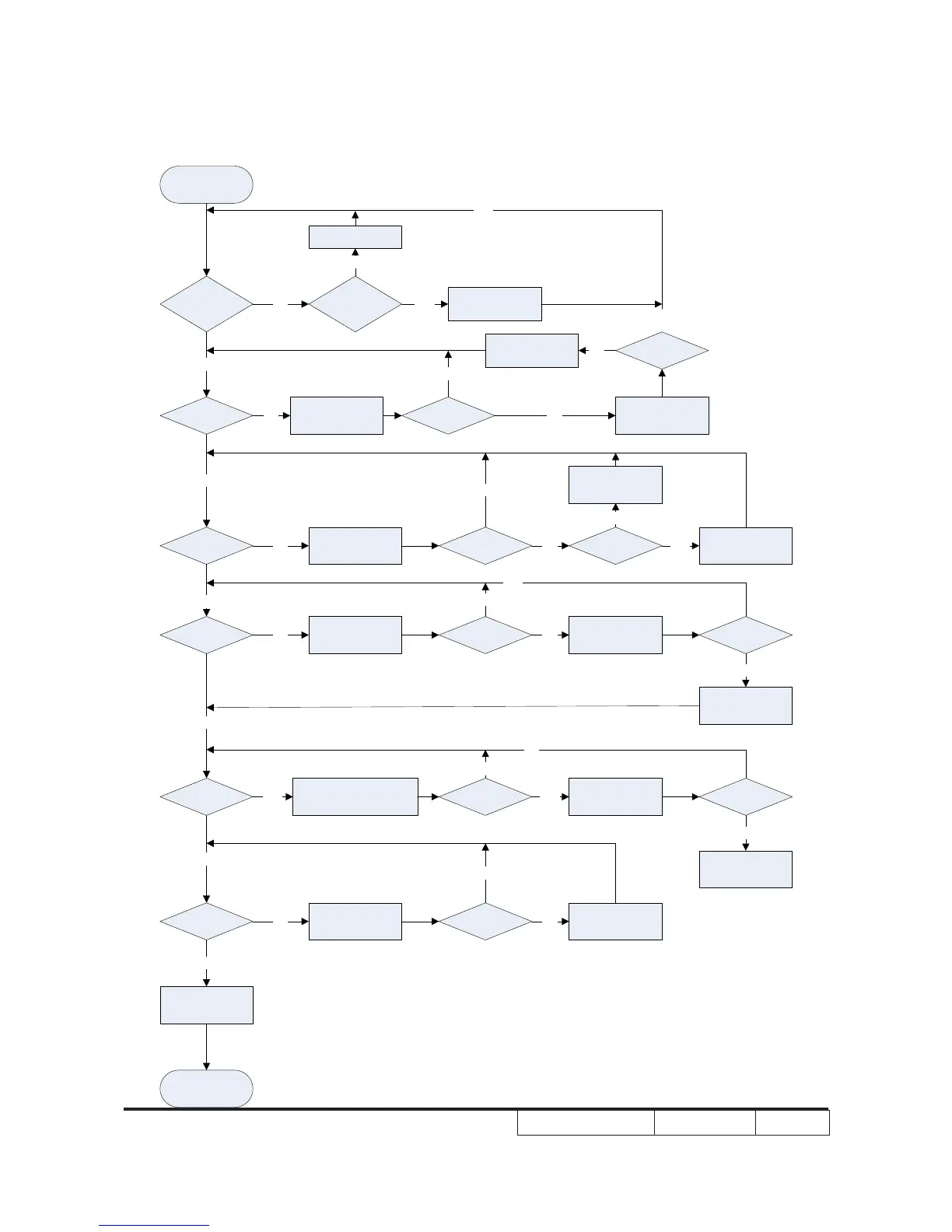
3-4 Image Performance Troubleshooting
Image performance
troubleshooting
Does the optoma
logo show on the
screen?
Have bright dots
on the screen or
white screen?
Change engine
module.
YES
NO
NO
Does the image
show on the
screen?
Ensure signal cable
and signal source
work well.
Does the image
show on the
screen?
Change main board.
Does the image
show on the
screen?
Change engine
module.
YES
NO NO
NO
YES
Is focus OK?
Make sure the
projection distance
is in spec.
Is the projection
lens clean?
Change engine
module.
Use the soft cloth to
clean the lens.
YES
NO
Is color OK?
Ensure signal cable
and signal source
work well.
Is focus OK? NO YES
NO
YES
Is color OK? Change main board. Is color OK?
Change engine
module.
YES
NO NO
NO
YES
YES
YES
Have line bar?
Make sure the main board
and engine module are
assembled properly
Have line bar?
Change engine
module.
Have line bar?
Change main board.
YES YES
YES
NO
Is uniformity
OK?
NO
Make sure the
projection lens and
screen clean.
Is uniformity
OK?
Change engine
module.
YES
NONO
NO
No fault found.
END
YES
YES
Change main board.