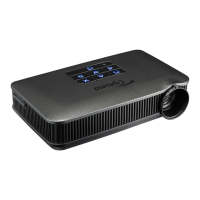
PK201
Condential
4-9
4-10 Others
1. Function Inspection
Keypad button - All keypad buttons must operate smoothly.
General - All OSD functions must be checked for functionality.
When OSD menu is displayed, there shall be no visible
peaking, ringing, streaking, or smearing artifacts on the
screen.
Factory Default - The factory settings (with appropriate centering, size,
geometry distortion, etc.) shall be displayed upon “Re-
call” is selected from OSD
Display Size - All preset modes shall expand to full screen size using
OSD Horizontal and Vertical Size controls
Display Data Channel (DDC) - The purpose of the DDC test is to verify the DDC1/
DDC2 operation of the projector and to verify Plug &
Play function.
2.Check points for exterior and print pattern
Check item Check point
Text & Pattern missing letters & pattern or blurry prints are unacceptable.
Exterior dirt, scrape, water ripples and uneven color are unacceptable.
Buttons stuck buttons are unacceptable.
Focus Ring Focus ring is functioning smoothly.
Logo missing logo, missing prints and blurry prints are unacceptable
Screw
All screws sure be xed and in right type.
Plastic parts
All plastic parts can not be brocken and damaged.
Connector
All interface connector should be complete and workable.


 To Next Page