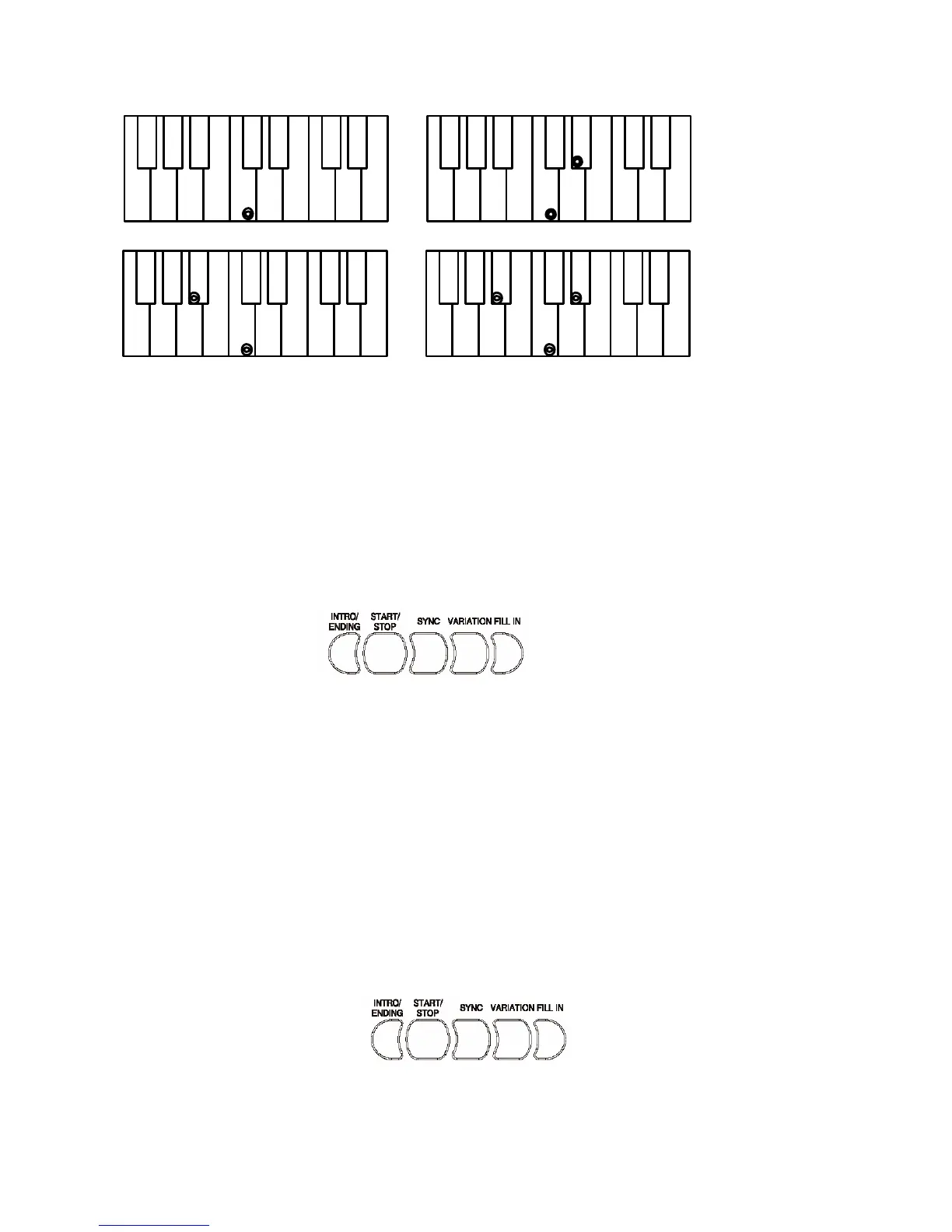
?
C chord - press C key C minor - press C + 3rd key to right
C 7th - press C + 2nd key to left C m 7th - press C + 2nd key to left and 3rd to right
The Auto Accompaniment will continue playing even if you lift your fingers from the keyboard.
You only need to press the keys when changing chords.
AUTO ACCOMPANIMENT CONTROLS
Your instrument provides a range of accompaniment features:
Start/Stop, Sync. Start, Intro, Main, Fill-In, Ending
START/STOP
The START/STOP button starts the selected accompaniment style immediately.
Select the Fingered or Single mode on the display to turn ACCOMPANIMENT on before
starting the style.
The accompaniment will start with the rhythm drum sound when the START/STOP button is
pressed, then the bass and chord parts will play as soon as the first note or chord is played on the
accompaniment part of the keyboard.
STYLE SELECTION
A different accompaniment style can be selected at any time while the accompaniment is playing.
The style number and name on the Message Display will change as soon as the selection is made,
but the new style will start from the beginning of the next bar. The tempo will not change when
the new style is running.
SYNCHRO START
Press the SYNCHRO-START button if you want the auto accompaniment to start when you play
the first note or chord on the AUTO ACCOMPANIMENT section of the keyboard.
If you press the SYNCHRO-START button, the BEAT indicator dots on the display will flash
at the current tempo.



 To Next Page