S-177-1
(
E)
1
4.5 流入方向の変更方法
● 出荷時のフローペットの流入方向は右から左に組
み付けられています。変更する場合は次の方法で
容易に変更可能です。
4.5 How to Change the Flow Directions
● The Flowpet is so assembled to accept the flow
from right to left. Flow directions can simply and
readily be changed in the following manner:
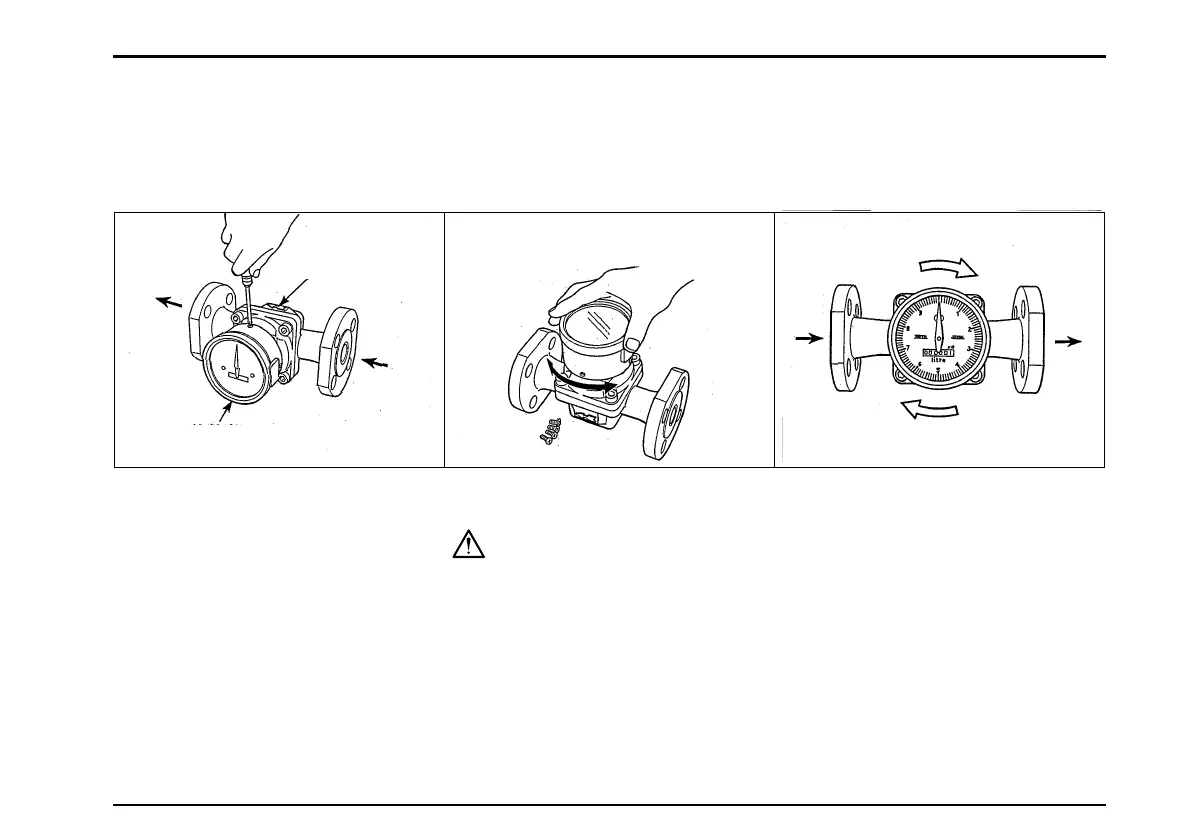
① 流量計をパイプラインより外してく
ださい。流入方向が右→左であった
ものを左→右に変える場合は、まず
計数部のねじ4本を外します。
② 計数部を180°回転させてから、再び
計数部を取り付けてください。
〈注意〉
回転する際、計数部から内器を引き抜
かないでください
③ 図のように本体を反転させ、再びパ
イプラインに取り付けてください。
左→右であったものを上→下、下→
上にする場合も同様に行なってくだ
さい。
① Remove the flowmeter from the
pipeline. In case of changing the
flow direction from R-to-L to
L-to-R. first of all take off four
screws on the register.
② Turn the register 180°.
Then, reinstall the register.
CAUTION:
Do not draw the internal assembly
out of the register while you rotate
the assembly.
③ Turn the meter body as shown
in the figure and reinstall in the
pipeline. The same applies to
changing the directions from
L-to-R to Top-to-Bottom or
Bottom-to-Top.
矢印(⇦)
ARROW MARK
計数部を180°回転させる。
Turn the register 180°.
計数部
REGISTER
OUT
IN
IN
OUT


 To Next Page