23
EN
5.3 History display
5.3.1 Screen descripon
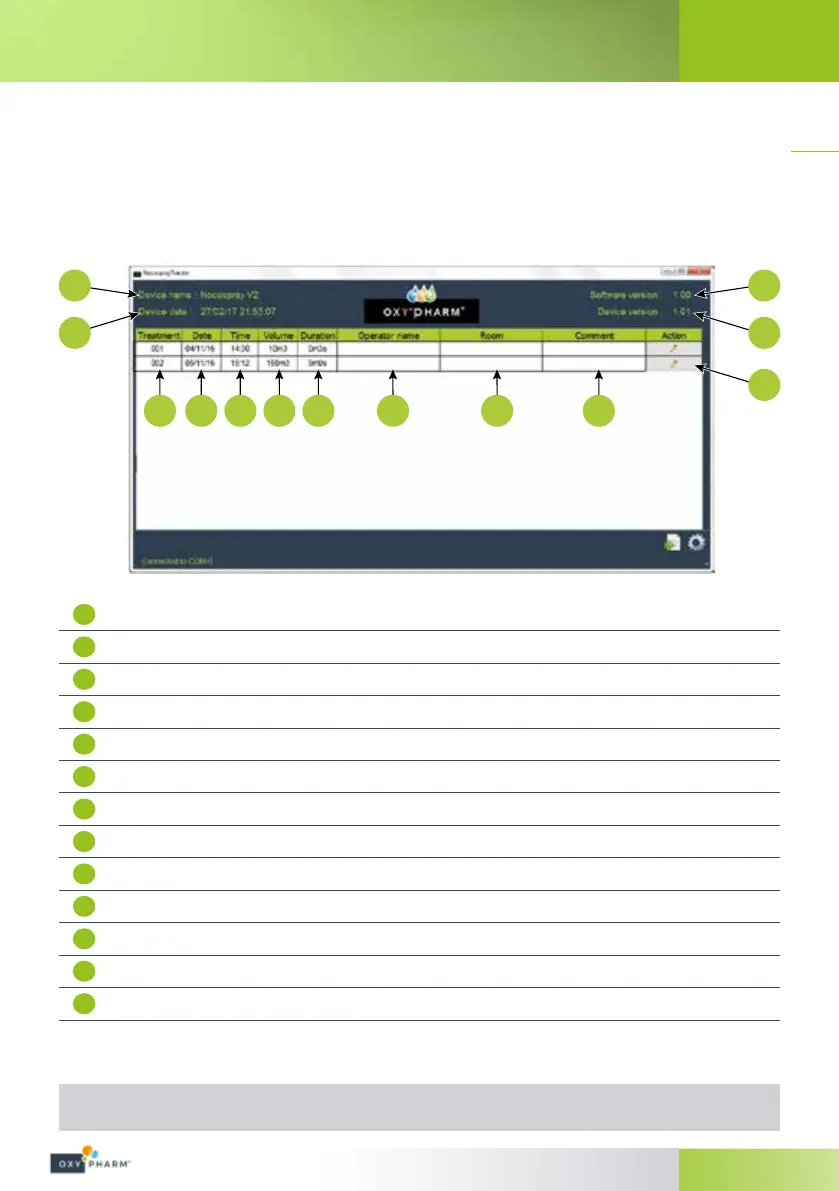
Open the software "NocosprayTracker" (in the programmes on your computer). The screen below shows an
example of a history. Each line of the table represented a treatment.
Note: The indication in the lower left, “Connected to COM4”, indicates that the NOCOSPRAY 2 is connected.
1
2
6 7 8 9 10 11 12 13
3
4
5
1
Device name (modiable parameter)
2
Device date and time
3
Nocospray Tracker software version
4
Nocospray internal software version
5
Input and “Operator name”, “Room” and “Comment” parameters (*)
6
Treatment number
7
Treatment date
8
Treatment time
9
Nocospray setting volume for the desired treatment
10
Treatment duration (this parameter is calculated automatically, not measured)
11
Operator name
12
Name of the room in which the treatment was performed
13
Other comments
It is possible to class treatments according to the number, date, time, volume or the duration, operator name,
room name or comments.
(*) Once the “Operator name”, “Room” and “Comment” parameters have been entered and validated, it is no
longer possible to change them.


 To Next Page