15
© Pacojet International AG 2022
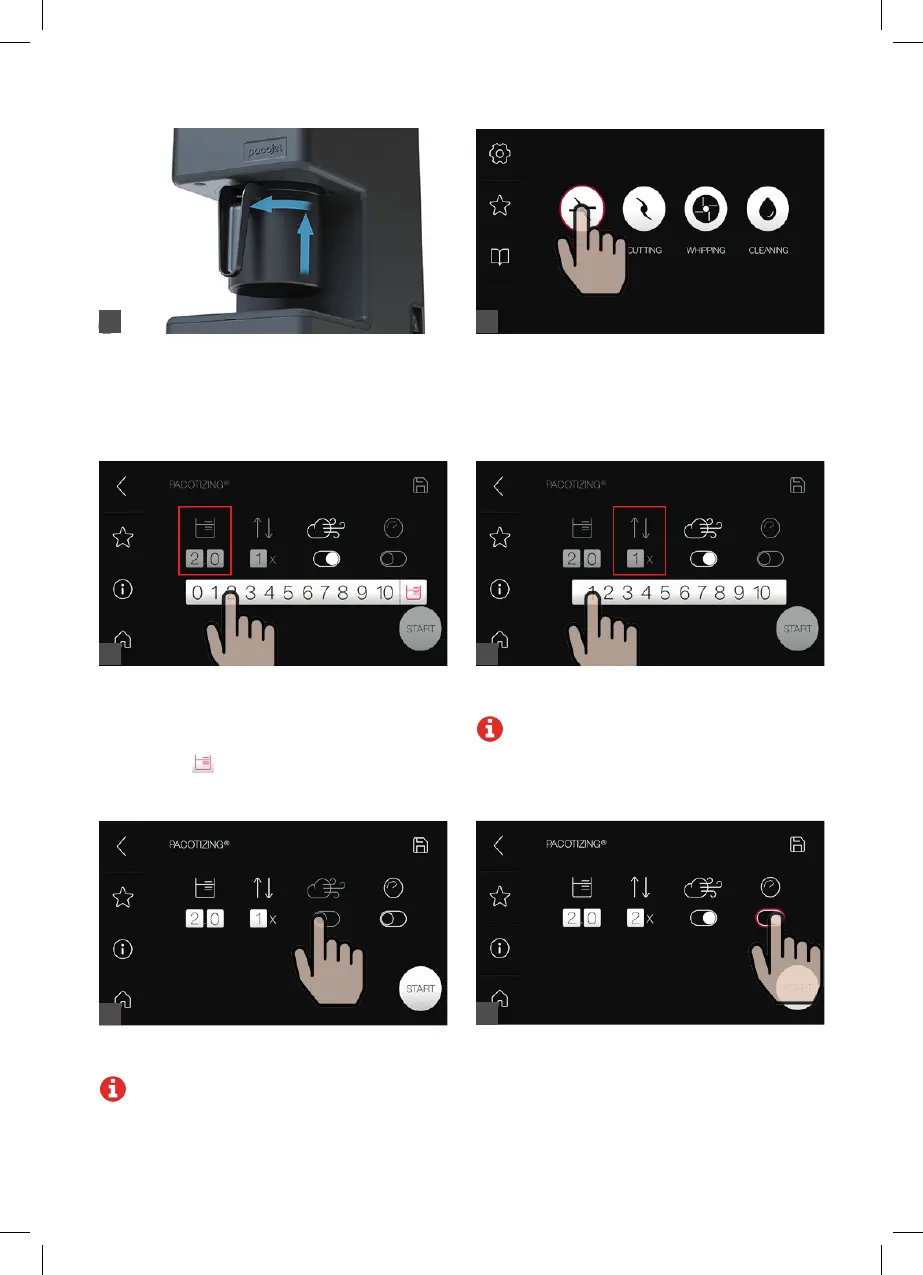
Select “Pacotizing
®
” in the main menu.
Select the number of portions (left number =
whole portions, right number = tenths of portions)
using the appropriate number in the number line
displayed.
Selecting the
symbol pacotizes
®
the entire
contents of the pacotizing
®
beaker.
If you wish to pacotize
®
without overpressure, turn
overpressure off.
Note: Pacotizing
®
with overpressure changes
the consistency (volume expansion, flavor
intensification) of the pacotized
®
mass.
Attach the pacotizing
®
beaker and protective
beaker. The protective beaker is properly mounted
when it has locked in place.
5 6
7
Select the number of automatic repeats using the
number line.
Note: The number of repeats applies to the
area that is pacotized
®
.
8
9
Press the Jet
®
Mode button for faster processing
(processing time 90 seconds). This automatically
changes the number of repeats to 2, which can be
changed later.
10



 To Next Page