User’s Manual
34
Text-In
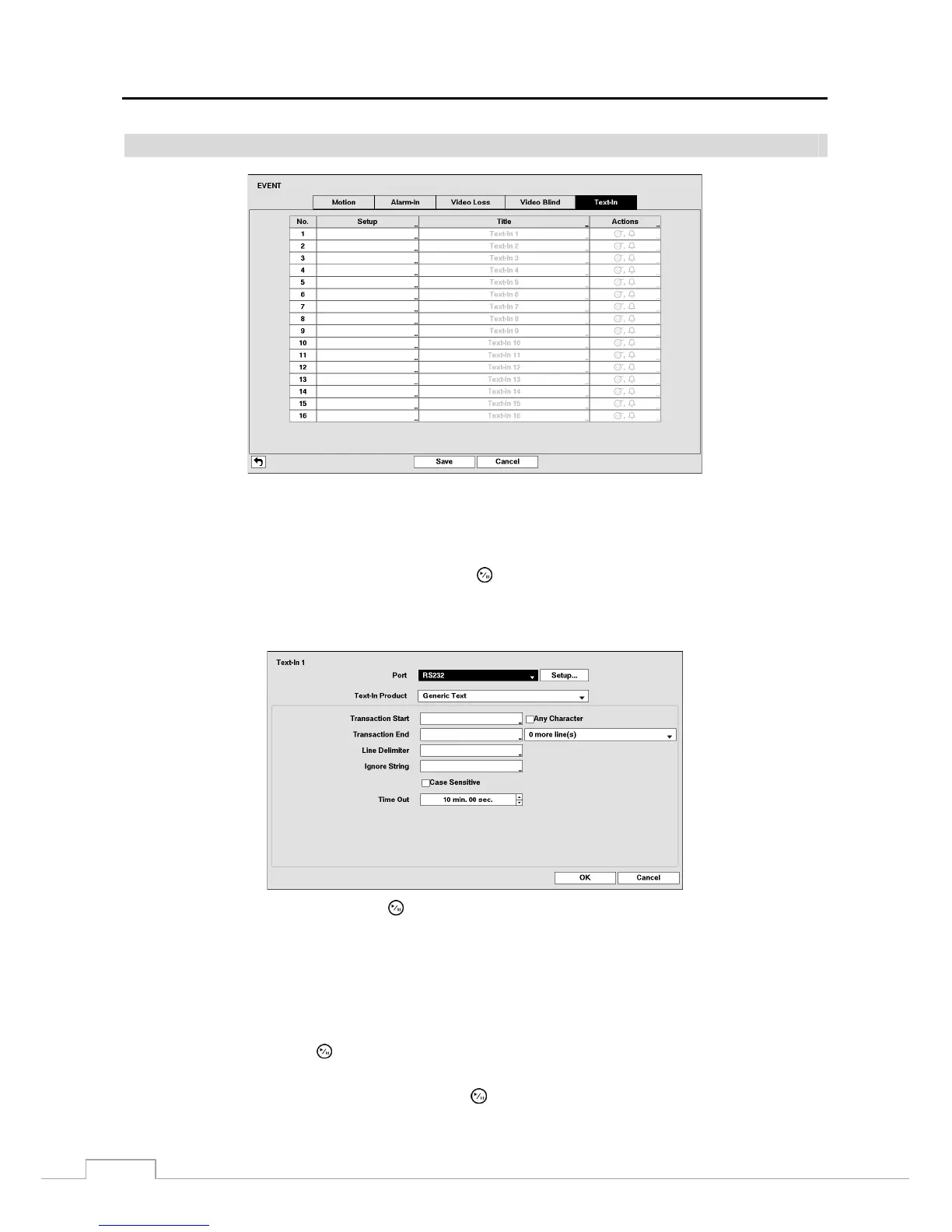
Figure 21: Event – Text-In setup screen.
The DVR can be set to react to text input from devices such as ATMs (Automated Teller Machines) and POS (Point
of Sale; i.e., cash registers). This screen allows you to configure the DVR for each text-in device.
Highlight the box under the Setup heading, and press the button. Selecting the Setup heading changes all the
parameters excluding Port settings of all the text input channels.
NOTE: The system performance might be affected when a large quantity of text inputs are detected from several
channels at the same time.
Highlight the box beside Port, and press the
button. Select from None, RS232, RS485, USB-Serial (1~8) and LAN
(1~16).
NOTE: If you have set the Port as None, you will not be able to make any changes to the screen.
When using the USB to serial text-in device, do NOT remove the USB cable from the port while the system
is running.
Text-in data might be lost when the text-in buffer is filled by simultaneous text-in transactions from all
16 LAN channels.
Highlight Setup…, and press the
button. Use the ATM or POS manufacturer’s recommended settings when configuring
the RS232, RS485, USB-Serial or LAN ports.
Highlight the box beside Text-In Product, and press the
button. Select your device from the list.







 To Next Page