YOUR PERSONAL INFORMATION ORGANIZER
TASKS
161
8
CHAPTER
3 Enter a description of the task. The text
can be longer than one line.
Setting task priority, due date, and other
details
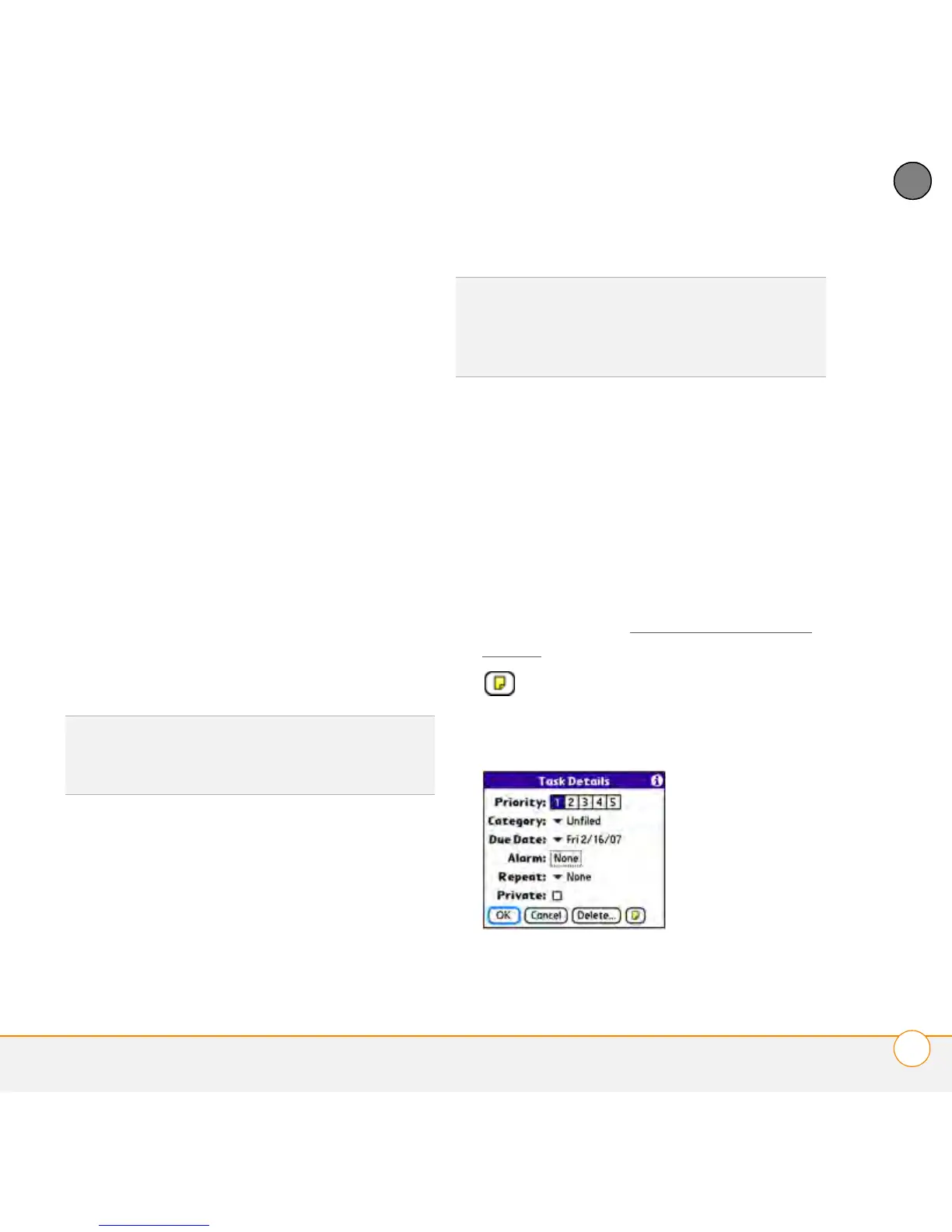
The Details dialog box enables you to
assign a priority level, due date, category,
privacy flag, and other details for each task.
1 Select the task to which you want to
assign details.
2 Select Details.
3 Set any of the following:
Priority: Select the priority number for
this task (1 is the most important). Later
you can arrange your tasks based on the
importance of each task.
Category: Assign the task to a specific
category.
Due Date: Select the Due Date pick list
and select a due date for the task.
Alarm: Set an alarm for this task.
Repeat: Indicate whether the task
occurs at regular intervals and how
often it repeats. When you check off a
repeating task, the next instance of this
task automatically appears in your task
list.
Private: Check this box to mark this
task private. See Working with private
entries for additional information.
: Select this button to enter
additional text that you want to
associate with the task.
4 Select OK.
TIP
You can also select the priority from the
Tasks list by selecting the number next to a
task and then selecting a priority level.
TIP
If you turn on the Show Due Dates option
in the Tasks Preferences screen, you can
select the due date in the Tasks list to set a
new date.



 To Next Page