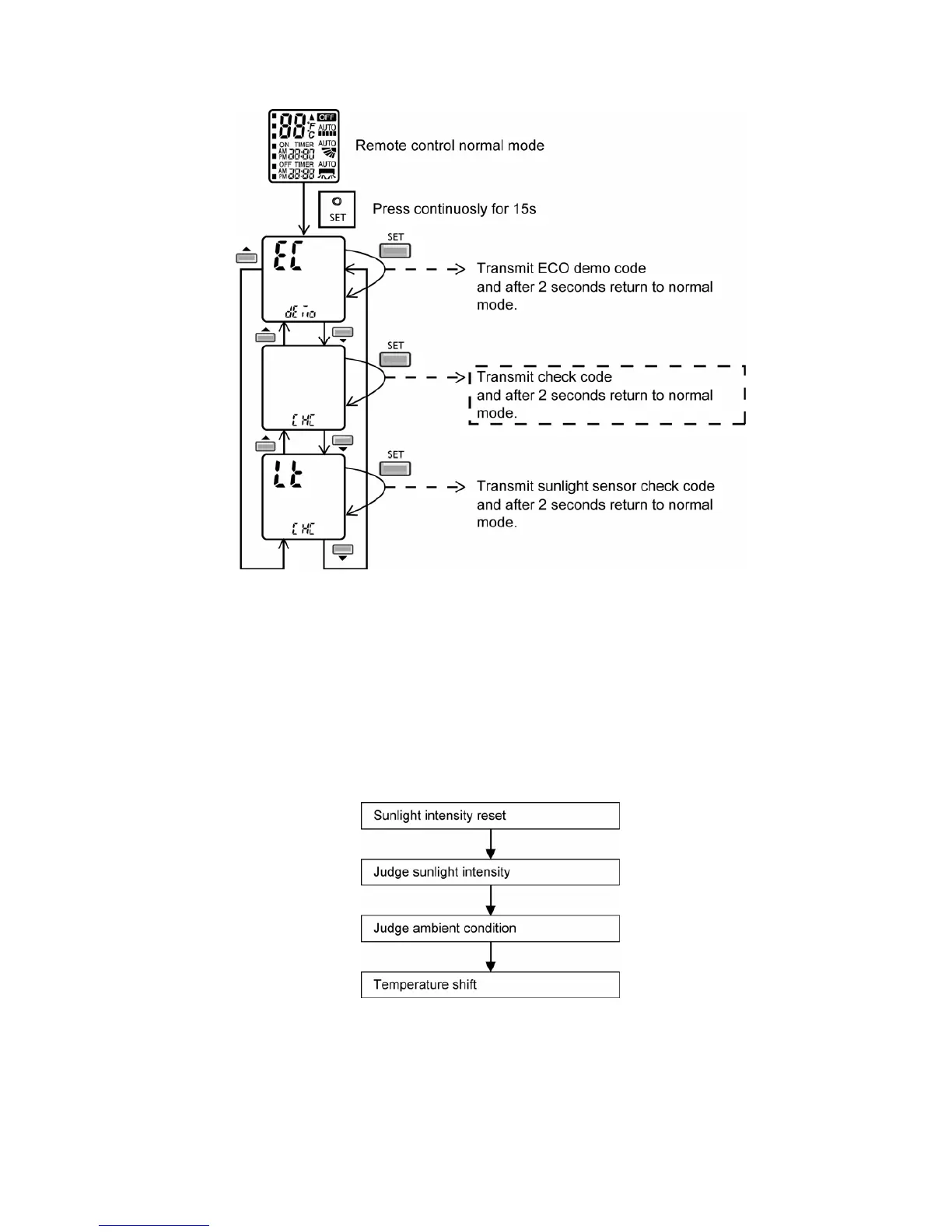
95
13.14.1.12 Human Activity Sensor Check Mode
• To enable human activity sensor abnormality check mode:
• During ECONAVI is ON, when CHECK signal received, if either sensors has abnormality, the 4 times abnormality
counter is ignored, ECONAVI Indicator will blink immediately and error code is memorized.
• The unit could operate without ECONAVI or AUTO COMFORT.
• The ECONAVI indicator blinking could be cancelled by pressing ECONAVI button again.
• If the human activity sensor has no abnormality, the CHECK process will end and continue with normal operation.
13.14.2 Sunlight Sensor
• During ECONAVI operation, the sunlight sensor detects sunlight intensity coming through windows and
differentiates between sunny and cloudy or night to further optimize energy saving by adjusting the temperature.
• Sunlight judgment is as following
13.14.2.1 Sunlight Intensity Reset
• The sunlight intensity will to reset to zero (no sunlight condition) when
o Each time ECONAVI is activated.
o Setting temperature is changed.
o Operation mode is changed.






 To Next Page