- 24 -
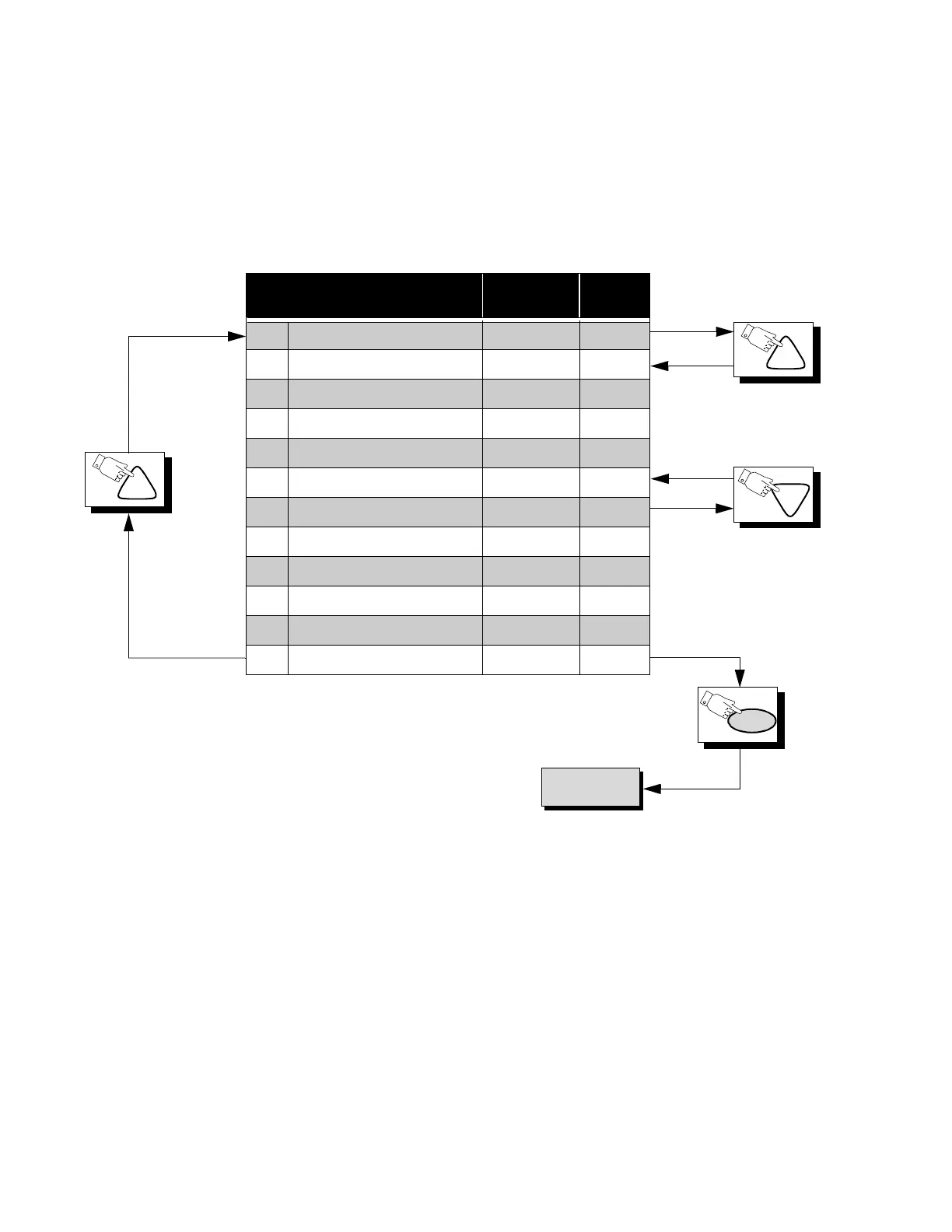
Press the Power Button on the Remote Control to select the Serviceman Adjustment
For Adjustments:
CH
PW
To B Items.
CH
CH
Comb Filter Adjustment Adj. Range
Default
Level
X0* COMB GAIN 0 ~ 255 152
X1* COMB SWITCH 0 ~ 63 12
X2* COMB LIMIT 0 ~ 63 24
X3* COMB CORE 0 ~ 127 41
X4* COMB RF DELAY 0 ~ 127 20
X5* COMB VIDEO DELAY 0 ~ 127 18
X6* COMB VMLM 0 ~ 127 90
X7* COMB VM SW 0 ~ 63 24
X8* COMB SHARP 0 ~ 255 30
X9* COMB VM LEVEL 0 ~ 255 255
Xa* COMB VMPKF 0 ~ 1 01
Xb* COMB ADJ SHARP 0 ~ 63 15
1.Press Channel Up/Down on the
Remote Control to select one of
the available Service Adjustments
(a in Fig. 27).
Note: Write Down the original
value set (b in
Fig. 27
) for
each address before
modifying anything. It is
easy to erroneously adjust
the wrong item.
2.Press Volume Up/Down on the
Remote Control to adjust the
level of the selected Service
Adjustment (b in Fig. 27).
*NOTE
This registers are preset at the
factory, should not be changed.



 To Next Page