- 9 -
Location of Controls
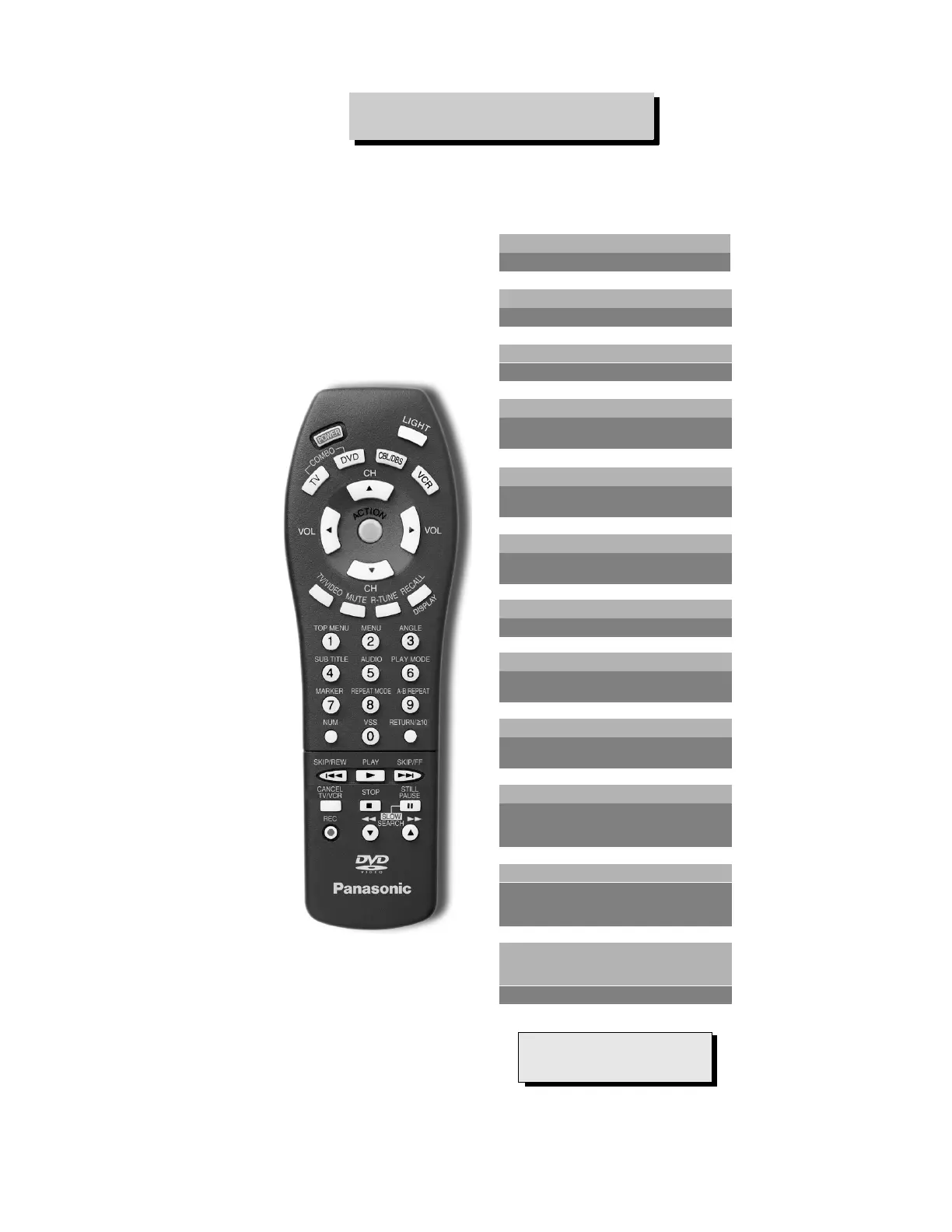
Figure 3. Location of Controls (Remote).
POWER
Press to turn ON and OFF.
TV DVD CBL/DBS VCR
Press to select remote operation.
VOL
Press to adjust TV sound and
navigate in menus.
MUTE
Press to mute sound. Press to access
and cancel (CC) Closed Caption.
“0”~ “9”
Press numeric keypad to select any
channel. Selects DVD functions in
DVD mode.
R-TUNE
Press to switch to previously viewed
channel or video mode.
CH
Press to select next channel and
navigate in menus.
RECALL/DISPLAY
Press to display time, channel, sleep
timer, and other options. Display On
Screen menus in DVD mode.
SKIP/REW, PLAY, SKIP/FF, CANCEL,
TV/VCR, STOP, STILL, PAUSE, REC,
SEARCH
Component function buttons.
REMOTE CONTROL
ACTION*
Press to access menu or enter
selections
LIGHT
Press to light remote control buttons.
TV/VIDEO
Press to select TV, Video or DVD mode.
IMPORTANT NOTE:
To exit the DVD menu, press the
RETURN button.
EUR511503



 To Next Page