Preparation
13
Helpline Tel. No.: U.K. 08700 100 076 R.O.I. 01289 8333
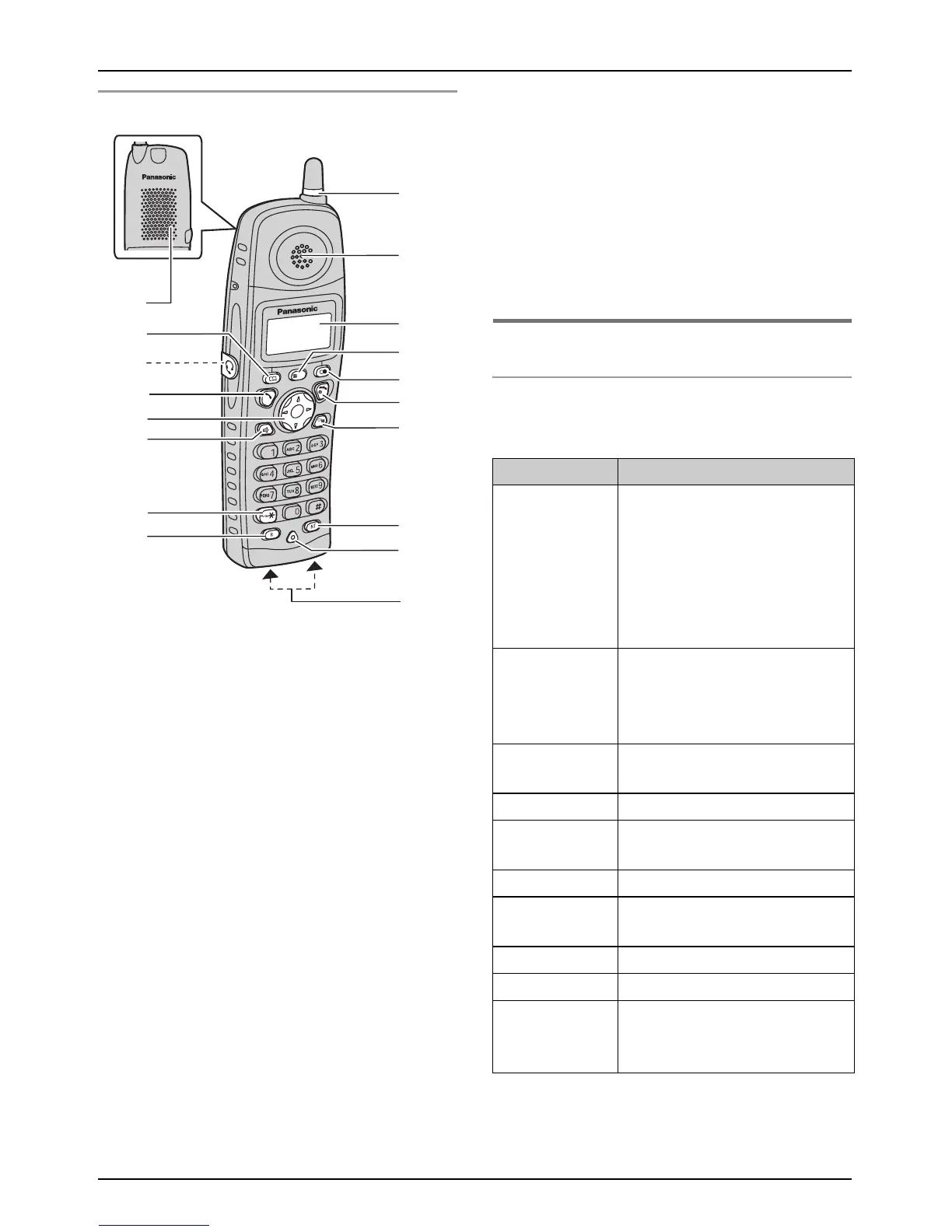
Handset
A Speaker
B {k} (Phonebook)
C Headset jack
D {C} (Talk)
E Navigator key
{e}{v}: To search for the desired item
in menus.
{>}: To select the desired item or move
the cursor to the right.
{<}: To return to the previous screen or
move the cursor to the left.
F {s} (Speakerphone)
G {*} (TONE)
H {R} (Recall)
I Ringer indicator
J Receiver
K Display
L {j/OK} (Menu/OK)
M {R} (Redial/Pause)
N {ih} (Off/Power)
O {C/T} (Clear/Mute)
P {INT} (Intercom)
Q Microphone
R Charge contacts
Note:
Up to 3 menu items can be displayed at a
time. To select a menu item not shown on
the current page, scroll up or down by
pressing the navigator key, {e} or {v},
respectively.
Displays
Display icons
Various icons appear on the handset display
to indicate the current status of the unit.
B
C
D
E
G
H
F
A
Q
N
M
P
L
I
K
O
J
/OK
R
Display icon Meaning
w Within range of base unit
When flashing: Handset is
searching for base unit.
(Out of range base unit,
handset is not registered to
base unit, no power on base
unit.)
L Handset is accessing base
unit (intercom, paging,
changing base unit settings,
etc).
k Handset is on an outside
call.
C Call bar is on (page 28).
u Answering system is on
(page 46)
5 Battery strength
[VE] Voice enhancer is set to
high or low tone (page 16).
[N] Night mode is on (page 27).
[X] Key lock is on (page 16).
[2] Handset number: The left
icon shows handset 2
example (page 28).











 To Next Page