SMS (Short Message Service)
42
Helpline Tel. No.: U.K. 08700 100 076 R.O.I. 01289 8333
Storing the sender’s number in
the handset phonebook
1
While reading a received message,
press {j/OK}.
2 Select “Add Phonebook”, then press
{>}.
3 Continue from step 3, “Adding entries to
the handset phonebook”, page 19.
Editing the sender’s number
before calling back
1
While reading a received message,
press {j/OK}.
2 Select “Edit and Call”, then press
{>}.
3 Edit the number, then press {C} or
{s}.
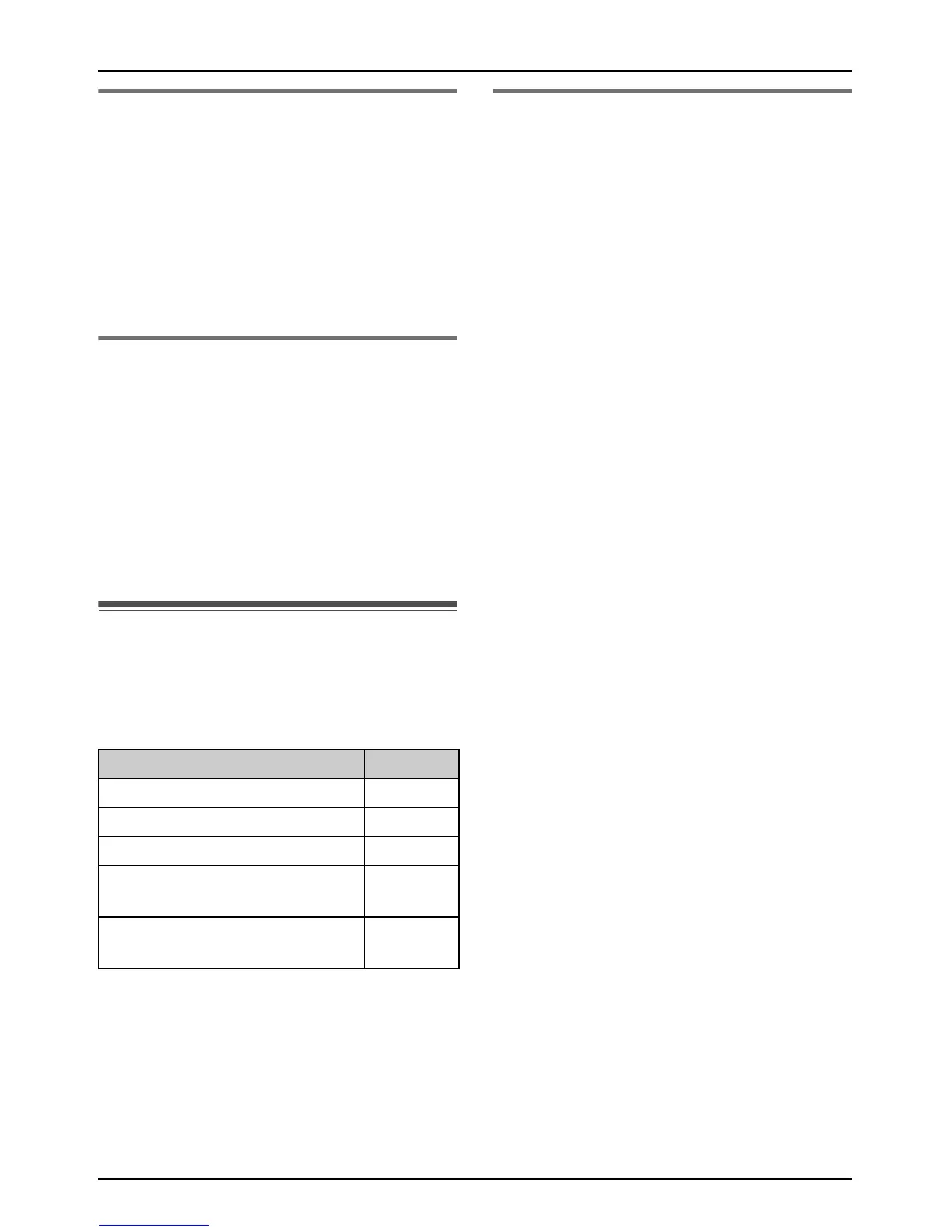
Guide to SMS settings
If the base unit is reset to its default settings
(page 34), the following SMS-related
settings will be reset.
Note:
L If the base unit is reset to its default
settings, the contents of the receive and
send lists will be erased.
Creating private mailboxes
Private mailboxes can be used for sending
and receiving SMS messages. Each private
mailbox is password protected.
1 Press {j/OK}.
2 Select “SMS”, then press {>}.
3 Select “Public”, then press {>}.
4 Select “Settings”, then press {>}.
5 Enter “0000” (default base unit PIN).
L If you changed the PIN, enter it (page
34).
6 Select “Private Mailbox”, then
press {>}.
7 Select the desired new mailbox number
(“Mailbox1” to “Mailbox6”), then
press {>}.
8 Enter a name for the mailbox (5
characters max., page 44), then press
{j/OK}.
9 Enter a 4-digit password for the mailbox,
then press {j/OK}.
10 Select “Save”, then press {>}.
11 Press {ih}.
Note:
L To receive SMS messages using a
mailbox, inform others of your mailbox
number.
You can change the password or name of
the private mailbox and erase the mailbox.
1 Press {j/OK}.
2 Select “SMS”, then press {>}.
3 Select “Public”, then press {>}.
4 Select “Settings”, then press {>}.
5 Enter “0000” (default base unit PIN).
L If you changed the PIN, enter it (page
34).
6 Select “Private Mailbox”, then
press {>}.
SMS settings Page
SMS on/off (default: “On”) page 38
Message Centre 1 page 38
Message Centre 2 page 38
Private mailboxes
(default: —)
page 42
PBX line access number
(default: “Off”)
page 43











 To Next Page