16
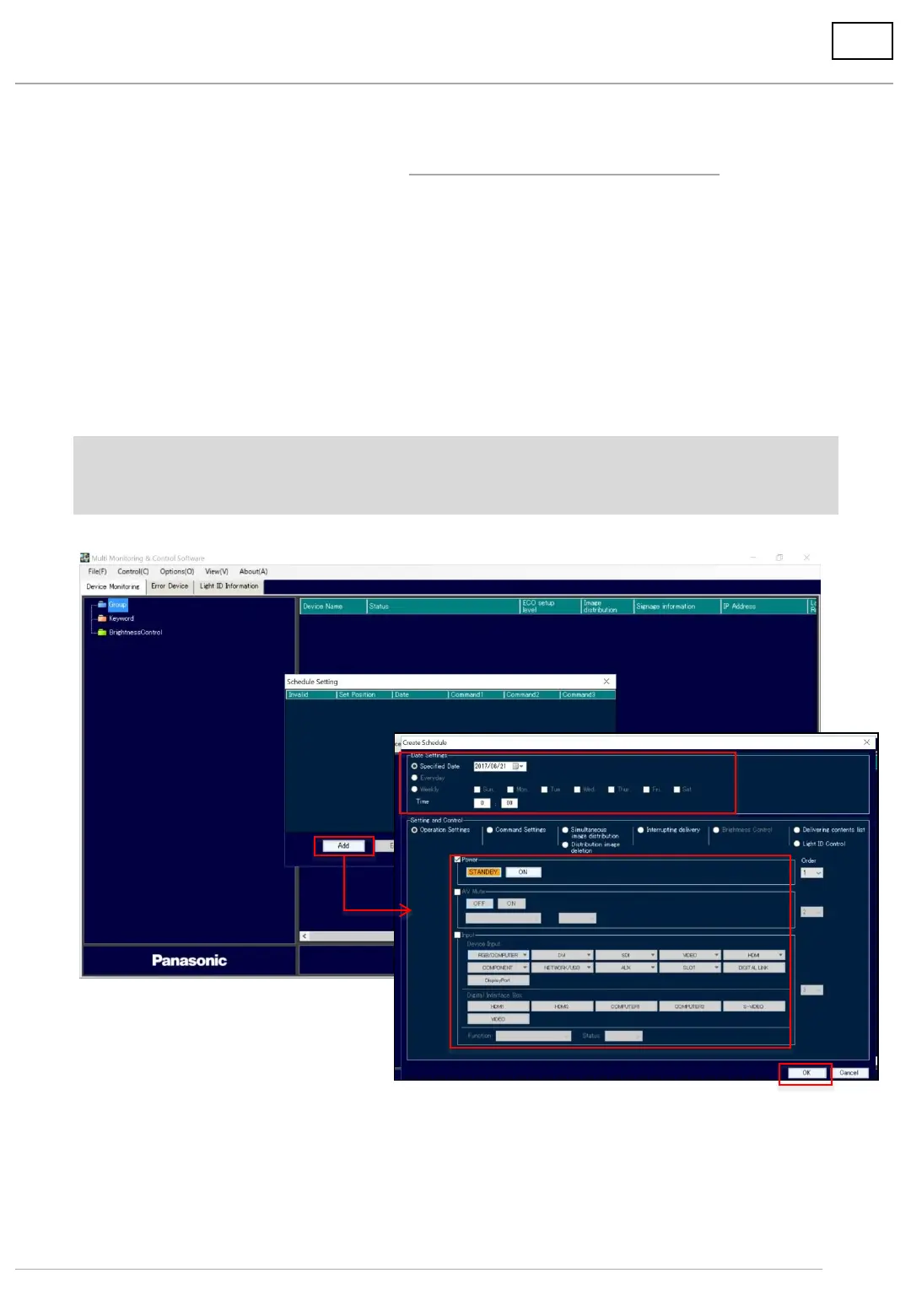
(7) You will return to the schedule setting screen. Click [Add] again.
(8) On the schedule creation screen, specify the date and time to start the content list
It can be set by date/time, day of the week, and date.
(9) In the control settings, select [Operation Settings].
Power supply: Select [On].
Input: Select [USB].
(10) Click [OK] when the setting is completed.
The schedule setting screen will be displayed. Click [Close] to close the screen.
The set schedule can be verified on the [Option] ⇒ [Schedule List] screen.
*When delivering and configuring operational settings according to schedule, please keep the
computer’s power turned on. The display(s) should be set to Network Standby mode ([Off] with the
remote control).
6. Deliver content on USB memory via LAN
6-2. Set date/time of delivery/playback and deliver
(7)
(8)
(9)
(10)






 To Next Page