B) Save content + scenario files on the USB memory and play
8
USB memory PC
Multi Monitoring
& Control
Software
LAN cable Divider
Necessary Necessary Necessary Unnecessary Unnecessary
<What to prepare>
5. Insert USB memory and use
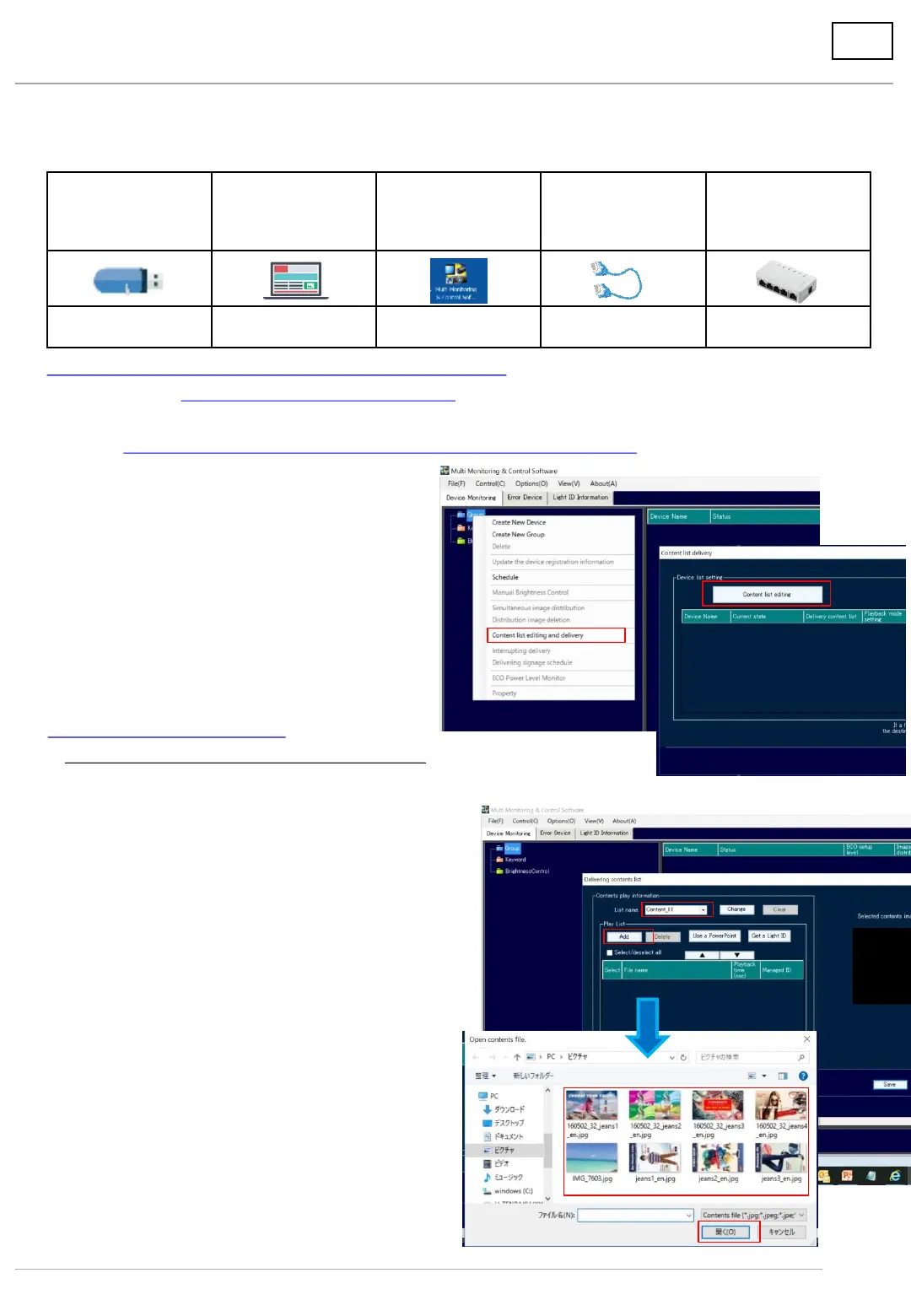
1. Activate multi monitoring & control software.
(1) Download Multi Monitoring & Control Software (MMCS) from the Website and install it on a computer.
(2) Activate MMCS.
(3) Right-click on Group and display the menu.
(4) Select [Content list editing and delivery].
(5) Select [Content list editing].
Download from here
⇒https://panasonic.net/cns/prodisplays/download/software/index.html
2. Create the content list.
*Save the content on a computer beforehand.
(1) Select the content list name.
- Maximum of 50 content lists can be created.
- List names can be arbitrarily changed. (Within
16 alphanumeric characters)
(2) Click [Add].
The explorer will open and select the folder where
the content was saved.
(3) Select the content you want to play.
(4) Click [Open]..
(3)
(4)
(5)
(1)
(2)
(3)
(4)




 To Next Page