10
USB memory PC
Multiple
Monitoring &
Control Software
LAN cable Divider
Necessary Necessary Necessary Necessary Necessary
<What to prepare>
6. Deliver content on USB memory via LAN
6-1. Deliver content
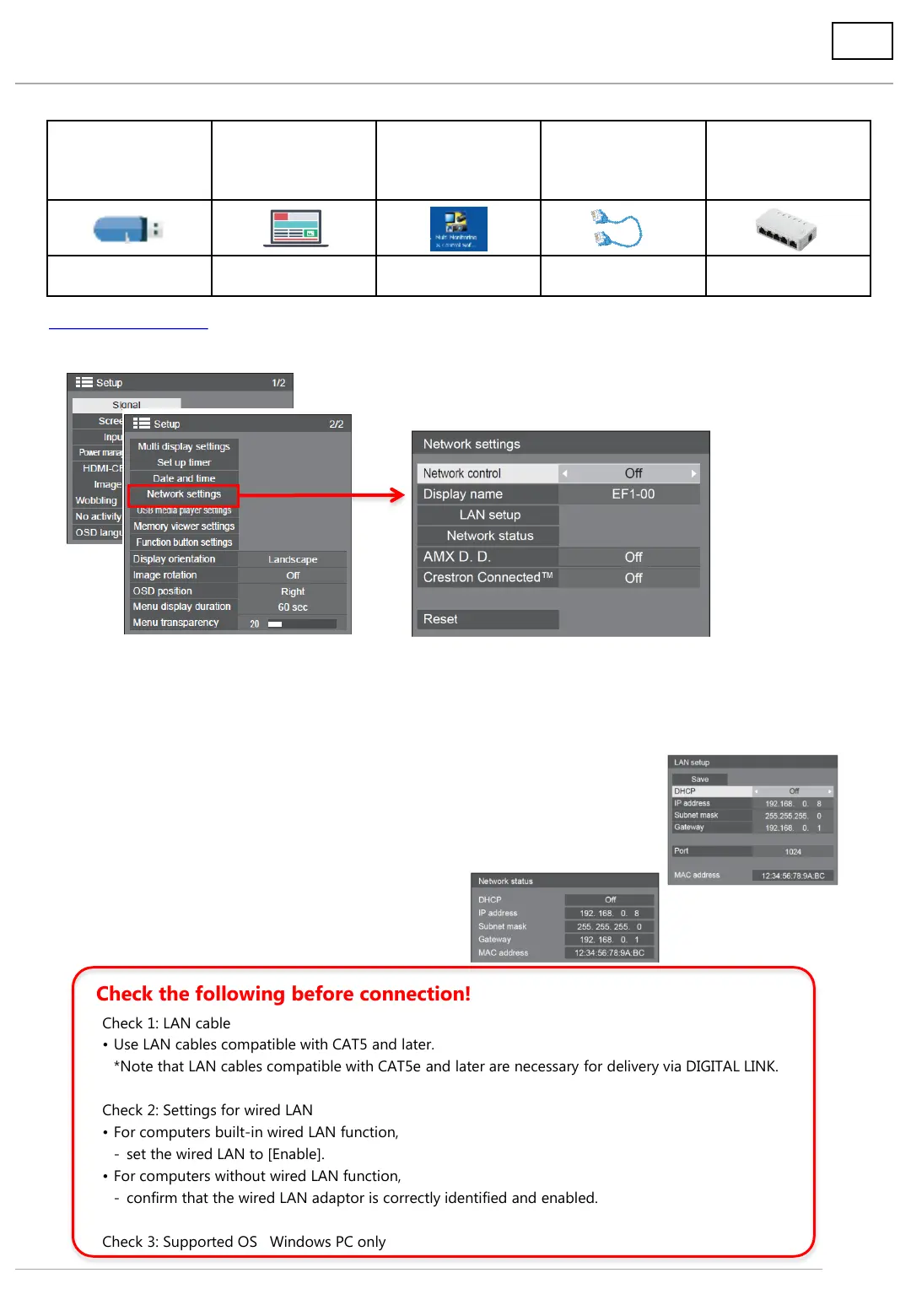
1. Set up network.
Select [Setup] → [Network settings] on the second page with the remote control.
(1) Network control *Factory setting is [Off].
Set network control to [On].
(2) Display name *Factory setting is [Name of “series-00”].
This name is displayed on the network. When you operate more than one computer,
changing the name is recommended.
(3) LAN set up *Factory setting is as the right figure shows.
When using an existing network, set up the LAN on this screen.
The display to be connected and the computer operated should
be in the same network.
(4) Network status
This screen is to confirm the network settings.
Check 1: LAN cable
• Use LAN cables compatible with CAT5 and later.
*Note that LAN cables compatible with CAT5e and later are necessary for delivery via DIGITAL LINK.
Check 2: Settings for wired LAN
• For computers built-in wired LAN function,
- set the wired LAN to [Enable].
• For computers without wired LAN function,
- confirm that the wired LAN adaptor is correctly identified and enabled.
Check 3: Supported OS Windows PC only
Check the following before connection!




 To Next Page