97
⿎
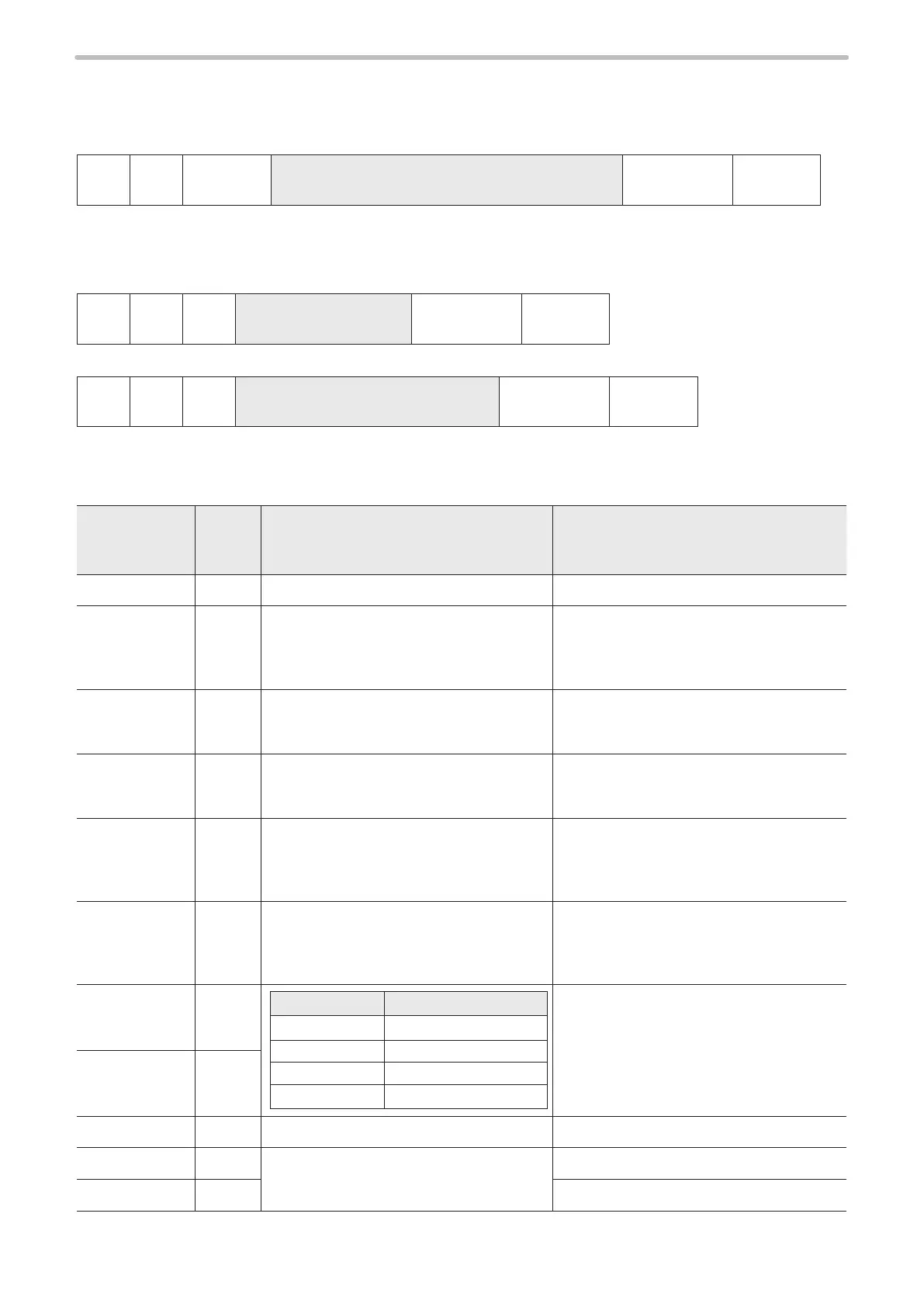
Bar code marking condition : BRF
Sets the marking condition for bar code and 2D code.
• Setting / Readout data of bar code marking condition
STX BRF
Sub
command
[Bar code No.] [Area No.] [Code type]
[Setting data
(varies depending on bar code type)]
(Check sum) Delimiter
Sub command is “S” at the time of setting and “A” for response data at the time of readout.
• Readout request of bar code marking condition
If the code type is other than composite
STX BRF R
[Bar code No.]
1-byte
(Check sum) Delimiter
If the code type is composite
STX BRF R
[Bar code No.] [1D/2D selection]
2-byte
(Check sum) Delimiter
In [1D/2D Selection] eld, specify “0” for readout of 1D side or “1” for readout of 2D side of composite code.
1. QR code (Data length : 41-byte)
Name
Data
length
[byte]
Description Remarks
Bar code No. 1 “0”–“7”
Area No. 1 “0”–“9”, “A”–“F”
Species which area part is the marking
position of the concatenated marking on the
ying object.
In case of marking static object, specify “0”.
Code type 2
“10”: model 1
“11”: model 2
“12”: micro QR code
Version 2
Model 1: “00”–“14”
Model 2: “00”–“22”
Micro QR: “00”–“04”
When specifying “00”, it is automatically
specied.
Data input
mode
1
“0”: Number
“1”: Alpha (text)
“2”: Binary
“3”: Kanji
Error correction
level
1
“0”: L
“1”: M
“2”: Q
“3”: H
For micro QR, Error Correction Level “H”
cannot be used.
X position 8
Model type* Setting range [mm]
LP-V10
“-045.000”–“+045.000”
LP-4x0
“-055.000”–“+055.000”
LP-4x5/LP-V15
“-080.000”–“+080.000”
LP-4x1/LP-W
“-027.500”–“+027.500”
Species the center coordinate of the code.
Y position 8
Rotation angle 7 “-180.00”–“+180.00” [°]
Module H. 5
“0.050”–“1.000” [mm]
Interval of module in longitudinal direction.
Module W. 5 Interval of module in lateral direction.
* For the detail of the model type, refer to “Target laser marker” (P.8).



 To Next Page