Installation 3
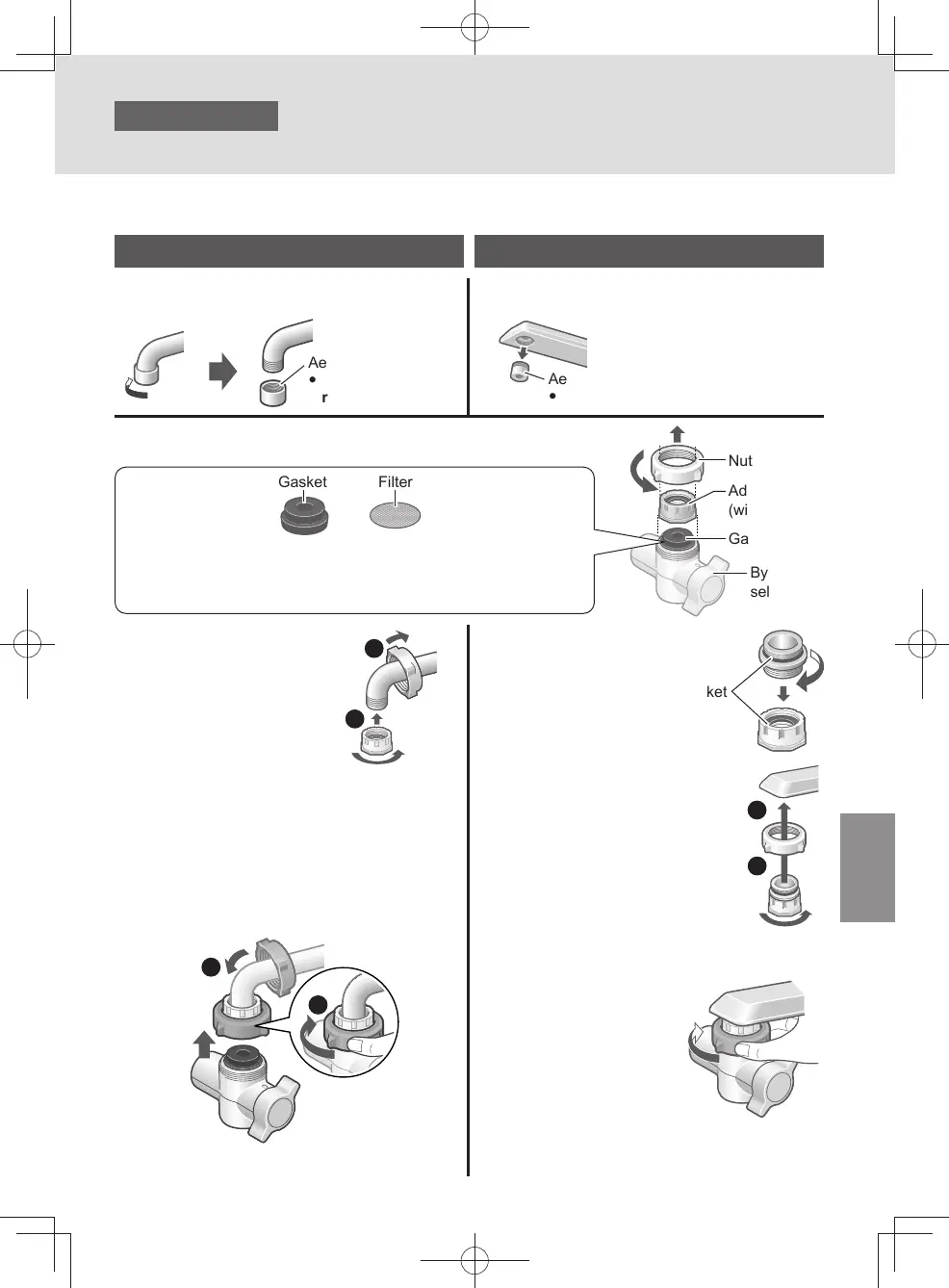
Attaching the bypass selector
Keep all parts that are not used during installation, as they may be needed later if the unit is moved or
the faucet is changed.
Aerator (not used)
y
Do not use the
removed aerator.
Aerator (not used)
y
Do not use the removed aerator.
y
Water faucet which can attach the bypass
selector without an accessory.
y
Water faucet which can attach the bypass
selector with accessory.
Outside-screwed faucet Inside-screwed faucet
1
Remove the nut and adaptor.
2
Attach the nut
and adaptor.
1
2
3
Attach the bypass selector and
tighten the nut until the bypass
selector does not turn.
z
Do not use any tools.
(This may damage the nut.)
z
Make sure the bypass selector is not
inclined.
1
2
2
Screw in the
bushing.
Insert into the
adaptor.
Gasket
3
Attach the nut and
adaptor.
z
The adaptor should be
screwed on straight.
Screwing it on tilted may
strip the threads, resulting
in water leaks.
4
Attach the bypass selector and
tighten the
nut until the
bypass selector
does not turn.
z
Do not use any
tools. (This may
damage the nut.)
z
Make sure the bypass selector is not
inclined.
1
2
Nut
Gasket and Filter
Do not remove the gasket and the lter inside the bypass selector.
If these are moved, return to the original position.
Make sure foreign matter is not attached to the lter and the gasket
is not inclined.
Gasket
Bypass
selector
Adaptor
(with gasket)
EN7
TK-CS200_01_EN.indd 6TK-CS200_01_EN.indd 6 2022/12/15 18:41:402022/12/15 18:41:40



 To Next Page