34
Delay start
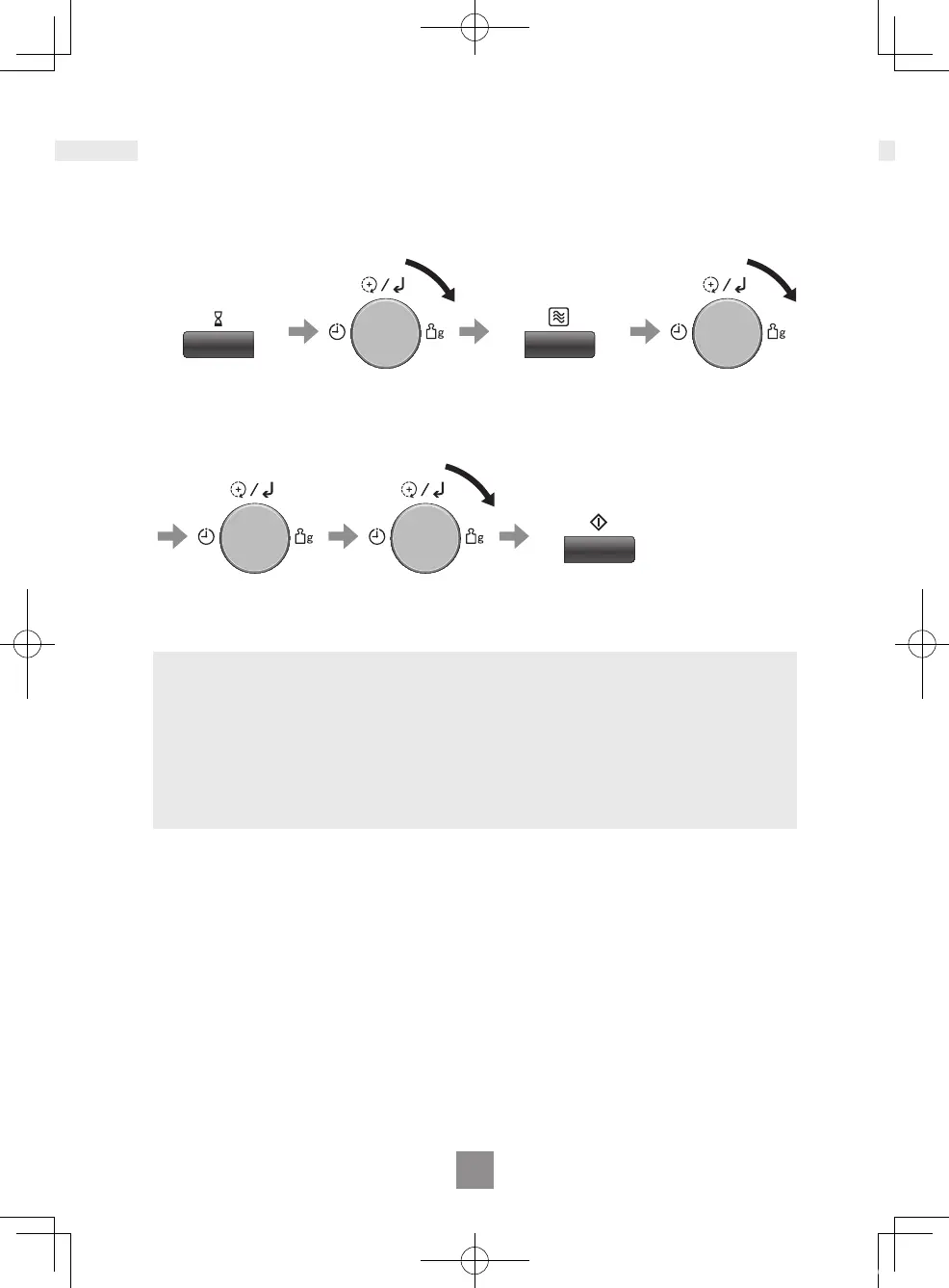
Example: To start cooking at 750 W (Medium) MICROWAVE power for 3 minutes
after 5 minutes of standing time.
Press Timer/
Clock.
Turn the dial until
5.00 appears in the
display.
(up to 90 minutes)
Press
Microwave.
Turn the dial until
750 appears in
the display.
Press the dial
to conrm the
setting.
Turn the dial until
3.00 appears in the
display.
Press Start.
The time counts down without the
oven operating.
Notes
1. After DELAY START is nished, “Add” is displayed for about 1 minute on the
display. While displaying, you can use ADD TIME feature, refer to page 32.
2. MULTI-STAGE COOKING can be programmed including STANDING TIME or
DELAY START.
3. Even if the oven door is opened during KITCHEN TIMER, STANDING TIME or
DELAY START, the time in the display window will continue to count down.
4. STANDING TIME/DELAY START cannot be programmed before/after any
AUTO PROGRAMME.
Using the timer
NN-C69KSM_EPG.indb 34 2019/07/29 18:14:50


 To Next Page
 Loading...