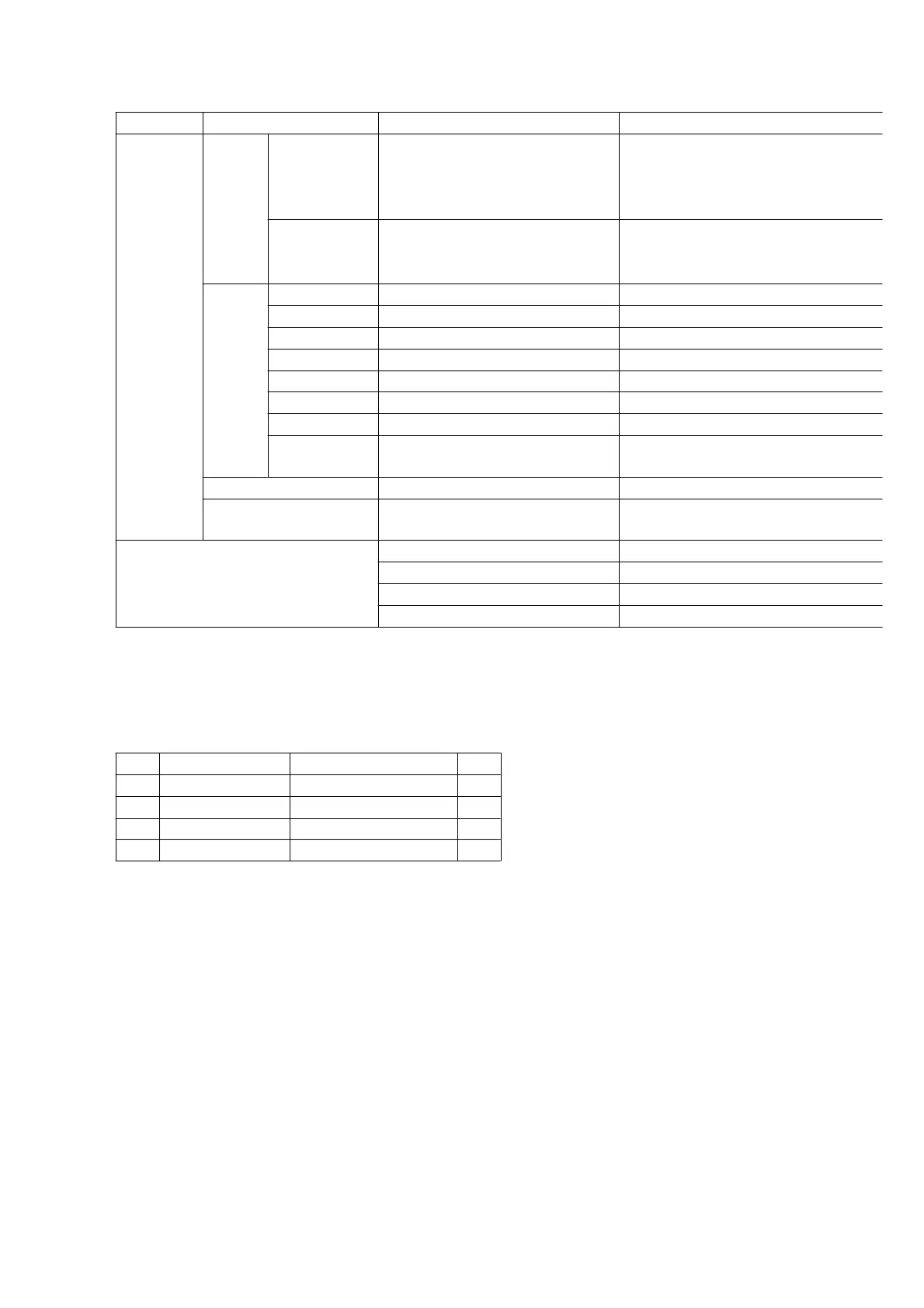
Circuit/Section Adjustment item Major Relative Components
ADJUST
MENT
AV REC/PB RF EQ/ VITERBI Adjustment
IC2004(EEPROM)
DD Cylinder, Capstan
Motor,Components on the Tape
Transportation
REC/PB PG Shifter Adjustment
IC2004(EEPROM)
DD-CYLINER, Components on the
Tape Transportation
VIDEO REC/PB Video VCO Adjustment IC2004(EEPROM)
REC/PB E-E Y Level Adjustment 1 IC2004(EEPROM)
REC/PB E-E Y Level Adjustment 2 IC2004(EEPROM)
REC Video-In (Y Level) Adjustment IC2004(EEPROM)
REC Video-In (C Level) Adjustment IC2004(EEPROM)
PB Playback Y Level Adjustment IC2004(EEPROM)
PB Playback C Level Adjustment IC2004(EEPROM)
REC/PB Horizontal Screen Position
Adjustment
IC2004(EEPROM)
AUDIO Audio Level Meter Adjustment IC2004(EEPROM)
SYSTEM CONTROL Tape End/Beg. Sensor
Adjustment
IC2004(EEPROM)
OTHERS All Ave/Fix data Saving IC2004(EEPROM)
All Ave/Fix data Overwriting IC2004(EEPROM)
Unit Unique ID Writing IC2004(EEPROM)
Function check -----
Fig. E1 Electrical Adjustment item list
3.3.1. How To Connect The PC-EVR.
Refer to the following figure to connect the VCR unit (NV-DV2000) and PC (Personnel Computer).
Before starting adjustment , confirm that all of the switch set to Normal Position.
No. Part No. Part Name Qty
1 VFK1317 30 Pin Flat card 2
2 VFK1395 232C(M3) I/F Cable 1
3 VFK1409 Measuring Board 1
4 VFK1410 EVR Connection Board 1
Fig. E2 Cable list for PC-EVR Adjustment
3.3.2. Measuring Equipment
1. OSCILLOSCOPE
(0.005-5V/Div. DC-More than 60MHz)
2. FREQUENCY COUNTER
(0 - 50MHz)
Fig. E3 Necessary connection for PC& the unit






 To Next Page