EasyManua.ls Logo

Panasonic NV-HD100EA - Page 12

Panasonic NV-HD100EA
35 pages
Print Icon
To Next Page IconTo Next Page
To Previous Page IconTo Previous Page
Loading...
Infra-red
Remote
Controller
=
iS]
SCO
ON
DOH
AW
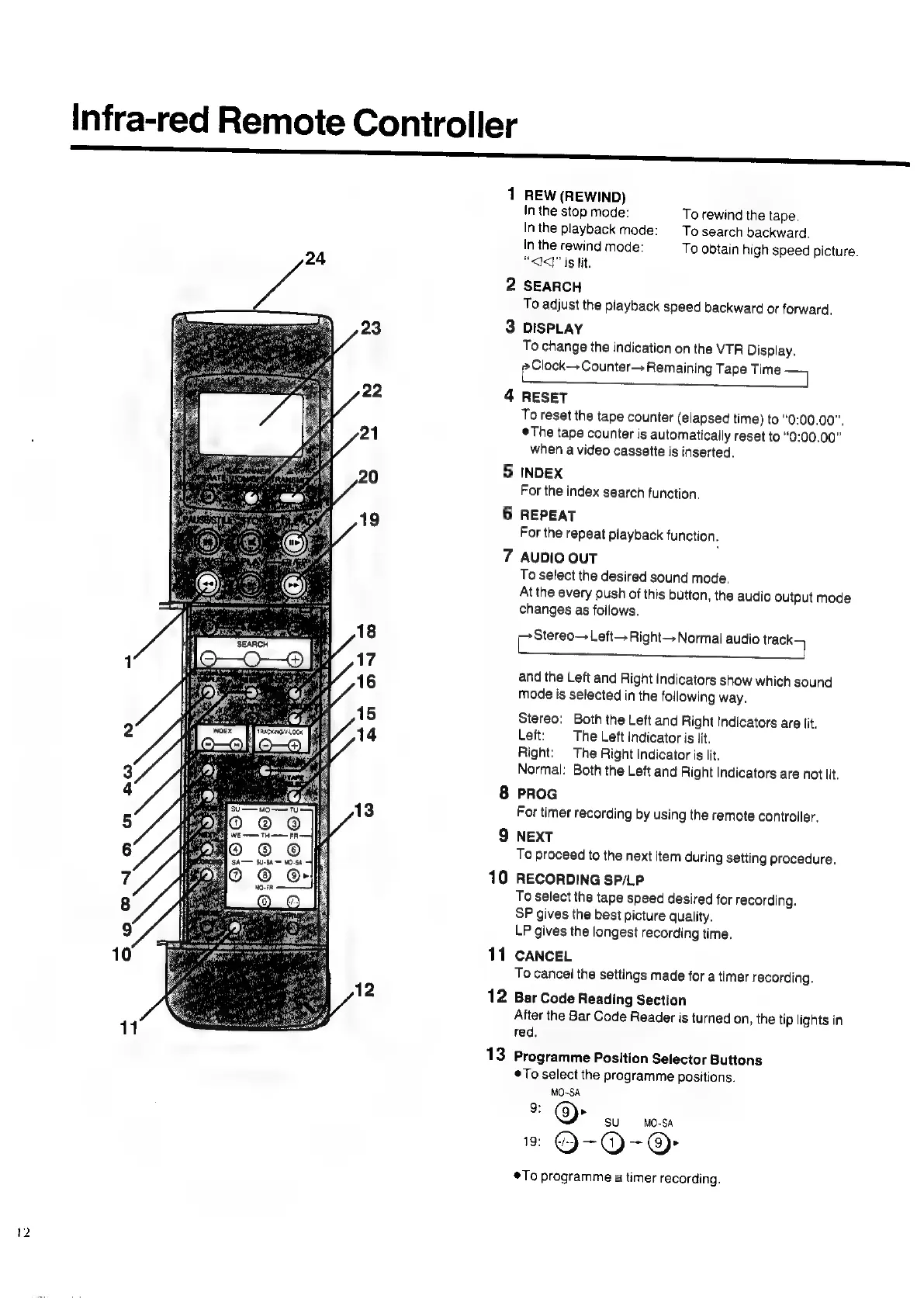
1
REW
(REWIND)
In
the
stop
mode:
To
rewind
the
tape.
In
the
playback
mode:
To
search
backward.
In
the
rewind
mode:
To
obtain
high
speed
picture.
“<J<q"
is
lit.
2
SEARCH
To
adjust
the
playback
speed
backward
or
forward.
3
DISPLAY
To
change
the
indication
on
the
VTR
Display.
pClock—-Counter—>
Remaining
Tape
Time
=
4
RESET
To
reset
the
tape
counter
(elapsed
time)
to
“0:00.00",
©The
tape
counter
is
automatically
reset
to
“0:00.00”
when
a
video
cassette
is
inserted.
5
INDEX
For
the
index
search
function.
6
REPEAT
For
the
repeat
playback
function.
7
AUDIO
OUT
To
select
the
desired
sound
mode.
At
the
every
push
of
this
button,
the
audio
output
mode
changes
as
follows.
eee
Left—
Right
Normal
audio
ee
and
the
Left
and
Right
Indicators
show
which
sound
Mode
is
selected
in
the
following
way.
Stereo:
Both
the
Left
and
Right
Indicators
are
lit.
Lett:
The
Left
indicator
is
Jit.
Right:
The
Right
Indicator
is
lit.
Normal:
Both
the
Left
and
Right
Indicators
are
not
lit.
8
PROG
For
timer
recording
by
using
the
remote
controller.
9
NEXT
To
proceed
to
the
next
item
during
setting
procedure.
10
RECORDING
SP/LP
To
select
the
tape
speed
desired
for
recording.
SP
gives
the
best
picture
quality.
LP
gives
the
longest
recording
time.
11
CANCEL
To
cancel
the
settings
made
for
a
timer
recording.
12
Bar
Code
Reading
Section
Alter
the
Bar
Code
Reader
is
turned
on,
the
tip
lights
in
red.
13
Programme
Position
Selector
Buttons
To
select
the
programme
positions.
MO-SA
3
©
SU
MO-SA
=
@-O-@
To
programme
a
timer
recording.

Related product manuals