EasyManua.ls Logo

Panasonic NV-HD100EA - Page 20

Panasonic NV-HD100EA
35 pages
Print Icon
To Next Page IconTo Next Page
To Previous Page IconTo Previous Page
Loading...
——-_-__——
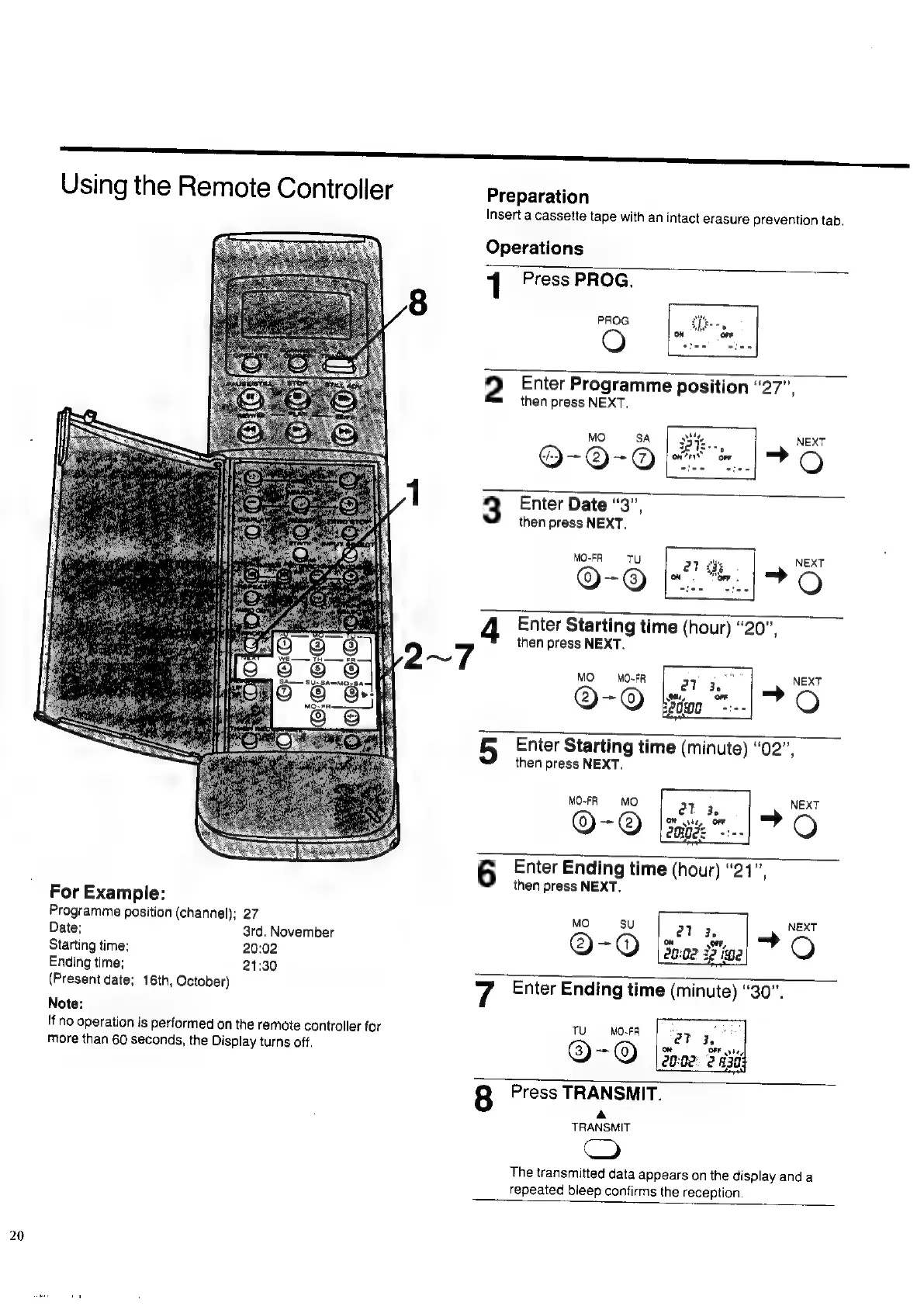
Using
the
Remote
Controller
Preparation
Insert
a
cassette
tape
with
an
intact
erasure
prevention
tab.
Operations
1
Press
PROG.
PROG
O
2
Enter
Programme
position
“27”,
then
press
NEXT.
MO
SA
Dk..,
NEXT
O-O-O
[en
*..|
FO
3
Enter
Date
“3”,
then
press
NEXT.
MO-FR
=
TU
22
2%
NEXT
BEG
QO-®
IFO
4
Enter
Starting
time
(hour)
“20”,
then
press
NEXT.
MO
MO-FR
@-@
5
Enter
Starting
time
(minute)
“02”,
then
press
NEXT.
MO-FR
MO
@-@
6
Enter
Ending
time
(hour)
“21”,
then
press
NEXT.
For
Example:
Programme
position
(channel);
27
MO
su
ar
NEXT
Date;
3rd,
November
an
Starting
time;
20:02
@
@
O
Ending
time;
21:30
(Present
date;
16th,
October)
7
Enter
Ending
time
(minute)
“30”.
Note:
If
no
operation
is
performed
on
the
remote
controller
for
TU
MO-FA
more
than
60
seconds,
the
Display
turns
off.
@
oe
©
8
Press
TRANSMIT.
A
TRANSMIT
CO
The
transmitted
data
appears
on
the
display
anda
repeated
bleep
confirms
the
reception.

Related product manuals