13
6.2. Service Menu
When abnormal detection contents are confirmed a When I do the following operation automatic diagnosis cord is dis-
played.
1. Preparation
Remove the tape from this machine.
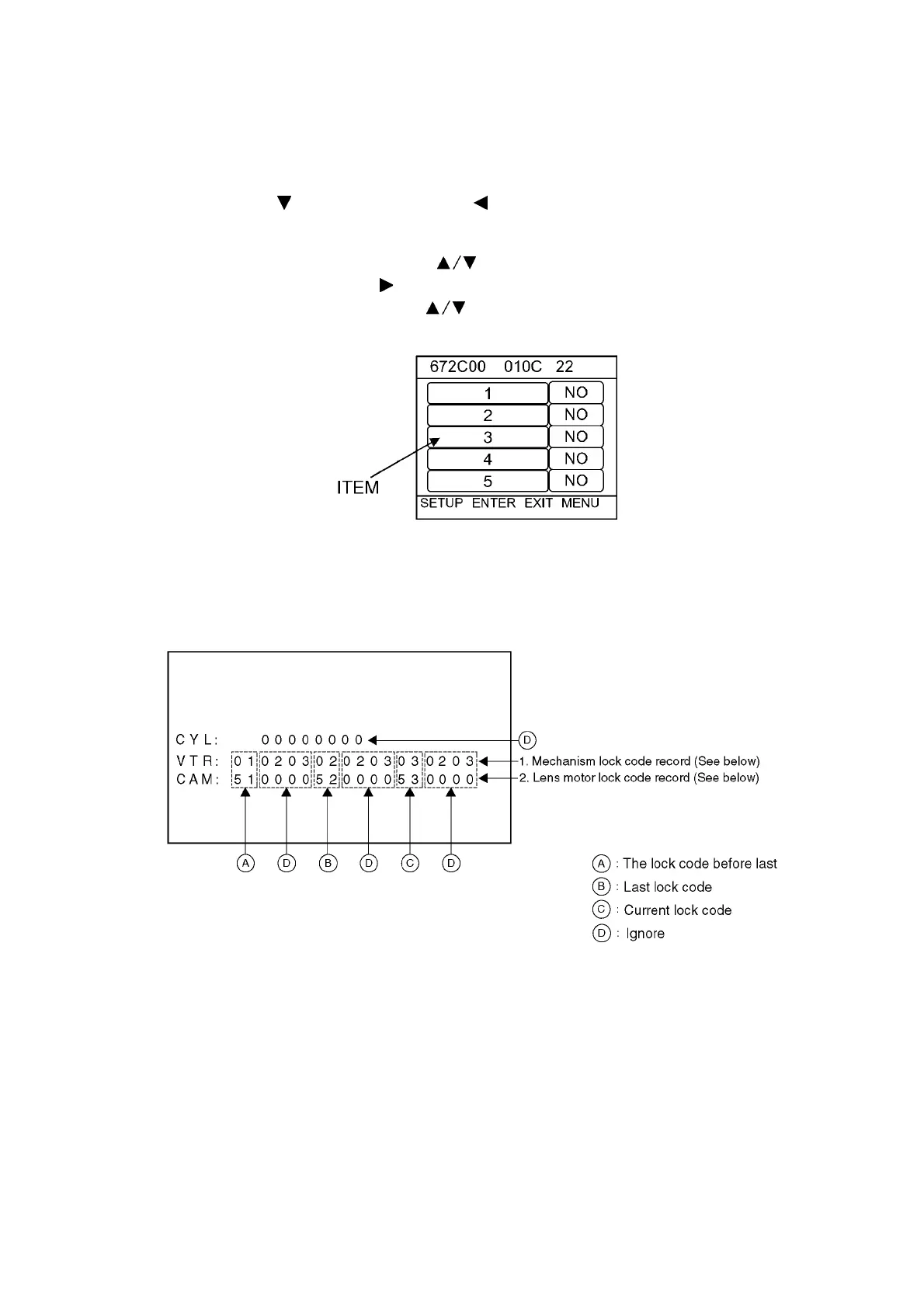
2. Service menu is dieplayed. (see Fig. S1)
Pushed [CURSOR DOWN ] button and [SURSOR LEFT ] button and [AUTO/MANUAL/FOCUS switch to FOCUS] button
simmultaneously for 3 seconds.
3. Operating automatic diagnosis cord is displayed.
Item [3] is selected with the [CURSOR UP or DOWN ] button.
[NO] is selected with the [CURSOR RIGHT ] button.
[YES] is selected with the [CURSOR UP or DOWN ] button.
Press the [CURSOR CENTER] button.
Fig. S1
NOTE:
Do not operate items Except for 3 in the Service Menu.
Self diagnosis cord contents are as follows.






 To Next Page