38
9.3. Electrical Adjustment Procedures
9.3.1. Computer assisted adjustment system <TATSUJIN> adjustment.
This unit employs the computer assisted system named; “TATSUJIN PC-Adjustment” for Electrical adjustment.
9.3.2. Set-up manual for DV-Camcorder.
1. SAVE THE SOFTWARE
Install the effective model’s TATSUJIN Software to PC: Personal Computer.
2. SET-UP (CONNECTION)
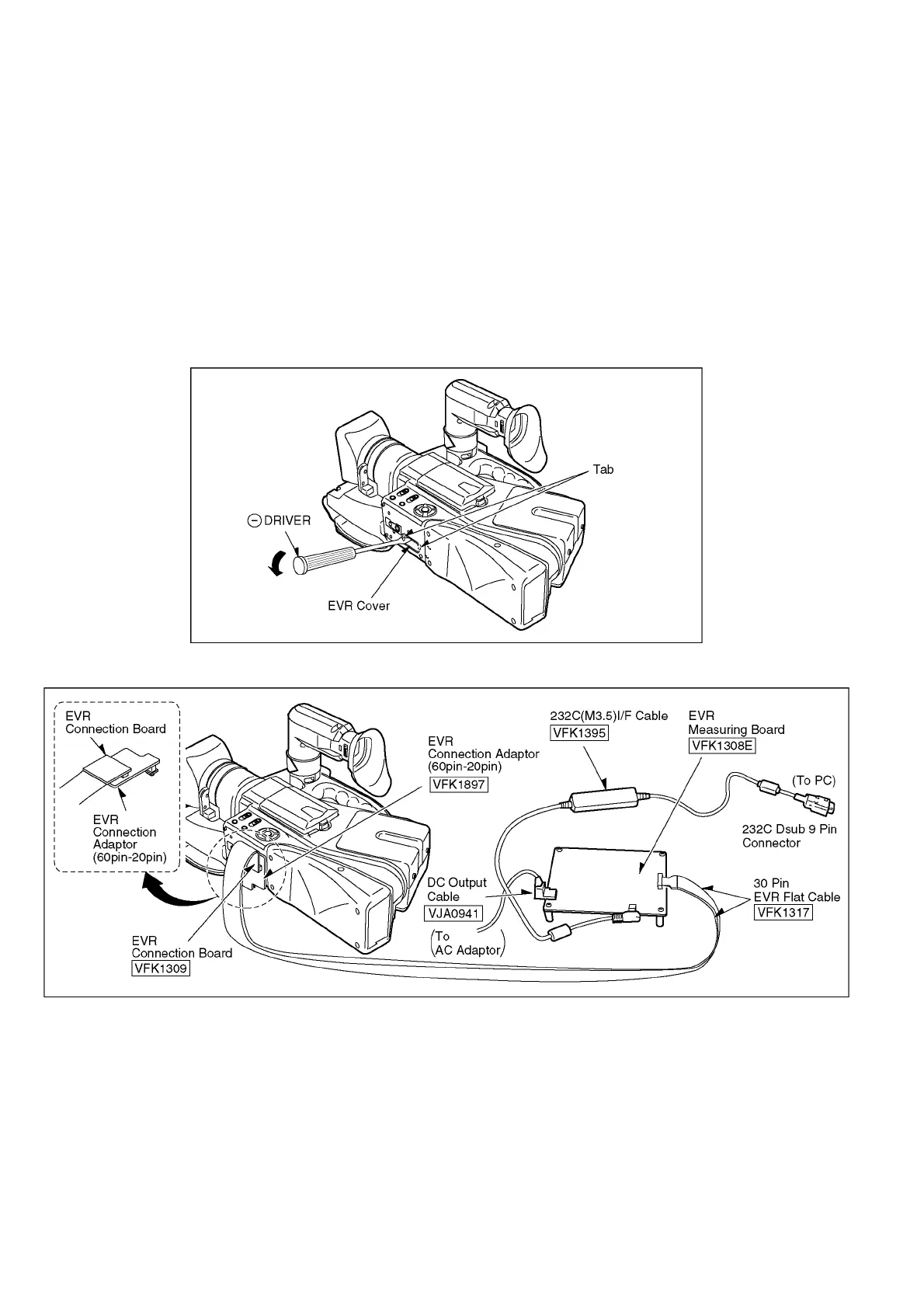
a. Remove the EVR cover of the DV Camcorder.
Unlock the locking tab and remove the EVR cover as shown in Fig. E1.
b. Make a connection.
Connect the PC, the PC/IF Unit and the DV Camcorder as shown in Fig.E2 and E3.
c. Check the SW position on Measuning Board.
The position of SW on Measuning Board checks as shown in Fig. E4.
Fig. E1
Fig. E2 Necessary Equipment & Tools for Connection.






 To Next Page