Before using
44
VQT0S76
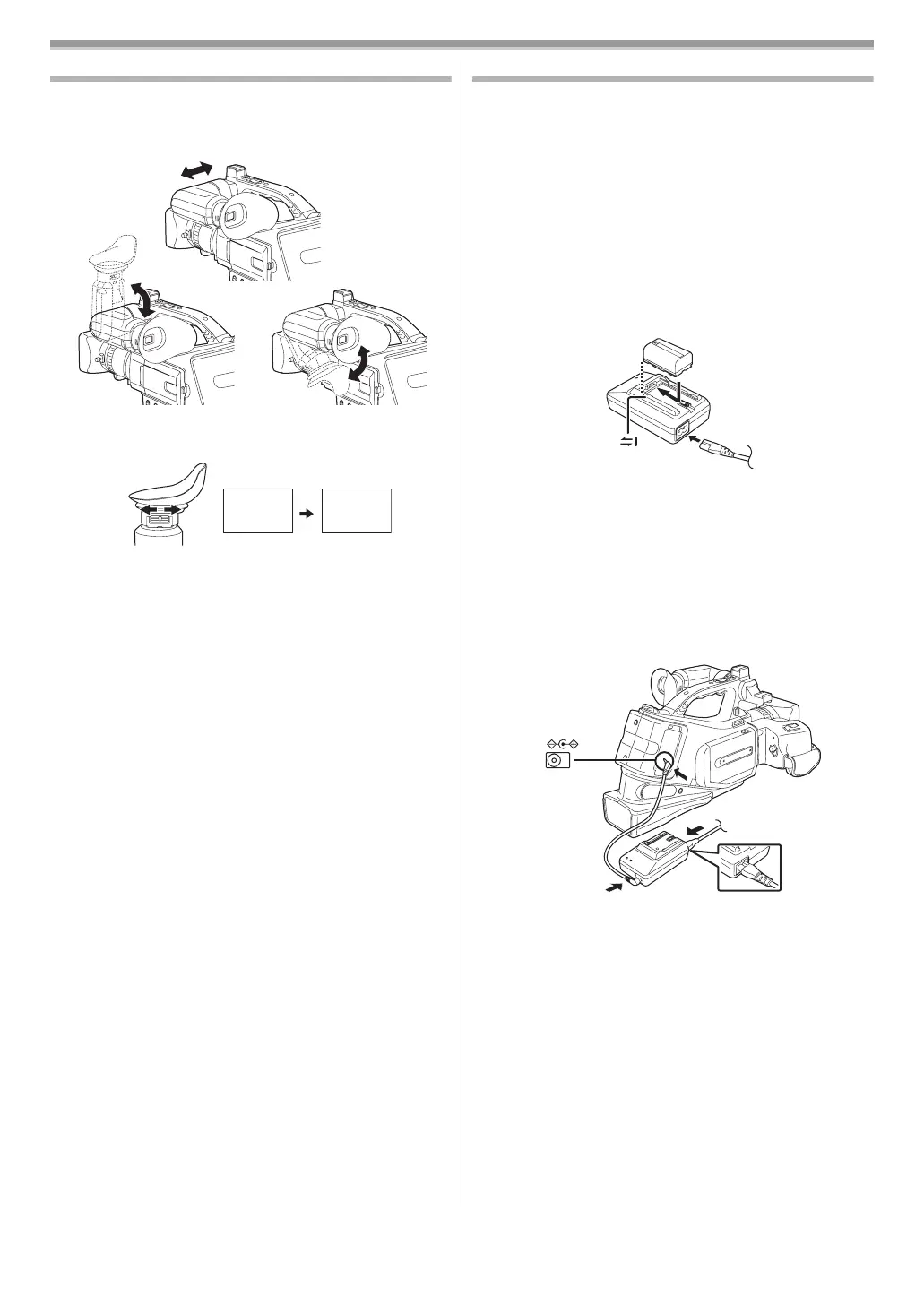
Using the viewfinder
ª Using the viewfinder
1 Pull out the viewfinder and turn it upward/downward by
pinching the viewfinder extension knob.
ª
Adjusting the field of view
1 Adjust the focus by sliding the eyepiece corrector knob.
≥You can adjust the brightness of the viewfinder from the
menu.
Power supply
ª Charging the battery
When this product is purchased, the battery is not charged.
Charge the battery before using this product.
≥Battery charging time (
-45-)
≥We recommend using Panasonic batteries.
≥If you use other batteries, we cannot guarantee the quality of
this product.
≥If the DC input lead is connected to the AC adaptor, then the
battery will not get charged. Remove the DC input lead from
the AC adaptor.
1 Connect the AC mains lead to the AC adaptor and the AC
mains socket.
2 Put the battery on the battery mount by aligning the
mark, and then securely plug it in.
ª
Charging lamp
Lights up: Charging
Goes off: Charging completed
Flashing: The battery is over discharged (discharged
excessively). In a while, the lamp will light up and
normal charging will start.
When the battery temperature is excessively high
or low, the [CHARGE] lamp flashes and the
charging time will be longer than normal.
ª
Connecting to the AC outlet
1
Connect the AC mains lead to the AC adaptor and the AC
mains socket.
2 Connect the DC Input Lead to the [DC IN] Socket on the
movie camera.
3 Connect the DC input lead to the AC adaptor.
≥The output plug of the AC mains lead is not completely
connected to the AC adaptor socket. As shown in 1, there
is a gap.
≥Do not use the power cord for other equipment since the
power cord is exclusively designed for the movie camera.
Or do not use the power cord of other equipment for the
movie camera.
12:30:45
15.10.2005
12:30:45
15.10.2005
12:30:45
15.10.2005
12:30:45
15.10.2005
DC IN 7.9V
1
VQT0S76_Eng.book 44 ページ 2005年7月21日 木曜日 午前11時48分






 To Next Page