Others
68
VQT0S76
Others
Indications
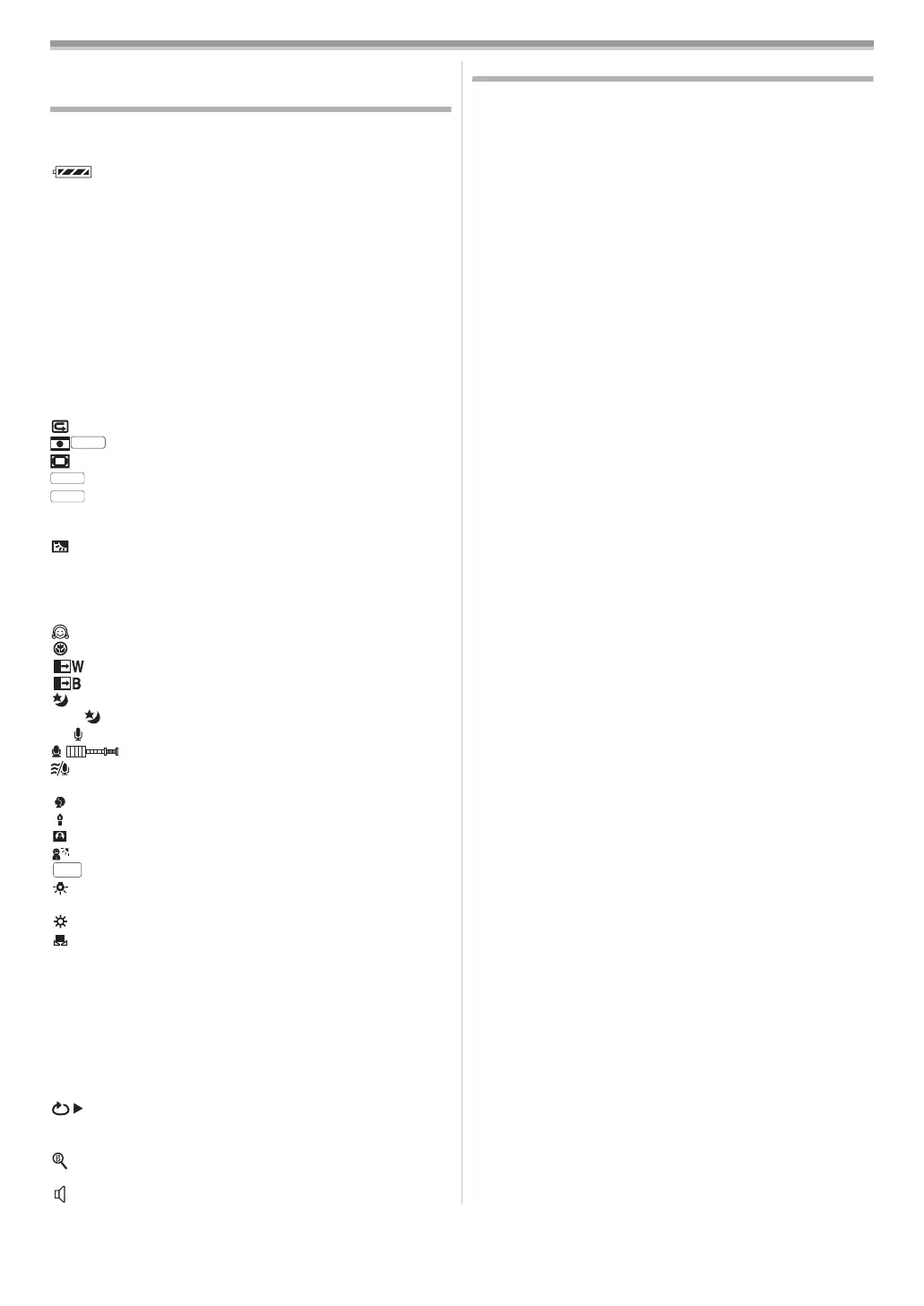
Various functions and the movie camera status are shown on
the screen.
Basic indications
: Remaining battery power
0h00m00s00f: Time code
15:30:45: Date/Time indication
Recording indications
R0:45: Remaining tape time
≥Remaining tape time is indicated in minutes. (When it reaches
less than 3 minutes, the indication starts flashing.)
SP: Standard Play mode
(Recording speed mode)
-54-
LP: Long Play mode
(Recording speed mode)
-54-
¥: Recording -54-
; (Green): Recording pause -54-
; (Green flash): Standby mode
; (Red): Fade out
: Recording check
-54-
: Cinema mode -58-
: Digital zoom -55-
: Automatic mode -53-
: Manual mode -58-, -59-, -60-
MF: Manual focus -60-
5k: Zoom magnification indication -55-
: Backlight mode -56-
[: Image stabilizer -58-
1/500: Shutter speed -60-
F2.4: F number -60-
6dB: Gain value -60-
: Soft skin mode -57-
: Tele macro -57-
: Fade (White) -57-
: Fade (Black) -57-
: Colour night view function -56-
: 0 Lux night view function -56-
: Zoom microphone -55-
: Microphone sensitivity level -55-
: Wind noise reduction -57-
5: Sports mode (Scene mode) -58-
: Portrait mode (Scene mode) -58-
: Low light mode (Scene mode) -58-
: Spotlight mode (Scene mode) -58-
: Surf & snow mode (Scene mode) -58-
: Auto white balance -59-
: Indoor mode (recording under
incandescent lamp)
-59-
: Outdoor mode -59-
: White balance adjustment mode -59-
Playback indications
¥: Recording underway
1: Playback
-61-
;: Pause -61-
5: Fast-forward/Cue playback -61-
6: Rewind/Review playback -61-
D/E: Slow motion playback -61-
;1/2;: Frame-by-frame playback -61-
2k5: Variable-speed search -62-
: Repeat playback -61-
A.DUB ¥: Audio dubbing -65-
A.DUB ;: Audio dubbing pause -65-
: Blank search -54-
12bit, 16bit: Audio recording mode -67-
: Volume adjustment -61-
Warning/alarm indications
If any one of the following indications lights up or flashes,
please check the movie camera.
Confirmatory indications
Y: A cassette with the accidental erasure prevention slider
placed in the [SAVE] position is inserted.
No cassette is inserted.
[--]/0:
The built-in battery is low.
-49-
°: The warning/alarm indication appears when you record
yourself. Turn the LCD monitor towards the viewfinder
and check the warning/alarm indication.
REMOTE:
An incorrect remote control mode has been selected.
-51-
2END:
The tape came to the end during recording.
:: The video heads are dirty.
-71-
Textual indications
3DEW DETECT/3EJECT TAPE:
Condensation has occurred. Take out the cassette and
wait for a while. It takes some time until the cassette
holder opens, but this is not a malfunction.
-71-
LOW BATTERY:
The battery is low. Recharge it.
-44-
NO TAPE:
No tape is inserted.
-46-
TAPE END:
The tape came to the end during recording.
CHECK REC TAB:
You are attempting to record pictures on a tape with the
accidental erasure prevention slider placed in the [SAVE]
position.
You are attempting audio dubbing or digital dubbing on a
tape with the accidental erasure prevention slider placed
in the [SAVE] position.
CHECK REMOTE MODE:
An incorrect remote control mode has been selected. This
is only displayed at the first operation of the remote
control after powering-on.
-51-
WRONG TAPE FORMAT:
You are attempting to play back a tape section that has
been recorded with a different TV system. This cassette is
incompatible.
UNABLE TO A.DUB (LP RECORDED):
Audio dubbing cannot be performed because the original
recording was in LP mode.
UNABLE TO A.DUB:
You are attempting to perform audio dubbing on a
non-recorded tape.
COPY PROTECTED:
Images cannot be recorded correctly because the
medium is protected by a copy guard.
NEED HEAD CLEANING:
The video heads are dirty.
-71-
PUSH THE RESET SWITCH:
An irregularity in the equipment has been detected. Press
the reset button (
-42-). This may solve the problem.
CHANGE TO MANUAL MODE:
You are attempting to select the item on the
[SCENE MODE] when the [AUTO/MANUAL/FOCUS]
switch is set to [AUTO].
REVERSE THE LCD MONITOR:
At the time of 0 Lux night view mode, when LCD monitor
is not reversed, it displays. When the LCD monitor is
rotated by 180° towards the lens, the brightness of the
LCD monitor cannot be adjusted.
CINEMA
AUTO
MNL
0Lux
ZOOM
AWB
VQT0S76_Eng.book 68 ページ 2005年7月21日 木曜日 午前11時48分






 To Next Page