Playback mode
61
VQT0S76
Playback mode
Playing back tape
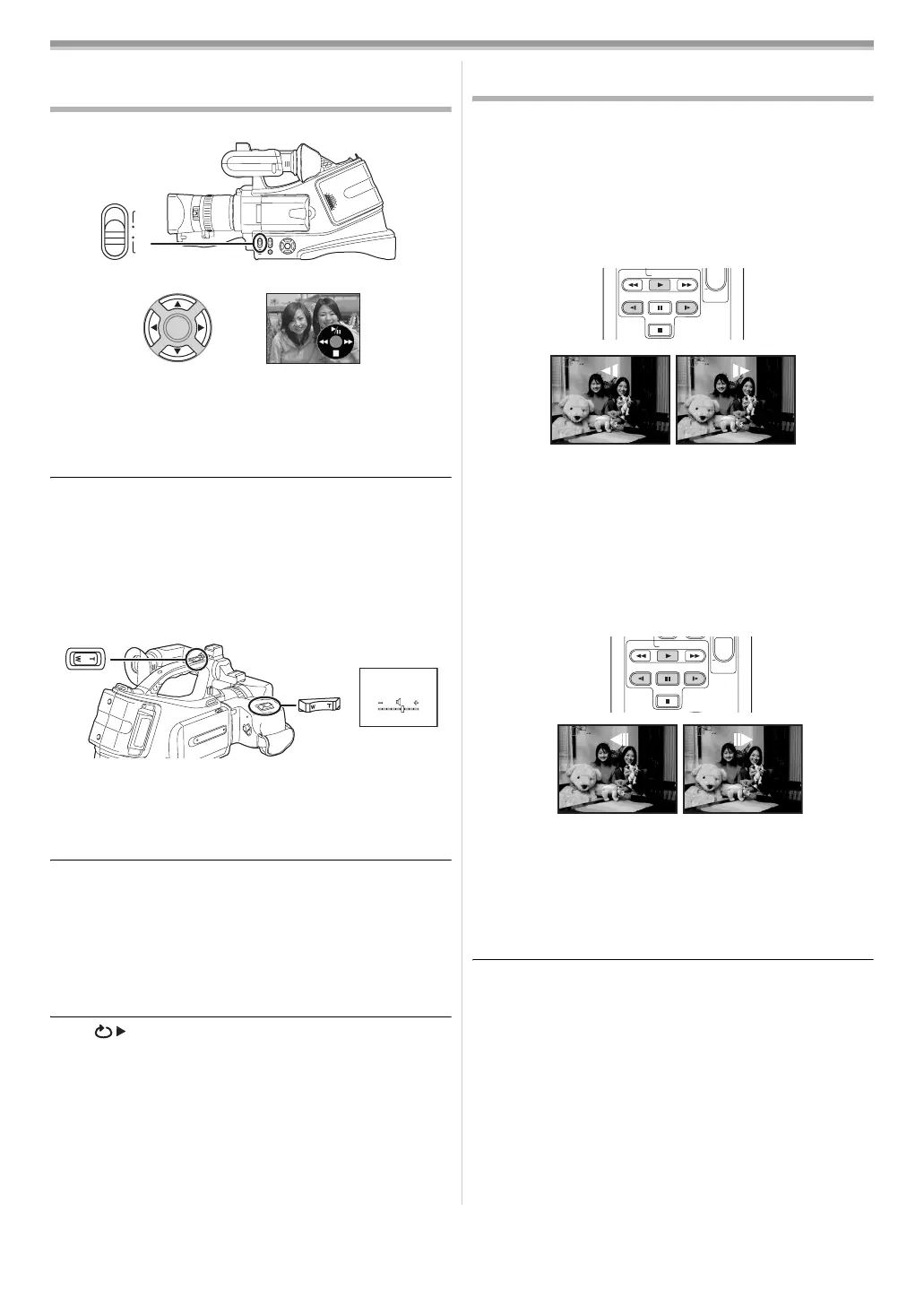
≥Set to Tape Playback Mode.
1 Operate with cursor buttons.
1/;: Playback/Pause
6: Rewind/Review playback
(Reverts to playback with the 1/; icon.)
5: Fast forward/Cue playback
(Reverts to playback with the 1/; icon.)
∫:Stop
≥During cue/review playback, fast-moving images may show
noise as a mosaic.
≥Before and after cue/review playback, the screen may
become black for a moment or images may be disturbed.
ª
To adjust volume
Adjust the speaker or headphone volume for playback.
1 Move the [W/T] lever (or sub zoom lever) to adjust the
volume.
Towards [T]: increases the volume
Towards [W]: decreases the volume
(Nearer the bar to [r], larger the volume.)
≥On the remote control, press the [T] button to increase the
volume or the [W] button to decrease it.
≥When the adjustment is completed, the volume indication will
disappear.
≥If you do not hear the sound, check the settings of [SETUP]
>> [12bit AUDIO].
ª
Repeat playback
When the tape end is reached, the tape will be rewound and
played back again.
1 Set [ADVANCE] >> [REPEAT PLAY] >> [ON].
≥The [ ] indication appears. (In order to cancel the repeat
playback mode, set [REPEAT PLAY] >> [OFF] or set
[OFF/ON] switch to [OFF].)
ª
Settings on the audio
≥If you cannot listen to the desired audio when playing back a
tape, check the settings in [SETUP] >> [12bit AUDIO].
≥When you record or dub the audio in [12bit] and set [SETUP]
>> [12bit AUDIO] >> [MIX], the audio will be played back in
stereo sound regardless of the settings in [AUDIO OUT].
Slow-motion playback/frame-by-frame
playback
≥Set to Tape Playback Mode. (Slow-motion playback can
only be performed by using the remote control.)
Slow-motion playback
If the image is recorded in the SP mode, then it will be played
back at a speed approx. 1/5 the normal speed.
If the image is recorded in the LP mode, then it will be played
back at a speed approx. 1/3 the normal speed.
1 During playback, press the [E] button or the [D] button
on the remote control.
≥If the slow-motion playback continues for approx.
10 minutes or more, then the playback will automatically
stop. (10 minutes of slow-motion playback is equivalent to
approx. 2 minutes in the SP mode or approx. 3 minutes in
the LP mode.)
Frame-by-frame playback
1 During playback, press the [;] button on the remote
control.
2 Press the [E] button or the [D] button on the remote
control.
≥Pushing the [W/T] lever (or sub zoom lever) towards [T]
(normal direction) or towards [W] (reversed direction) of this
camera during playback pause also turns into the frame-by-
frame playback. If you keep pushing the lever, then the
images will continuously be played back frame by frame.
ª
To return to normal playback
Press the [1] button on the remote control.
Slow-motion playback
≥In the reversed slow-motion playback, the time code
indication may be unstable.
Frame-by-frame playback
≥Press and hold the [E] or the [D] button in the playback
pause, and then the images will continuously be played back
frame by frame.
CAMERA
VCR
STOP
V
/REW
STILL ADV
VOL
PLAY
PAUSE
FF/
W
STILL ADV
W
STOP
V
/REW
STILL ADV
VOL
PLAY
PAUSE
FF/
W
STILL ADV
W
VQT0S76_Eng.book 61 ページ 2005年7月21日 木曜日 午前11時48分






 To Next Page