Record mode
55
VQT0S76
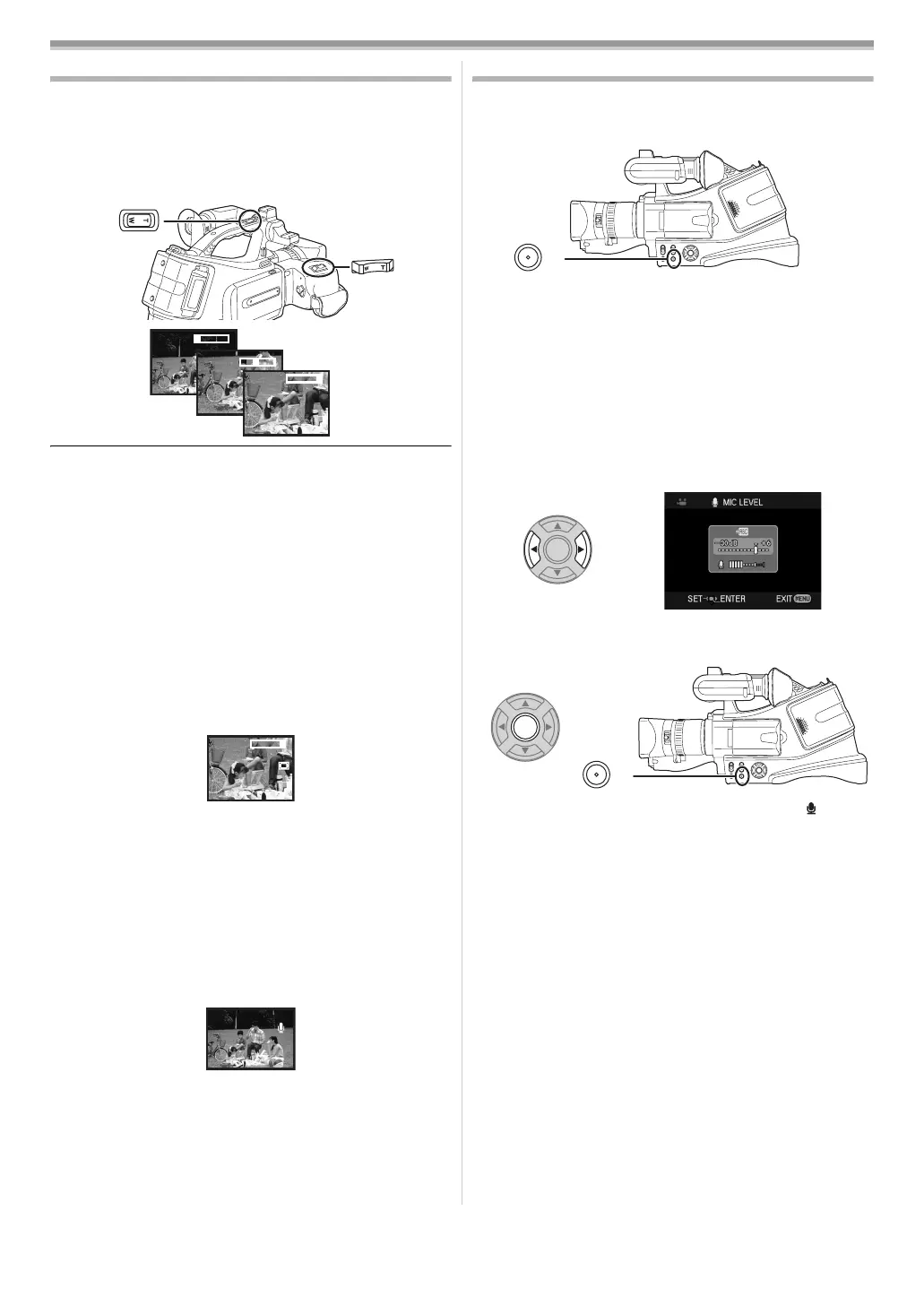
Zoom in/out function
You can zoom in up to 10koptically.
≥Set to Tape Recording Mode.
1 Wide-angle recording (zoom out):
Push the [W/T] lever (or sub zoom lever) towards [W].
Close-up recording (zoom in):
Push the [W/T] lever (or sub zoom lever) towards [T].
≥When zooming in and taking a picture while holding the movie
camera by hand, we recommend using the image stabilizer
function.
≥When you are zooming on a faraway subject, a sharper focus
is achieved if the recording subject is 1.2 metres or further
from the movie camera.
≥When the zoom speed is high, the subject may not be
focused easily.
≥When the zoom magnification is 1k, the movie camera can
focus on a subject approx. 4 cm distant from the lens.
ª
Digital zoom function
If the zoom magnification exceeds 10 times, then the digital
zoom function will be activated. The digital zoom function
allows you to select a magnification from 20k to 500k.
1 Set [ADVANCE] >> [D.ZOOM] >> [20k] or [500k].
[OFF]: Optical zoom only (Up to 10k)
[20k]: Up to 20k
[500k]: Up to 500k
≥The larger the digital zoom magnification, the more the image
quality is degraded.
ª
To use the zoom microphone function
Interlocked with the zooming operation, the microphone will
collect sounds clearly far away with the tele-shot or those in the
vicinity with the wide-angle shot.
≥Set to Tape Recording Mode.
1 Set [ADVANCE] >> [ZOOM MIC] >> [ON].
ª
About the variable speed zoom function
≥When pushing the [W/T] lever as far as it will go, you can
zoom from 1k to 10k in 2.1 second at the maximum.
≥The zoom speed varies according to the amount of movement
of the [W/T] lever.
≥The variable speed zoom function cannot be used with the
remote control and sub zoom lever.
Adjusting the Microphone Sensitivity Level
You can adjust the microphone sensitivity for recording.
1 Set [ADVANCE] >> [MIC LEVEL] >> [AUTO], [SETrAGC]
or [SET].
≥AGC*: Auto Gain Control
[AUTO]: AGC is activated, and the recording level is
adjusted automatically.
[SETrAGC]: The desired recording level can be set. AGC will
also be activated to reduce the amount of
distortion in the music.
[SET]: AGC is not activated and so natural recording
can be performed. Adjust in such a way that the
sound will not be distorted at the maximum
volume level.
2 Press the [2] or [1] button to increase or decrease the
bars of the gain value.
3 Press the [MENU] or [ENTER] button to complete the
settings.
≥Adjust the gain value so that the last 3 Bars of the [ ] will not
light red. (Otherwise,the Sound is distorted.)
≥The [MIC LEVEL] ([AUTO], [SETrAGC] or [SET]) setting on
the [TAPE RECORDING MENU] and
[TAPE PLAYBACK MENU] will be the same.
(Microphone sensitivity level can be adjusted on each mode
separately.)
≥When [ZOOM MIC] is set to [ON], set the zoom to the [T]
position before performing this adjustment.
≥Select a lower setting for gain value or set [MIC LEVEL] to
[AUTO].
≥It is recommended that you check through the headphones
before recording to ensure that the sound is not distorted.
1tW
5tW
10tW
T
T
T
20tW
T
ZOOM
MENU
MENU
VQT0S76_Eng.book 55 ページ 2005年7月21日 木曜日 午前11時48分






 To Next Page