Record mode
60
VQT0S76
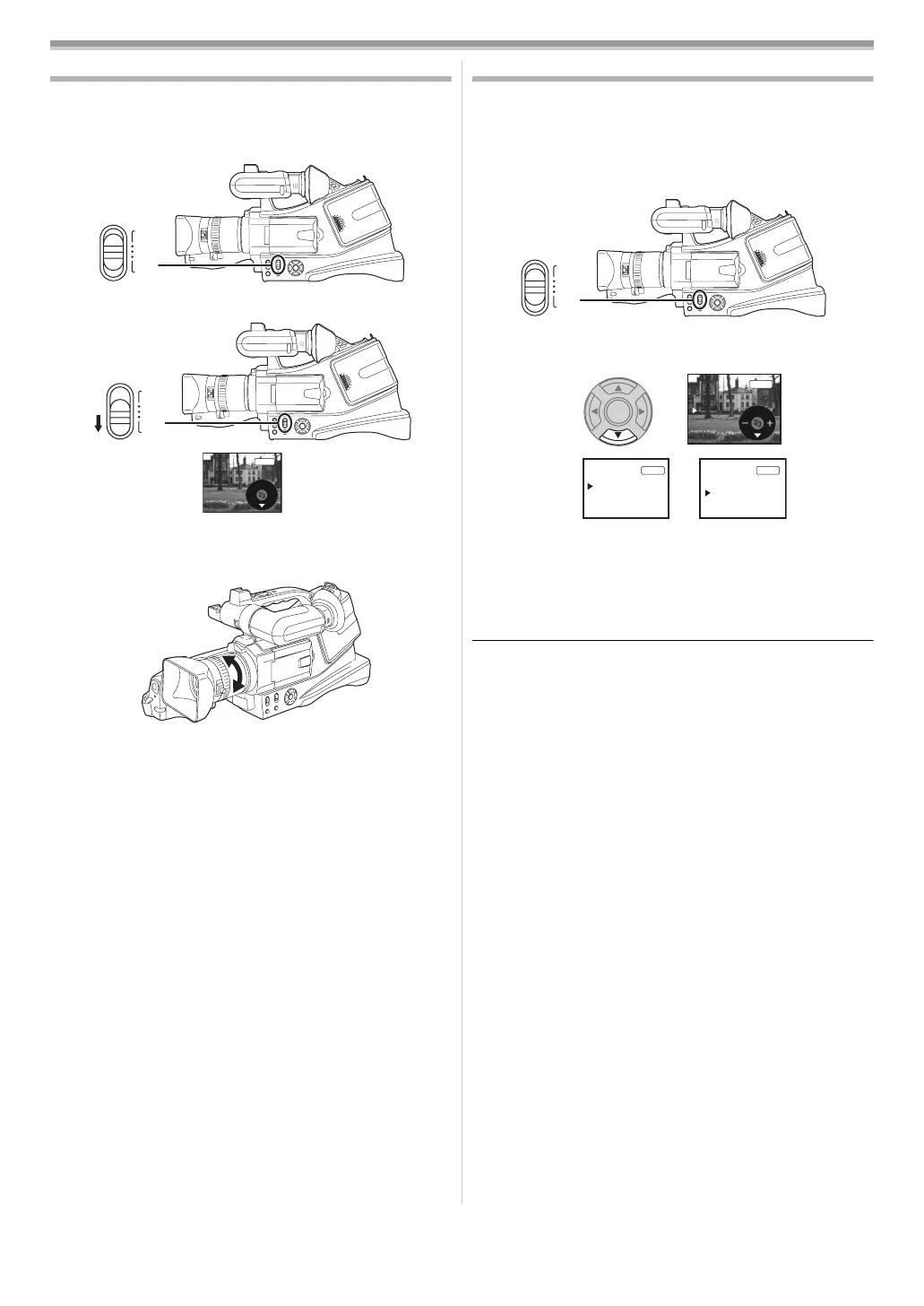
Manual focus adjustment
If auto focusing is difficult due to the conditions, then manual
focusing is available.
≥Set to Tape Recording Mode.
1 Set the [AUTO/MANUAL/FOCUS] switch to [MANUAL].
2 Set the [AUTO/MANUAL/FOCUS] switch to [FOCUS].
≥The MNL and the manual focus indication [MF] will be
displayed.
3 Rotate the focus ring to adjust the focus.
≥When focused with a wide angle, the subject may not be in
focus when zoomed in. First, zoom in on the subject, and then
focus on it.
ª
To restore to the automatic adjustment
Set the [AUTO/MANUAL/FOCUS] switch to [AUTO] or
[FOCUS].
Manual shutter speed/aperture adjustment
Shutter Speed
Adjust it when recording fast-moving subjects.
Aperture
Adjust it when the screen is too bright or too dark.
≥Set to Tape Recording Mode.
1 Set the [AUTO/MANUAL/FOCUS] switch to [MANUAL].
2 Press the [4] button until the shutter speed indication or
aperture value indication appears.
1) Shutter speed
2) (Aperture) Iris/gain value
3 Press the [2] or [1] button in order to adjust the shutter
speed or aperture.
ª
To restore to automatic adjustment
Set the [AUTO/MANUAL/FOCUS] switch to [AUTO].
Manual shutter speed adjustment
≥Avoid recording under fluorescent light, mercury light or
sodium light because the colour and brightness of the
playback image may change.
≥If you increase the shutter speed manually, the sensitivity
lowers and accordingly the gain value increases
automatically, which may increase the noises on the screen.
≥You may see vertical lines of light in the playback image of a
brightly shining subject or highly reflective subject, but this is
not a malfunction.
≥During normal playback, image movement may not look
smooth.
≥When recording in the extremely bright place, the colour of
the screen may change or flickers. If so adjust the shutter
speed manually to 1/50 or 1/100.
Manual iris/gain adjustment
≥If the value does not become “OPEN”, you cannot adjust the
gain value.
≥If the gain value is increased, the noise on the screen
increases.
≥Depending on the zoom magnification, there are iris values
that are not displayed.
ª
Shutter speed range
1/50 to 1/8000 seconds: Tape Recording Mode
The shutter speed closer to 1/8000 is faster.
ª
Iris/gain value range
CLOSE (Closed), F16, ..., F2.0,
OPEN (Opened) 0dB, ..., 18dB
Value closer to [CLOSE] darken the image.
Value closer to [18dB] brighten the image.
Values with dB are gain values.
AUTO
MANUAL
FOCUS
AUTO
MANUAL
FOCUS
MF
MNL
AUTO
MANUAL
FOCUS
1/1000
MNL
1)
1/50
F2.0
0dB
MNL
2)
MNL
1
/
50
OPEN
OdB
VQT0S76_Eng.book 60 ページ 2005年7月21日 木曜日 午前11時48分






 To Next Page