Before using
41
VQT0S76
Before using
Accessories
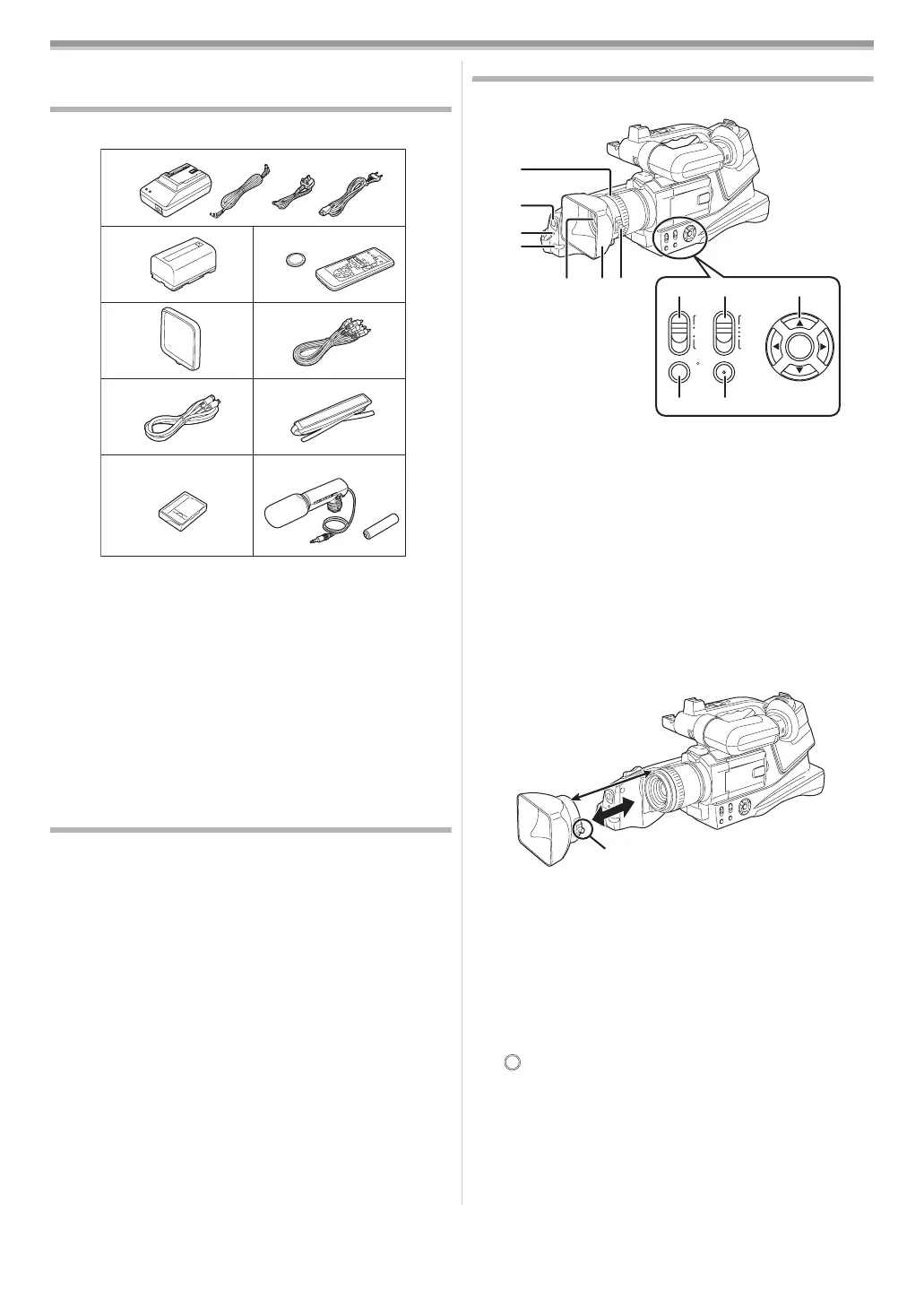
The followings are the accessories supplied with this product.
1) AC adaptor, DC input lead, AC mains lead
-44-
A Hong Kong Special Administrative Region of China and
Saudi Arabia
B Areas Other than Hong Kong Special Administrative
Region of China and Saudi Arabia
2) Battery pack
-44-, -45-
3) Remote control, button-type battery -50-
4) Lens cap -43-
5) AV cable -62-, -63-
6) S-Video cable -62-, -63-
7) Shoulder strap -43-
8) Digital video head cleaner -71-
9) External Stereo Microphone and Battery -51-, -52-
Optional
1) AC adaptor (VW-AD9E/B)
2) Battery pack (lithium/CGR-D08S/800mAh)
3) Battery pack (lithium/CGR-D16S/1600mAh)
4) Battery pack (lithium/CGP-D28S/2800mAh)
5) Wide conversion lens (VW-LW4307ME)
6) Filter kit (VW-LF43WE)
7) Tripod (VW-CT45E)
8) DV cable (VW-CD1E)
≥Some optional accessories may not be available in some
countries.
Parts identification and handling
ª Camera
(1) Focus ring -60-
(2)
White balance sensor -59-
(3)
Recording lamp -67-
(4)
Remote control sensor -50-
(5)
Lens
(6) Lens hood
(7) Lens hood attachment knob
≥Do not attach other conversion lenses in front of the lens
hood; there is no mount to be used for the attachment.
≥When you wish to attach the wide conversion lens
(VW-LW4307ME; optional), MC protector, or ND filter in the
Filter Kit (VW-LF43WE; optional), first of all, loosen the lens
hood attachment knob 1. If the MC protector or ND filter is
used, the lens hood can be mounted on the filter.
≥When you attach the lens hood back, unite the marks and
fasten the lens hood attachment knob 1.
≥If you push the [W/T] lever toward [W] during recording with
the filter or conversion lens attached to the movie camera,
4 corners of the image may become dark (vignetting). For
details, please refer to the operating instructions of your
accessories.
≥Be sure to keep the lens hood attached to the movie camera
so as to shut out unnecessary light.
(8) Mode switch [CAMERA/VCR] -47-, -54-, -61-
(9)
Mode selector switch [AUTO/MANUAL/FOCUS]
-53-, -58-
(10)
Cursor buttons -47-, -48-
/[ENTER] button
3/Playback/Pause button [1/;]
2/Rewind/Review button [6]
4/Stop button [∫]
1/Fast forward/cue button [5]
(11) Power LCD button [POWER LCD] -49-
Power LCD lamp
(12) Menu button [MENU] -48-
1)
2)
5)4)
7)
8)
6)
3)
AB
9)
(2)
(3)
(4)
POWER
LCD
MENU
AUTO
MANUAL
FOCUS
CAMERA
VCR
(5) (6) (7)
(1)
(8)
(9)
(11)
(12)
(10)
1
Eng_Body.fm 41 ページ 2005年7月21日 木曜日 午後1時22分






 To Next Page