Edit mode
63
VQT0S76
Edit mode
Copying onto a DVD recorder or a VCR
(Dubbing)
Pictures recorded by the movie camera can be stored on a
DVD-RAM or other such media. Refer to the instructions for the
recorder.
≥Place a recorded cassette in the movie camera, and an
unrecorded DVD-RAM or cassette in the DVD recorder or
VCR.
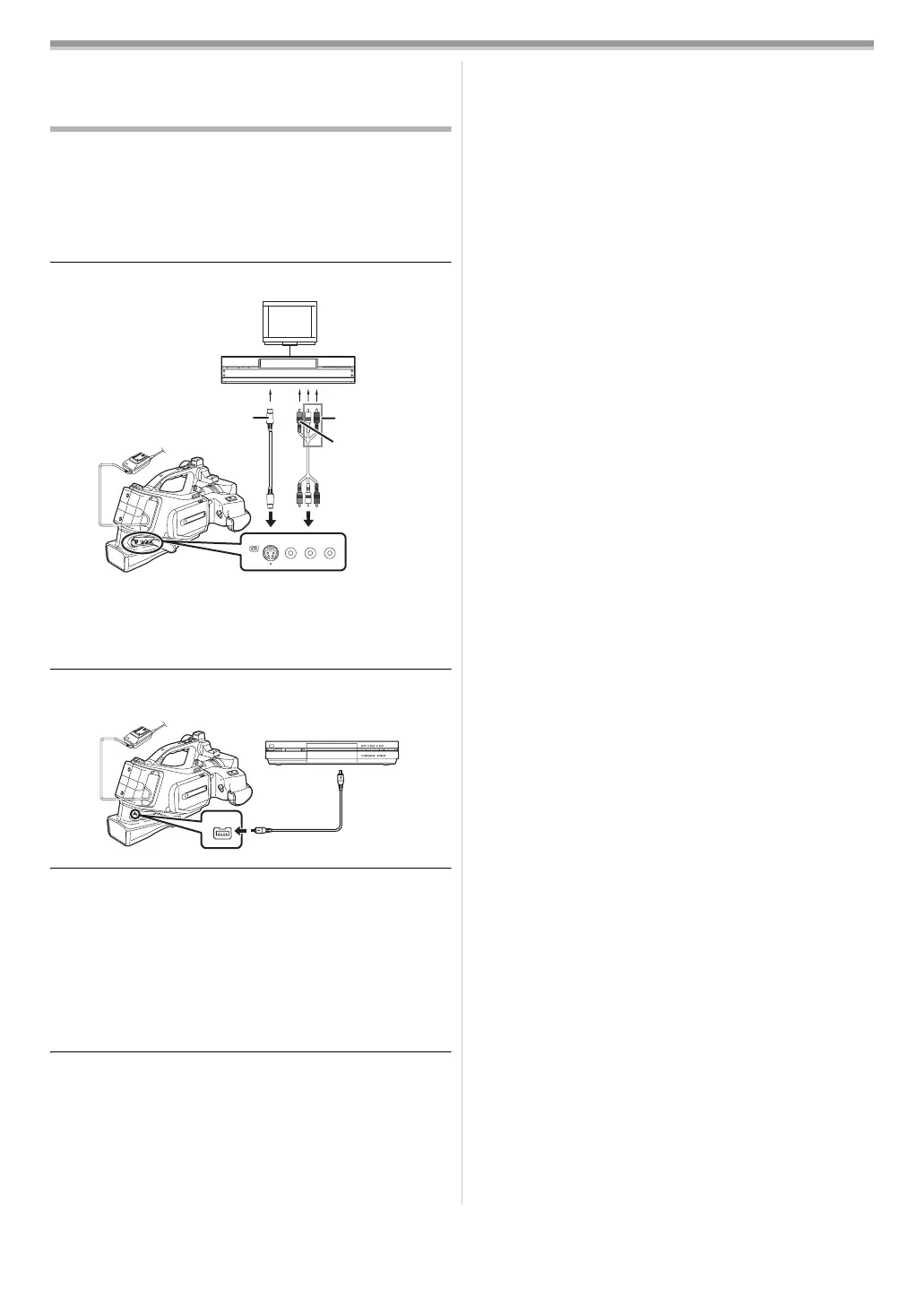
1 Connect the movie camera and the recorder.
Connecting with the AV cable
≥Connect the movie camera and the recorder by using the
AV cable 1.
≥If the recorder has an S-Video terminal, then also connect
an S-Video cable 2. It allows you to copy clearer image.
Connecting with the optional DV cable (Only for equipment
with a DV terminal)
2 Turn on the movie camera and set to Tape Playback
Mode.
3 Select the input channel on the TV set and recorder.
4 Press the [3] button to select the [1/;] icon to start
playback.
≥The image and sound are reproduced.
5 Start recording. (Recorder)
6 Press the [4] button to select the [∫] icon to stop
playback.
7 Stop recording. (Recorder)
≥For more information, refer to the operating instructions for
your TV set and recorder.
≥When you do not need functional indications or date and time
indications, press the [OSD] button on the remote control for
no indication. (When you connect the movie camera and a
recorder with the DV cable, these indications may not
appear.)
ª
When neither image nor sound from the movie
camera is output to the TV set
≥Check that the plugs are inserted as far as they go.
≥Check the connected terminal.
[VIDEO IN]
[AUDIO IN]
[S-VIDEO IN]
12
VIDEO OUT
DV
AUDIO
L–
–R
OUT
S-VIDEO OUT
2
(L2)
S
/
DV
VQT0S76_Eng.book 63 ページ 2005年7月21日 木曜日 午前11時48分






 To Next Page