EasyManua.ls Logo

Panasonic NV-VX55A - Using the Digital Zoom Function

Panasonic NV-VX55A
96 pages
Print Icon
To Next Page IconTo Next Page
To Previous Page IconTo Previous Page
Loading...
3
MENU
1
PAUSE
$TOP
(
MAIN
MENU
SPEED
psp
LP
TAPESS
h30
45 60
TITLESET
=
>OFF
ON
a
P:
OFF
ON
3pb.zo0om
=
4ax
=
250x
“WSENSOR
=
>
OFF
ON
SHUTTER
REC
OFF
ON
SELF
SHOT
»NOR,
MIR.
PRESS
MENU
TO
EXIT
D.MODE
>
L-perrect
¥
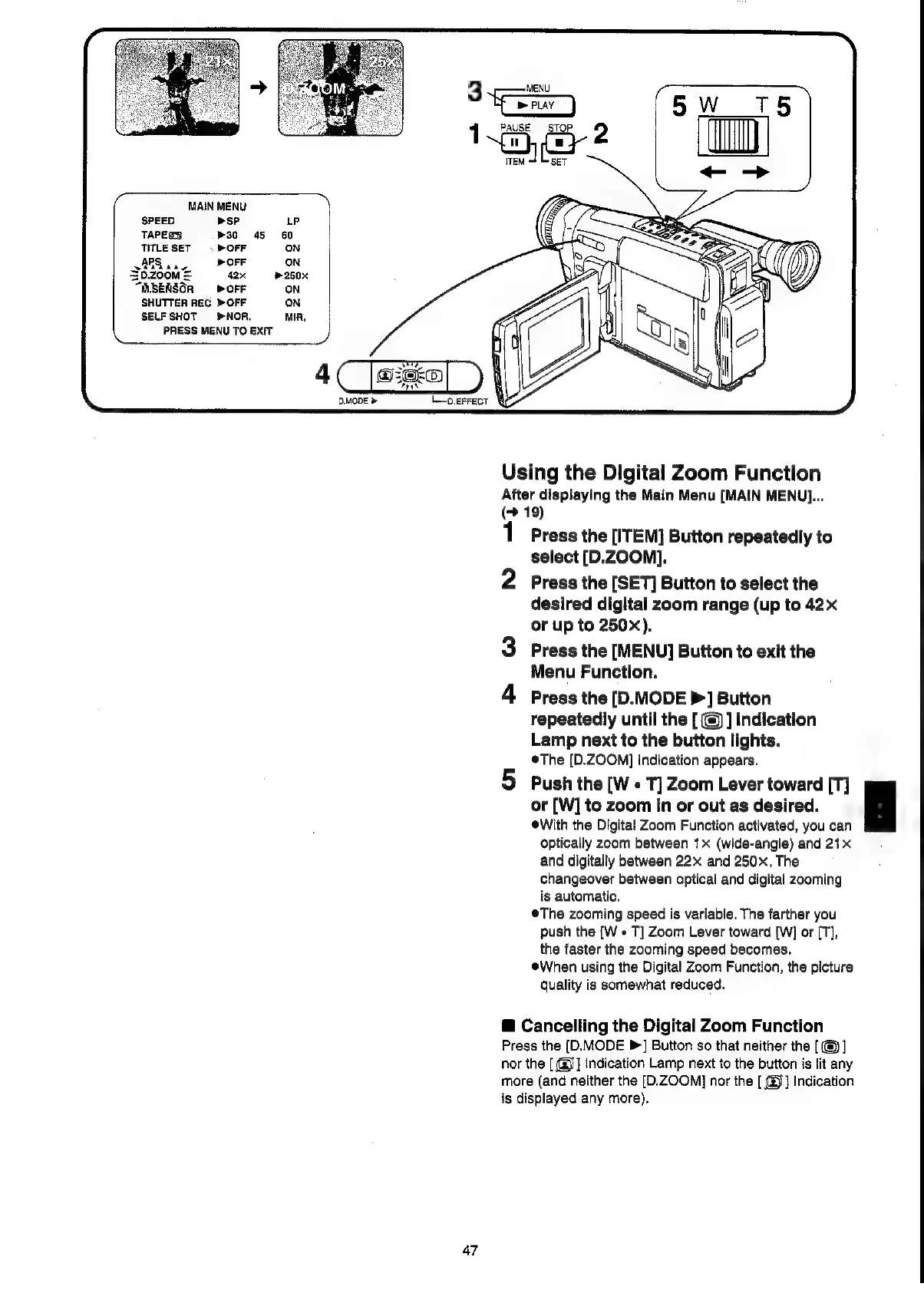
Using
the
Digital
Zoom
Function
After
displaying
the
Main
Menu
[MAIN
MENU]...
(>
19)
1
Press
the
[ITEM]
Button
repeatedly
to
select
[D.ZOOM].
2
Press
the
[SET]
Buiton
to
select
the
desired
digital
zoom
range
(up
to
42x
or
up
to
250x).
3
Press
the
[MENU]
Button
to
exit
the
Menu
Function.
Press
the
[D.MODE
>]
Button
repeatedly
until
the
[
@)
]
Indication
Lamp
next
to
the
button
lights.
The
[D.ZOOM]
Indication
appears.
5
Push
the
[W
«
T]
Zoom
Lever
toward
[T]
or
[W]
to
zoom
in
or
out
as
desired.
i
eWith
the
Digital
Zoom
Function
activated,
you
can
optically
zoom
between
1x
(wide-angle)
and
21x
and
digitally
between
22x
and
250.
The
changeover
between
optical
and
digital
zooming
is
automatic.
®The
zooming
speed
is
variable.
The
farther
you
push
the
[W
«
T]
Zoom
Lever
toward
[W]
or
[T],
the
faster
the
zooming
speed
becomes.
When
using
the
Digital
Zoom
Function,
the
picture
quality
is
somewhat
reduced.
@
Cancelling
the
Digital
Zoom
Function
Press
the
(D.MODE
P]
Button
so
that
neither
the
[@]
nor
the
[
(g]]
Indication
Lamp
next
to
the
button
is
lit
any
more
(and
neither
the
[D.ZOOM]
nor
the
[
@)]
Indication
is
displayed
any
more).
47

Related product manuals