EasyManua.ls Logo

Panasonic NV-VX55A - About the Digital Effect Functions

Panasonic NV-VX55A
96 pages
Print Icon
To Next Page IconTo Next Page
To Previous Page IconTo Previous Page
Loading...
D.FADE
2
a
»>
MIRROR
»
STROBE
SOLARI
¢
D.ZOOM
D,FADE
2
48
g
(Z
+
=
Niet
ie)
D.Z0OM
D.FADE
1
About
the
Digital
Effect
Functions
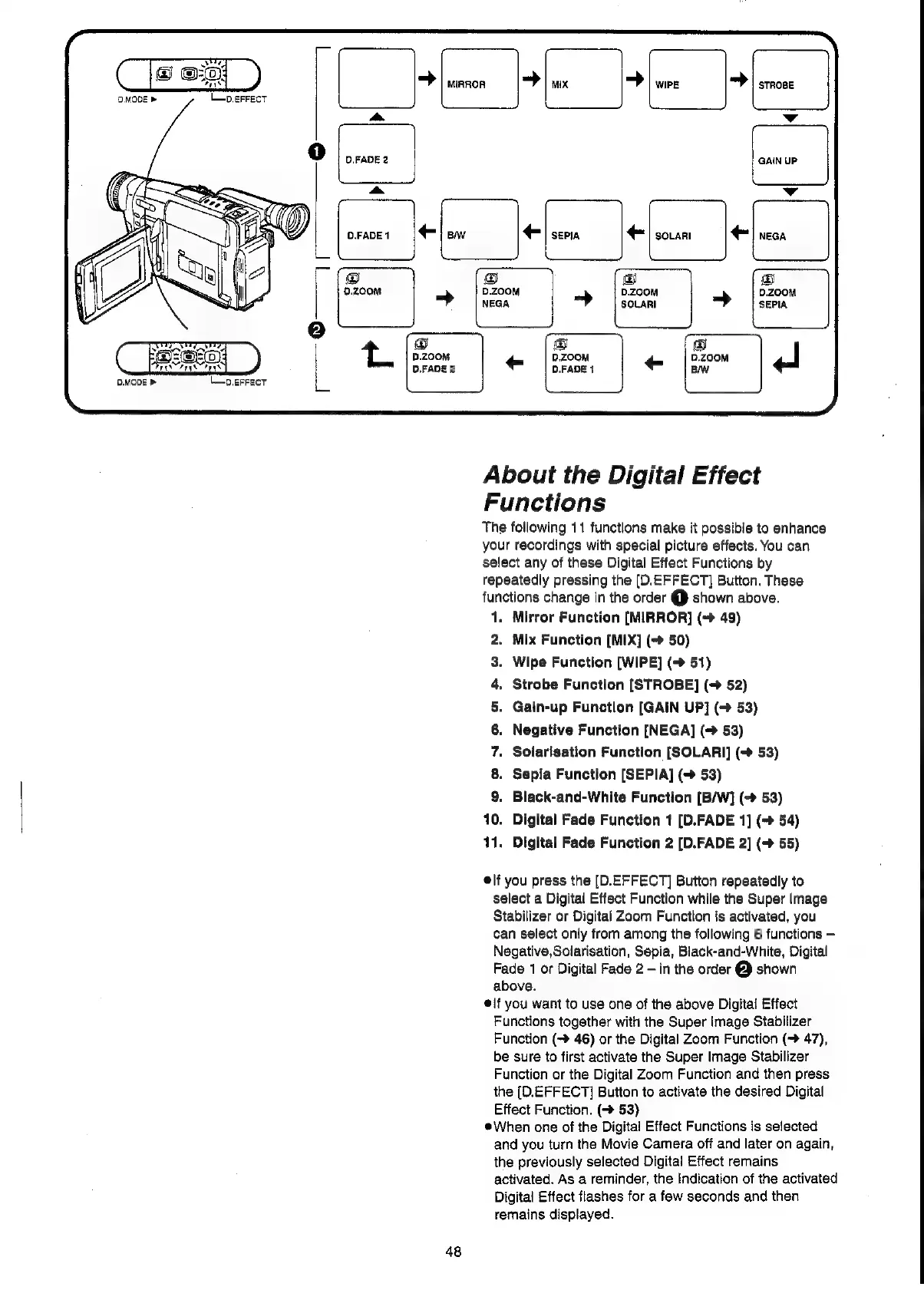
The
following
11
functions
make
it
possible
to
enhance
your
recordings
with
special
picture
effacts.
You
can
select
any
of
these
Digital
Effect
Functions
by
repeatedly
pressing
the
(D.EFFECT]
Button.
These
functions
change
in
the
order
@
shown
above.
1.
Mirror
Function
[MIRROR]
(>
49)
2.
Mix
Function
[MIX]
(-»
50)
3.
Wipe
Function
[WIPE]
(=>
51)
4,
Strobe
Function
[STROBE]
(>
52)
Gain-up
Function
[GAIN
UP]
(7
53)
Negative
Function
[NEGA]
(->
53)
Soiarisation
Function
[SOLARI]
(>
53)
Sepia
Function
[SEPIA]
(+
53)
Black-and-White
Function
[B/W]
(->
53)
10.
Digital
Fade
Function
1
[D.FADE
1]
(~»
54)
11,
Digital
Fade
Function
2
[D.FADE
2]
(>
55)
oO
Ono
elf
you
press
the
[D.EFFECT]
Button
repeatedly
to
select
a
Digital
Effect
Function
while
the
Super
Image
Stabilizer
or
Digital
Zoom
Function
is
activated,
you
can
select
only
from
among
the
following
6
functions
Negative,Solarisation,
Sepia,
Black-and-White,
Digital
Fade
1
or
Digital
Fade
2
in
the
order
@
shown
above.
¢{f
you
want
to
use
one
of
the
above
Digital
Effect
Functions
together
with
the
Super Image
Stabilizer
Function
(~
46)
or
the
Digital
Zoom
Function
(>
47),
be
sure
to
first
activate
the
Super
Image
Stabilizer
Function
or
the
Digital
Zoom
Function
and
then
press
the
(D.EFFECT]
Button
to
activate
the
desired
Digital
Effect
Function.
(>
53)
When
one
of
the
Digital
Effect
Functions
is
selected
and
you
turn
the
Movie
Camera
off
and
later
on
again,
the
previously
selected
Digital
Effect
remains
activated.
As
a
reminder,
the
Indication
of
the
activated
Digital
Effect
flashes
for
a
few
seconds
and
then
remains
displayed.

Related product manuals