FM
ANT
AM
ANT
75 Ω
LOOP
EXT
LOOP
ANT
GND
AC IN
~
AC IN
~
SPEAKERS
R
C
SURROUND FRONT
R L L
6~8
Ω
4~8
Ω
L L L
TV
GAME/AUX
SUBWOOFER
DVR/DVD-P
R
L
R R R
IN IN OUT OUT IN
OPT 2 OPT 1
COAXIAL
DVR/DVD-P
TV
DIGITAL IN
AUDIO
DIGITAL AUDIO
OUT
VIDEO OUT
VIDEO IN
AUDIO IN
AUDIO OUT
DIGITAL AUDIO
OUT
VIDEO OUT
VIDEO IN
FRONT (L, R)
AUDIO OUT
DIGIT
AL A
UDIO OUT
DIGITAL AUDIO
OUT
AUDIO OUT
AUDIO OUT
VIDEO IN
VIDEO OUT
OPT 2
DVR/DVD-P
OPT 2
DVR/DVD-P
COAXIAL
L
TV
R
IN
OPT 1
TV
GAME/AUX
L
R
IN
L L
DVR/DVD-P
R R
OUT IN
L
DVR/DVD-P
R
IN
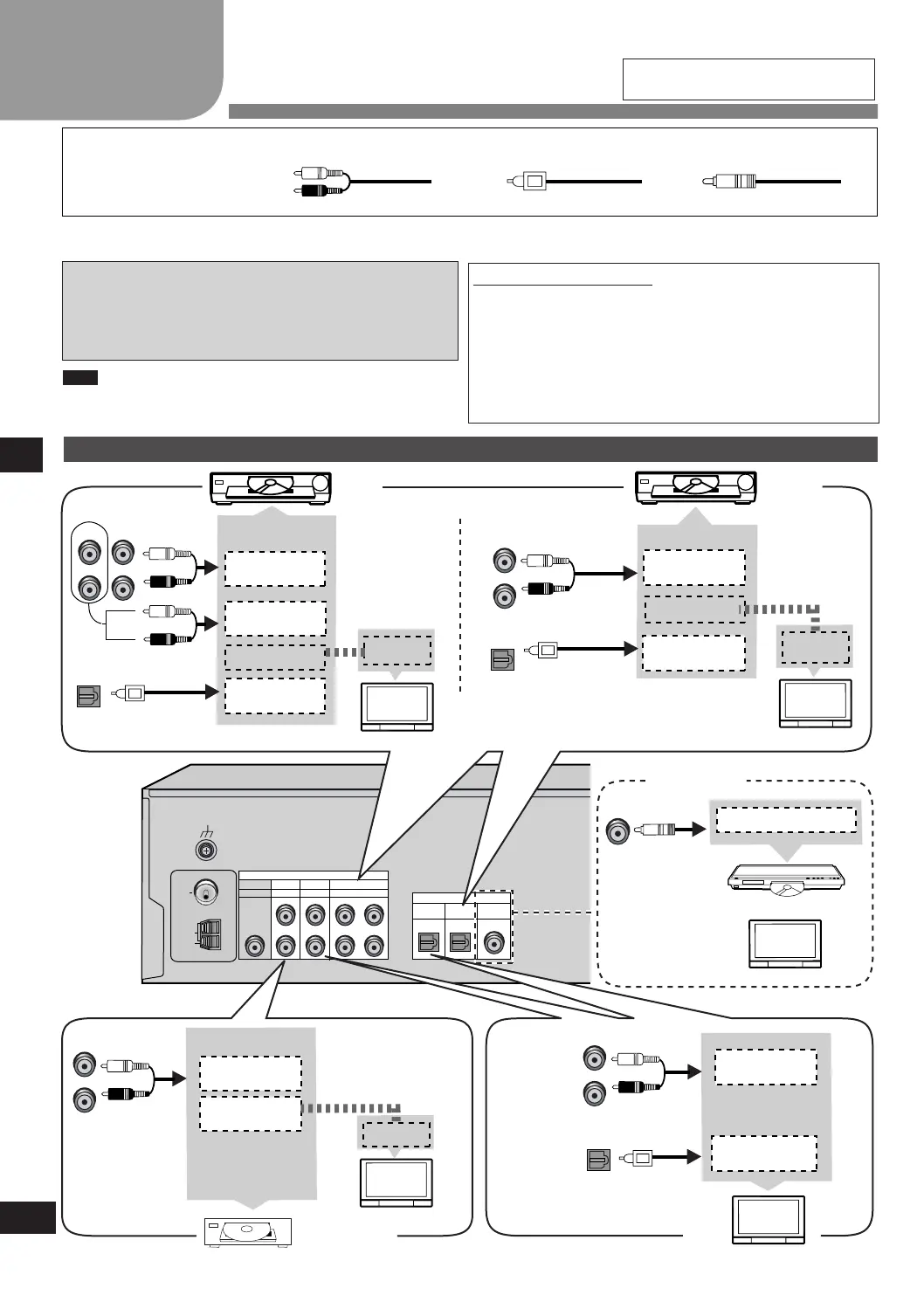
Step 2 Home theater connections
Home theater connections
Step
Other accessories
Stereo phono cable
Left
Right
Coaxial cable
Turn off all components before making any connections.
To connect equipment, refer to the appropriate operating instructions.
Changing the digital input settings
You can change the input settings for the digital terminals if
necessary. Note the equipment you have connected to the
terminals, then change the settings. One of the terminals will
remain unused, whatever the setting. (➡ page 8)
Use digital connection to enjoy Dolby Digital or DTS.
Do not bend the optical fibre cable.
•
•
Notes on digital input
This unit can decode the following signals:
Dolby Digital, DTS
PCM, including PCM with sampling frequencies of 96 or
88.2 kHz
It cannot decode:
Other digital signals, such as MPEG
Dolby Digital RF signals from a laser disc player
•
•
•
•
TV
Optical fibre cable
TV
Note
Peripheral equipment and cables sold
separately unless otherwise indicated.
6
TV, DVR/DVD-P and Game/Aux
DVR
DVD
Player
C o n n e c t t h e
v i d e o c a b l e
directly to the
TV.
Conn e c t t he
v i d e o c a b l e
directly to the
TV.
TV (Monitor)
TV (Monitor)
Coaxial
DVR/DVD-P
or
Game/Aux
C o n n e c t t h e
v i d e o c a b l e
directly to the
TV.
TV (Monitor)
SA-HE40(RQTV0109-1E).indb 6 2/22/2006 4:33:08 PM




 To Next Page