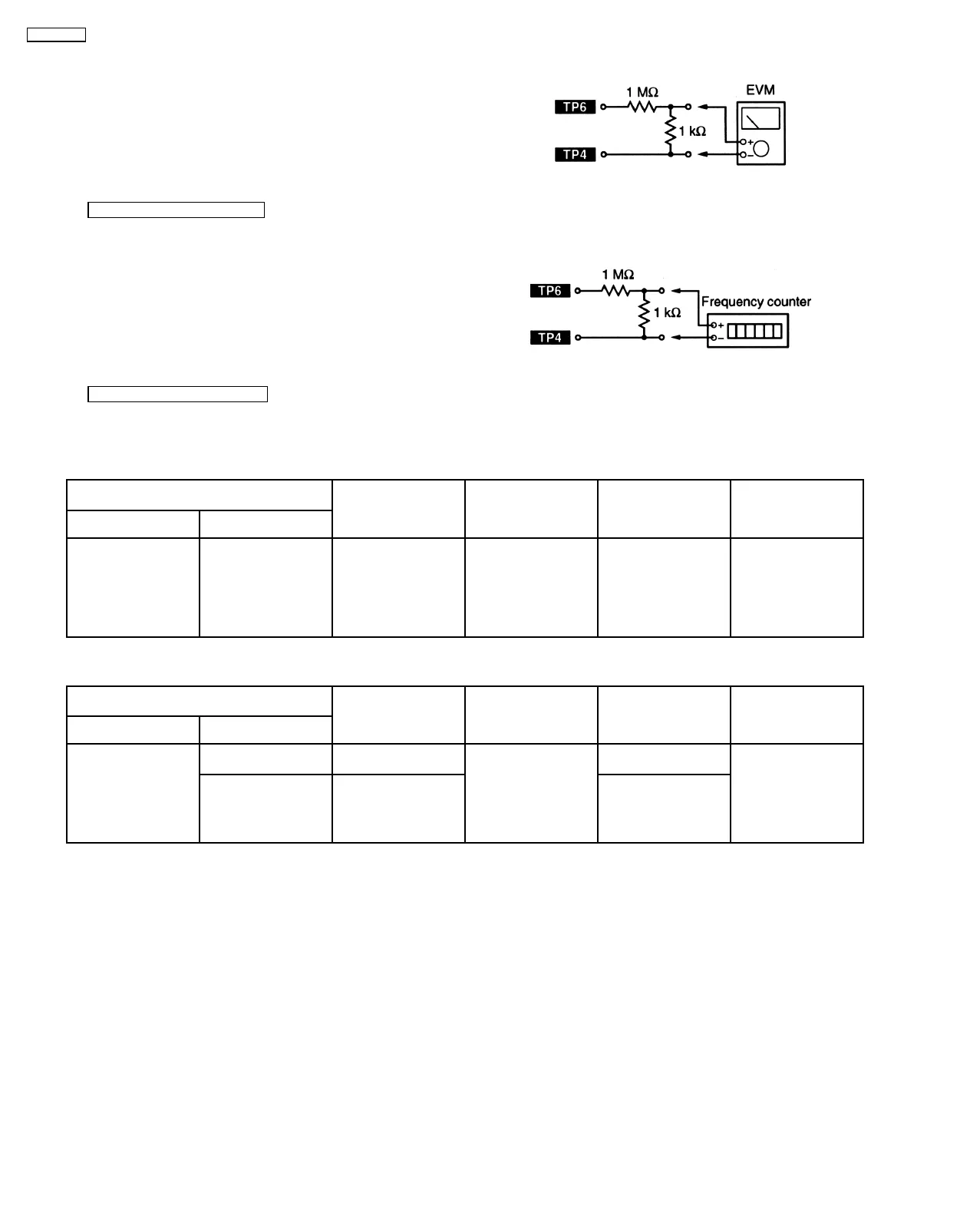
1. Connect the measuring instrument as shown in Fig. 6.
2. Set the unit to “AUX” position.
3. Insert the normal blank tape (QZZCRA) and set the unit to
“REC” mode (use “●REC/STOP” key).
4. Measure and make sure that the output is within the
standad value.
Standard value : 16 ± 3mV
1. Connect the measuring instrument as shown in Fig. 7.
2. Set the unit to “AUX” position.
3. Insert the normal blank tape (QZZCRA) and set the unit to
“REC” mode (use “●REC/STOP” key).
4. Measure and make sure that the output is within the
standard value.
Standard value : 98 ± 8kHz
10.2.1. AM-IF Alignment
10.2.2. AM-RF Alignment
Fig. 6
Fig. 7
10.1.3. Bias Vlotage Check
10.1.4. Bias Frequency Check
10.2. Tuner Section
SIGNAL GENERATOR or SWEEP
GENERATOR
RADIO DIAL SETTING INDICATOR
(ELECTRONIC
VOLTMETER or
OSCILLOSCOPE)
ADJUSTMENT (Shown
in Fig. 3)
REMARKS
CONNECTIONS FREQUENCY
Fashion a loop of
several turns of wire
and radiate a signal
into the loop ant. of
receiver.
450kHz 30% Mod. at
400Hz
Point of non-
interference. (on about
600kHz)
Headphones Jack
(32
Ω
) (Fabricate the
plug as shown in Fig.
2 and then connect the
lead wires of the plug
to the measuring
instrument.)
Z102 (AM IFT) Adjust for maximum
output
SIGNAL GENERATOR or SWEEP
GENERATOR
RADIO DIAL SETTING INDICATOR
(ELECTRONIC
VOLTMETER or
OSCILLOSCOPE)
ADJUSTMENT (Shown
in Fig. 3)
REMARKS
CONNECTIONS FREQUENCY
Fashion a loop of
several turns of wire
and radiate a signal
into the loop ant. of
receiver.
522kHz Tuning capacitor fully
closed
Headphones Jack
(32
Ω
) (Fabricate the
plug as shown in Fig.
2 and then connect the
lead wires of the plug
to the measuring
instrument.)
Z101 (AM OSC Coil) Adjust for maximum
output
603kHz Tuning to signal Z101 (AM ANT Coil)
22
SA-PM30MD









 To Next Page