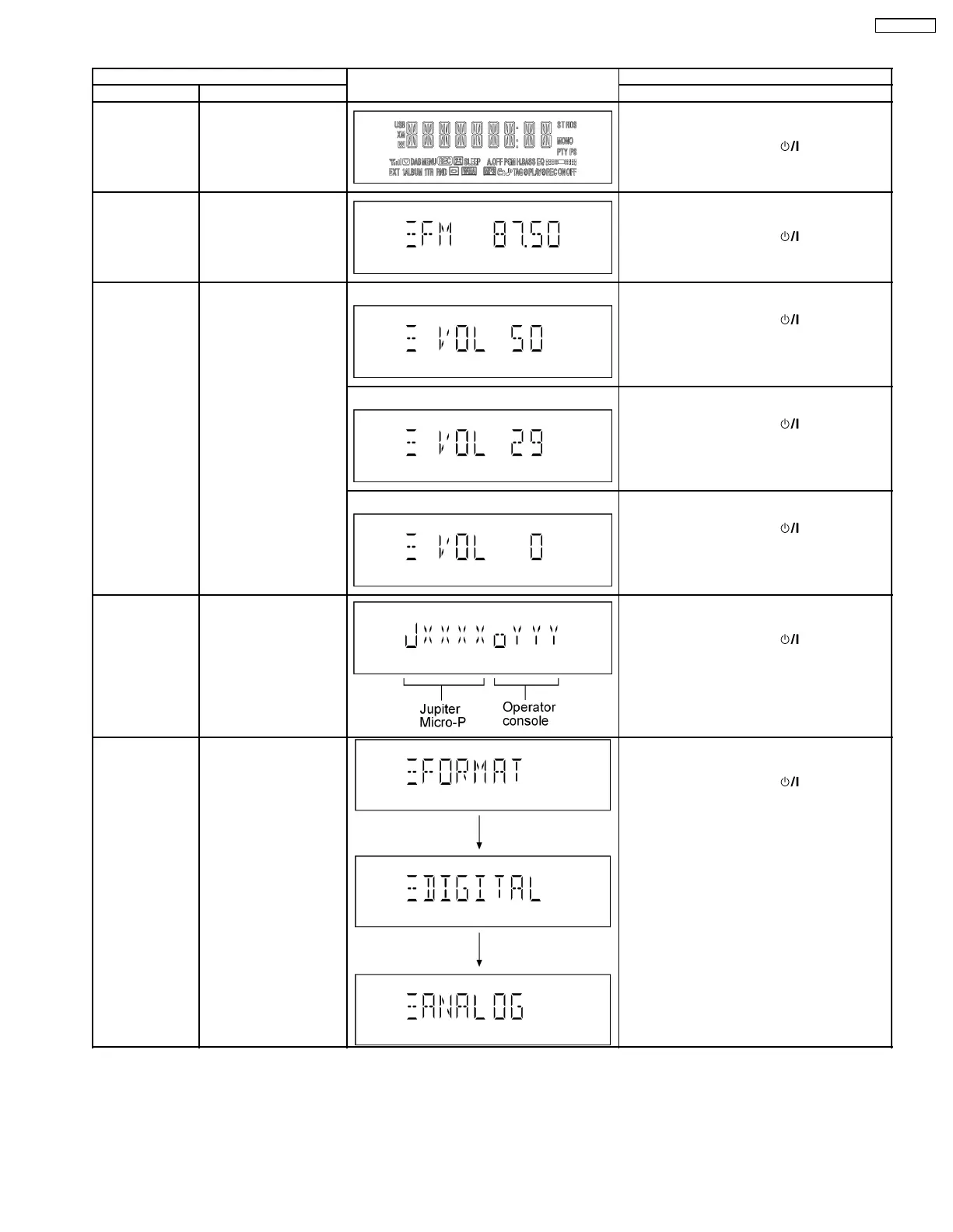
7.2.2. Service Mode Table 2
Item FL Display Key Operation
Mode Name Description Front Key
FL Display Test To check the FL
segments display (All
segments will light up)
In doctor mode:
1. Press [1] button on remote control.
To exit Doctor Mode, press [
] button on
main unit or remote control.
Tuner Check To Inspect Tuner Check In doctor mode:
1. Press [MUSIC.P] button on remote control.
To exit Doctor Mode, press [
] button on
main unit or remote control.
Volume Setting
Mode
To check for the volume
setting of the main unit.
The volume will be
automatically set to its
respective level (in dB).
During this mode,
treble/bass/EQ will be set
to ‘0’dB & OFF.
Display 1 In doctor mode:
1. Press [7] button on remote control.
To exit Doctor Mode, press [
] button on
main unit or remote control.
Display 1 In doctor mode:
2. Press [8] button on remote control.
To exit Doctor Mode, press [
] button on
main unit or remote control.
Display 1 In doctor mode:
3. Press [9] button on remote control.
To exit Doctor Mode, press [
] button on
main unit or remote control.
Micro-P Version
Display
Checking of various
items and firmware
version.
Note: The micro-
processor version as
shown is an example. It
will be revise when there
is an updates.
In doctor mode:
1. Press [2] button on remote control.
To exit Doctor Mode, press [
] button on
main unit or remote control.
CD→USB
Recording &
Playing inspection
To check for the
CD→USB Recording
setting of the main unit.
The volume will be
automatically set to its
respective level (in dB).
During this mode,
treble/bass/EQ will be set
to ‘0’dB & OFF.
In doctor mode:
1. Press [4] button on remote control.
To exit Doctor Mode, press [
] button on
main unit or remote control.
13
SA-PMX3GN





 To Next Page