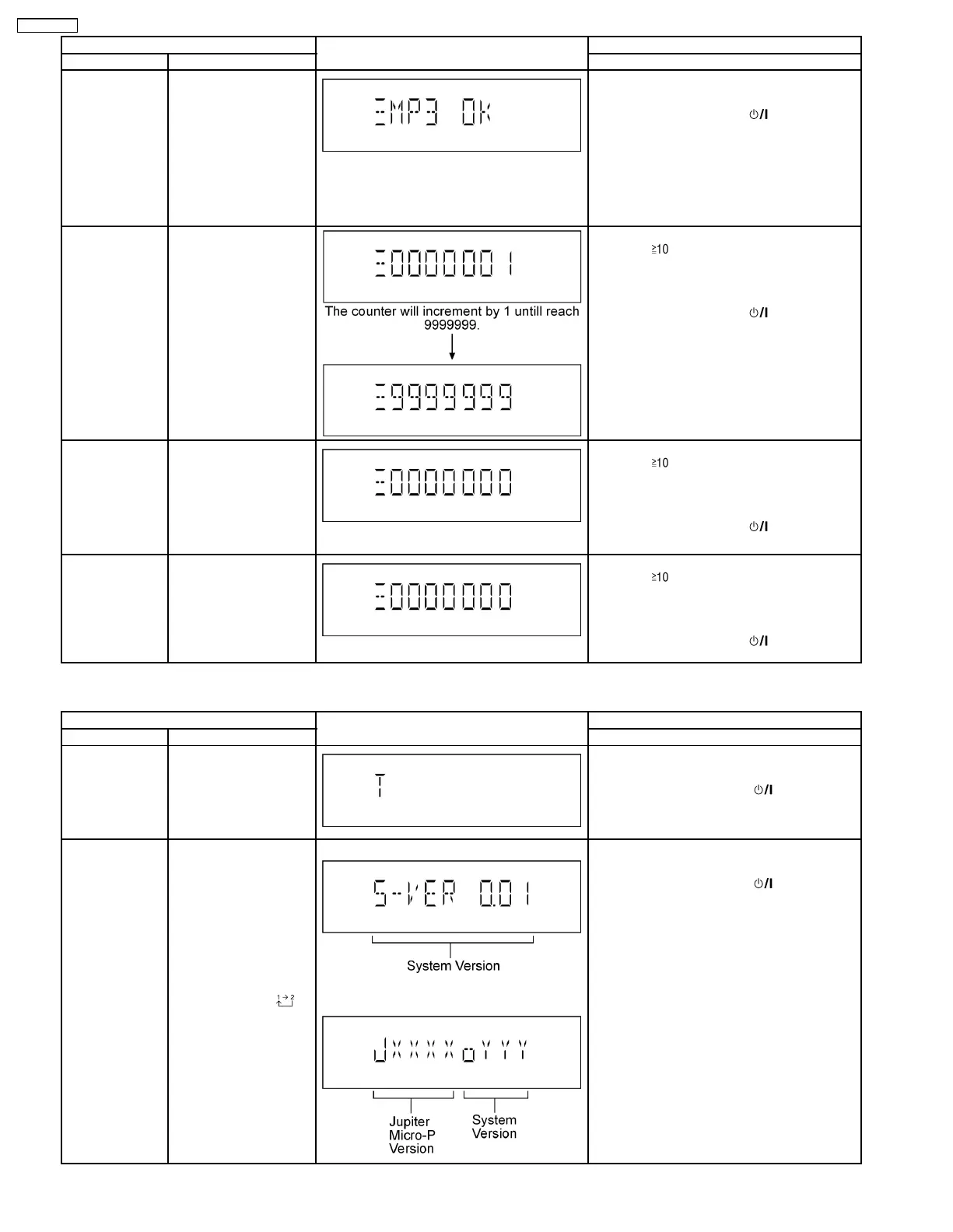
Item FL Display Key Operation
Mode Name Description Front Key
CD-MP3 Reading
& Playing
inspection
To check for the CD-MP3
Reading setting of the
main unit. The volume
will be automatically set
to its respective level (in
dB). During this mode,
treble/bass/EQ will be set
to ‘0’dB & OFF.
(For more information,
refer to section 8.2.4)
In doctor mode:
1. Press [5] button on remote control.
To exit Doctor Mode, press [
] button on
main unit or remote control.
CD Loading Test
Mode
To determine the
reliability of CD Loading
Unit.
To check for the
open/close operation for
the CD loading unit. It
fails when there is
abnormality in opening or
closing.
In doctor Mode:
1. Press [
], [1] & [1] button on remote
control.
To cancel, press [PROGRAM] button on remote
control.
To exit Doctor Mode, press [
] button on
main unit or remote control.
CD Traverse Unit
Test Mode
To check for the traverse
unit operation. In this
mode, the first & lost
track is access & read
(TOC). It fails when TOC
is not completed by IDS
or the traverse is out of
focus.
In doctor Mode:
1. Press [
], [1] & [2] button on remote
control.
To cancel, press [PROGRAM] button on remote
control.
To exit Doctor Mode, press [
] button on
main unit or remote control.
CD Combination
Test Mode
A combination of CD
loading & Traverse unit
test.
In doctor Mode:
1. Press [
], [1] & [3] button on remote
control.
To cancel, press [PROGRAM] button on remote
control.
To exit Doctor Mode, press [
] button on
main unit or remote control.
7.2.3. Service Mode Table 3
Item FL Display Key Operation
Mode Name Description Front Key
Self Diagnostic
History
Checking the records for
self-diagnostic.
In service mode:
1. Press [1] button on remote control.
To exit Service Mode, press [
] button on
main unit or remote control.
To clear history, press & hold [0] for 5 seconds
or more.
Micro-P Version
Display
Checking of various
items and firmware
version.
Note: The micro-
processor version as
shown is an example. It
will be revise when there
is an updates.
FL Display
sequenceDisplay [
]
(Display 1)
(Display 2)
In service mode:
1. Press [2] button on remote control.
To exit Service Mode, press [
] button on
main unit or remote control.
14
SA-PMX3GN





 To Next Page