Item FL Display Key Operation
Mode Name Description Front Key
Cold Start (Reset) To activate cold start
ipon next AC power up.
In service mode:
1. Press [3] button on remote control.
To exit Service Mode, press [
] button on
main unit or remote control.
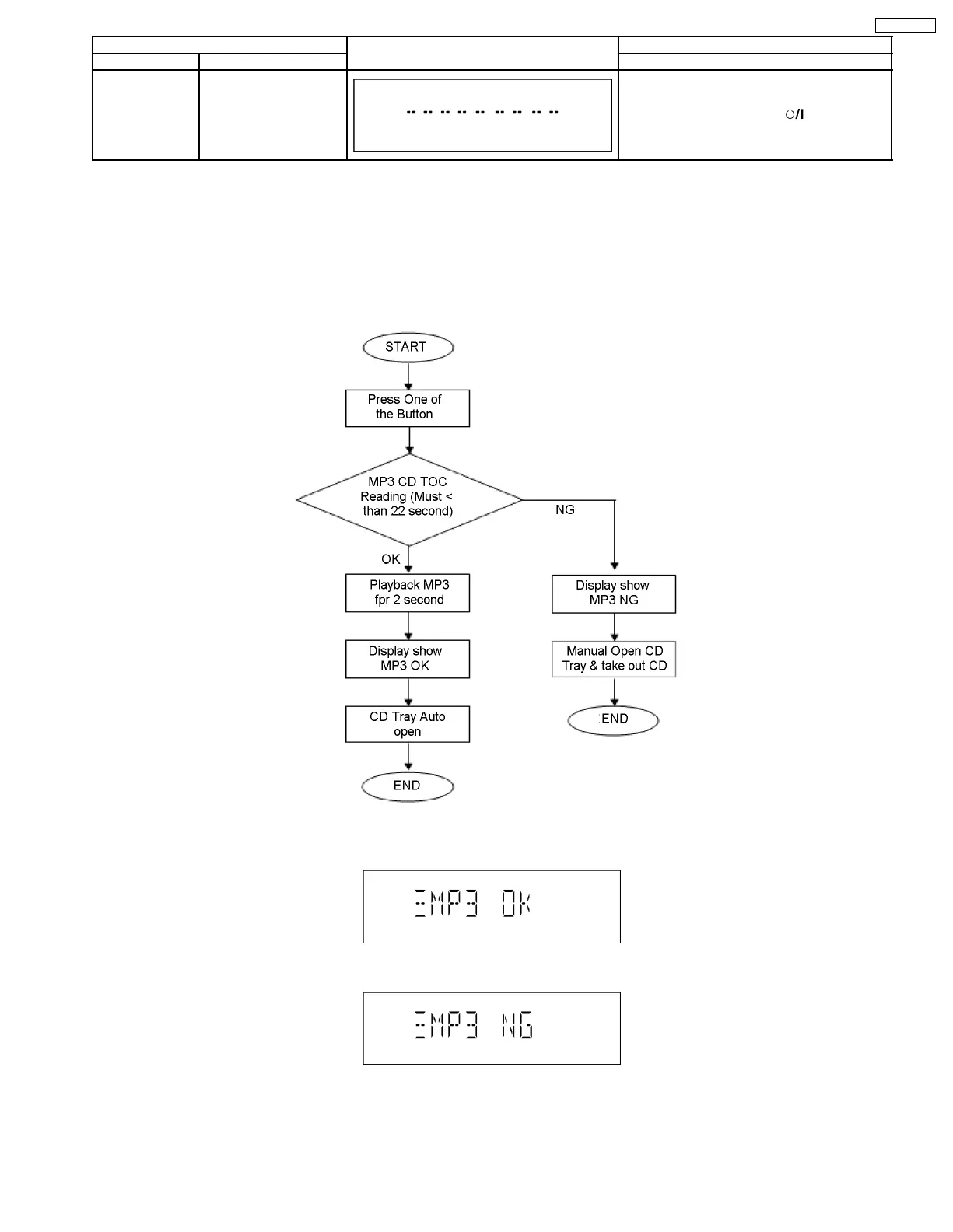
7.2.4. CD-MP3 Reading & Playing inspection
Purpose : CD-MP3 Reading & Playing test.
Below is the procedures for this mode.
Step 1 : Enter into Doctor mode. (For more information refer to section 7.1 on key operation to enter into this mode)
Step 2 : Insert CD with MP3 tracks. (Ensure correct MP3 tracks is loaded)
Step 3 : Press [5] button on remote control. Execute MP3 Disc Check (Refer Flowchart below)
Result display :
• Displayed if MP3 test OK
• Displayed if MP3 test NG
15
SA-PMX3GN





 To Next Page