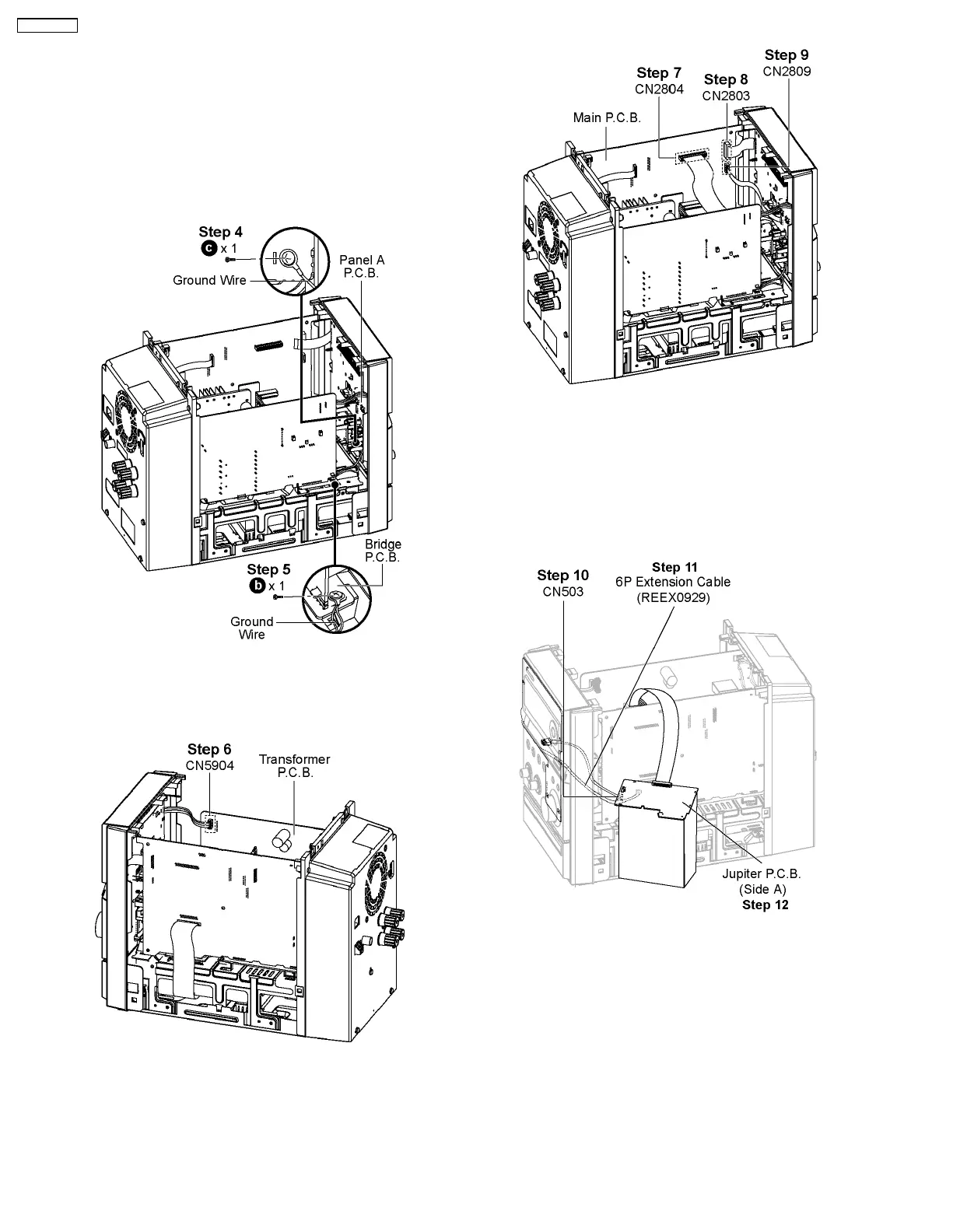
11.4. Checking & Repairing Jupiter
P.C.B.
• Servicing Side A of Jupiter P.C.B.
Step 1 : Remove Top Panel.
Step 2 : Remove Front Panel.
Step 3 : Remove Jupiter P.C.B..
Step 4 : Screw the Ground Wire to Panel A P.C.B..
Step 5 : Screw the Ground Wire to Bridge P.C.B..
Step 6 : Connect 4P cable at the connector (CN5904) on
Transformer P.C.B..
Step 7 : Connect 20P FFC cable at the connector (CN2804) on
Main P.C.B..
Step 8 : Connect 17P FFC cable at the connector (CN2803) on
Main P.C.B..
Step 9 : Connect 4P cable at the connector (CN2809) on Main
P.C.B..
Step 10 : Connect 5P cable at the connector (CN503) on
Jupiter P.C.B..
Step 11 : Attach extension cable REEX0929 (6P FFC cable
from CN6802 to CN502).
Step 12 : Check and Repair Jupiter P.C.B. (Side A).
• Servicing Side B of Jupiter P.C.B.
44
SA-PMX3GN









 To Next Page