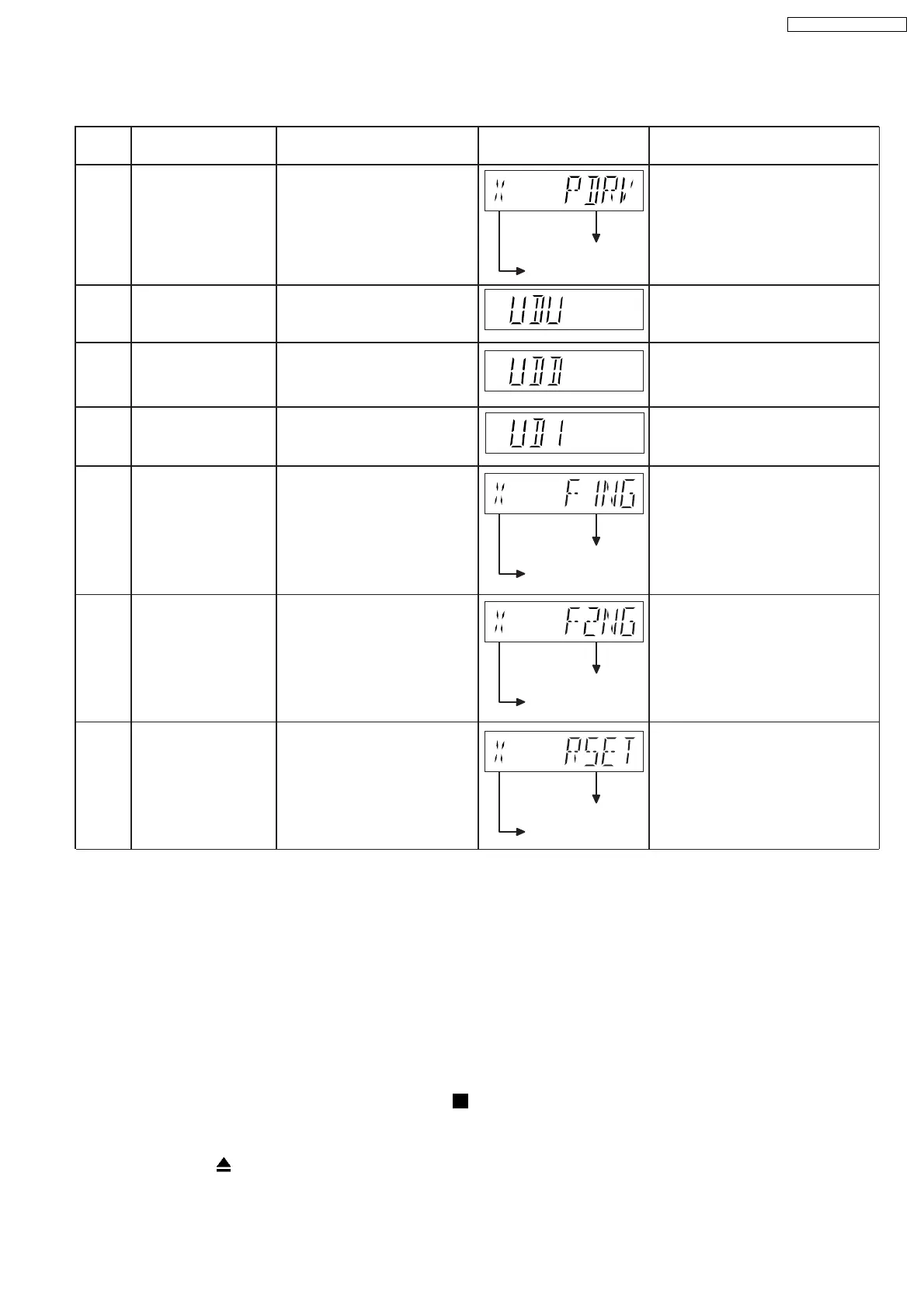
Error
Code
Diagnosis Contents Description of error Automatic FL Display Remarks
PDRV Cam gear/gear
assembly abnormal
For CD/DVD changer unit (CR14).
UDU For CD/DVD changer unit (CR14).
F1NG For CD/DVD changer unit (CR14).
For CD/DVD changer unit (CR14).
For CD/DVD changer unit (CR14).
Fail - safe mode.
(For open/close tray
unit(s))
Press [EXCHANGE] on main unit
for next error.
When the tray open operation
is performed, it fails to open. It
will automatically close all
trays after the time-out by the
microprocessor. During this
time when it fails, the error
code will appear.
Press [EXCHANGE] on main unit
for next error.
Press [EXCHANGE] on main unit
for next error.
Press [EXCHANGE] on main unit
for next error.
UD base assembly does not
move upwards from tray 5 to
tray 2.
UD base assembly
abnormal
Cam gear does not move from
"HOME" to "PLAY" drive
position.
Error code
Sequence of errors
Error code
Sequence of errors
Error code
Sequence of errors
UDD For CD/DVD changer unit (CR14).
Press [EXCHANGE] on main unit
for next error.
UD base assembly does not
move downwards from tray 1
to tray 5.
UD base assembly
abnormal
UD1 For CD/DVD changer unit (CR14).
Press [EXCHANGE] on main unit
for next error.
UD base assembly does not
move to tray 1.
UD base assembly
abnormal
F2NG Fail - safe mode.
(For open/close tray
unit(s))
When the tray open operation
is performed, it fails to close. It
will automatically close all
trays after the time-out by the
microprocessor. During this
time when it fails, the error
code will appear.
RSET Cam gear jam/close
sensor faulty
During tray re-open, the cam
gear will rotate in the opposite
direction to reset the cam gear
position. When it fails, the
error code will appear.
Press [EXCHANGE] on main unit
for next error.
Error code
Sequence of errors
8.7. Sales Demonstration Lock Function
This function prevents discs from being lost when the unit is used for sales demonstrations by disabling the disc eject function.
"LOCKED" is displayed on the unit, and ordinary operation is disabled.
8.7.1. Setting
•
• •
• Prohibiting removal of disc
1. Select the DVD/CD function.
2. At POWER ON condition, press and hold down the
button and the power button on the main unit for at least three
seconds. (The message, “LOCKED” appears when the function is activated.)
Note:
OPEN/CLOSE
button is invalid and the main unit displays “LOCKED” while the lock function mode is entered.
•
• •
• Prohibiting operation of selector and disc
41
SA-PT660P / SA-PT660PC













 To Next Page