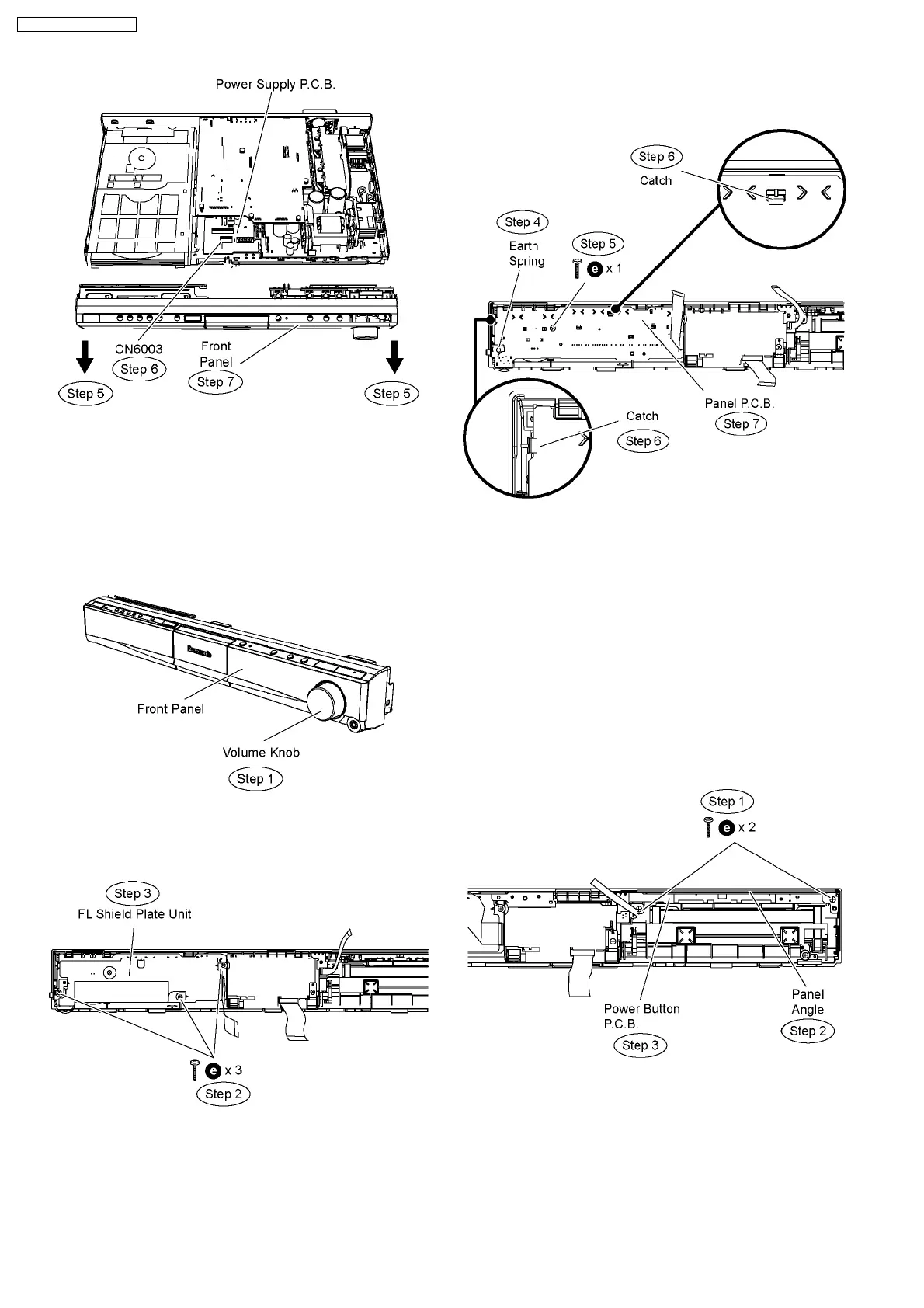
Caution: Do not attempt to exert strong force when
detaching the front panel.
9.7. Disassembly of Panel P.C.B.
•
• •
• Follow (Step 1) to (Step 3) of Item 9.3.
•
• •
• Follow (Step 1) to (Step 7) of Item 9.6.
Step 1 Remove the volume knob.
•
• •
• Disassembly of FL shield plate unit.
Step 2 Remove 3 screws from the FL shield plate unit.
Step 3 Remove the FL shield plate unit.
Caution Note: Keep the FL shield plate unit in safe place.
Avoid denting it. Place it back during assembling.
Step 4 Remove the earth spring.
Step 5 Remove 1 screw on Panel P.C.B.
Step 6 Release the catch.
Step 7 Remove Panel P.C.B.
Caution Note: Keep the earth spring in safe place. Avoid
denting it. Place it back during assembling.
9.8. Disassembly of Power/Disc
Button P.C.B.
•
• •
• Follow (Step 1) to (Step 3) of Item 9.3.
•
• •
• Follow (Step 1) to (Step 7) of Item 9.6.
•
• •
• Disassembly of Panel Angle.
Step 1 Remove 2 screws from the panel angle.
Step 2 Remove the panel angle.
Step 3 Remove Power/Disc Button P.C.B.
Caution Note: Keep the panel angle in safe place. Avoid
denting it. Place it back during assembling.
9.9. Disassembly of DVD Lid
•
• •
• Follow (Step 1) to (Step 3) of Item 9.3.
•
• •
• Follow (Step 1) to (Step 7) of Item 9.6.
50
SA-PT660P / SA-PT660PC













 To Next Page