7.4. Using the iPod
To view photos/videos from the iPod
Ensure the video connection to the SCART (AV)
terminal on this unit and select "VIDEO" from "VIDEO
OUT SCART" in "VIDEO" menu
Operate the iPod menu to make the appropriate photo/
video output settings for your TV. (Refer to operating
instructions of your iPod.)
To display the picture, turn on the TV and select the
appropriate video input mode.
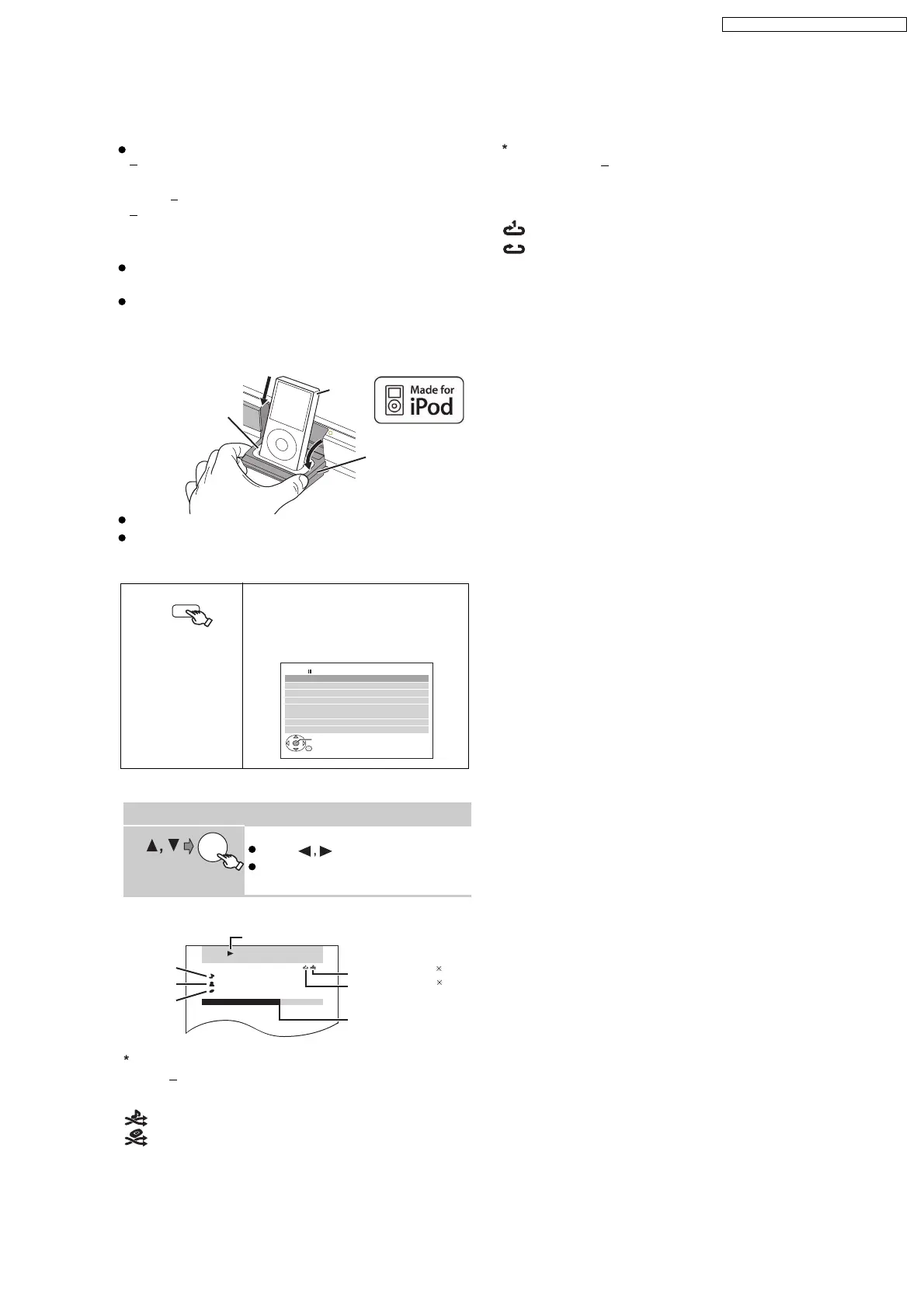
Before connecting/disconnecting the iPod, turn this unit
off or reduce the volume of this unit to its minimum.
Connect the iPod (not included) firmly.
Recharging starts when the iPod is inserted.
To operate through display of iPod, press [FUNCTIONS].
Play starts from the selected song.
1
To select shuffle modes
Each time you press the button:
2
To select repeat modes
Press and hold and then press the button
repeatedly within 3 seconds.
Each time you press the button:
Select "IPOD".
The iPod automatically switches to
this unit’s display mode.
Music menu appears on the TV.
iPod/USB
iPod Home Cinema
OK
Playlists
Ar tists
Alb ums
Songs
Podcasts
Genres
Composer s
Audiobooks
e.g.
Enjo ying m usic
Select an item.
Press [ ] to skip page by page.
To return to the previous screen,
press [RETURN].
OK
RETURN
iPod Home Cinema
Good mornin g
Ronaldo
Happy days
3/ 20
2:43 -1:15
e.g.
Song
Artist
Album
Playback condition
Shuffle mode
1
Repeat mode
Current position
: Song shuffle
: Album shuffle
Off: Cancel
: Repeat 1 track
: Repeat all
Off: Cancel
Preparation
2
Press
REPEAT
[]
PLAY MODE
[
]
Hold the dock when connecting/disconnecting the iPod.
Attach the dock adapter which should be supplied with
your iPod to the dock for the stable use of the iPod.
If you need an adapter, consult your iPod dealer.
This unit
iPod
Dock for iPod
e.g.
Dock adapter
(not included)
19
SA-PT860E / SA-PT860EB / SA-PT860EG



 To Next Page