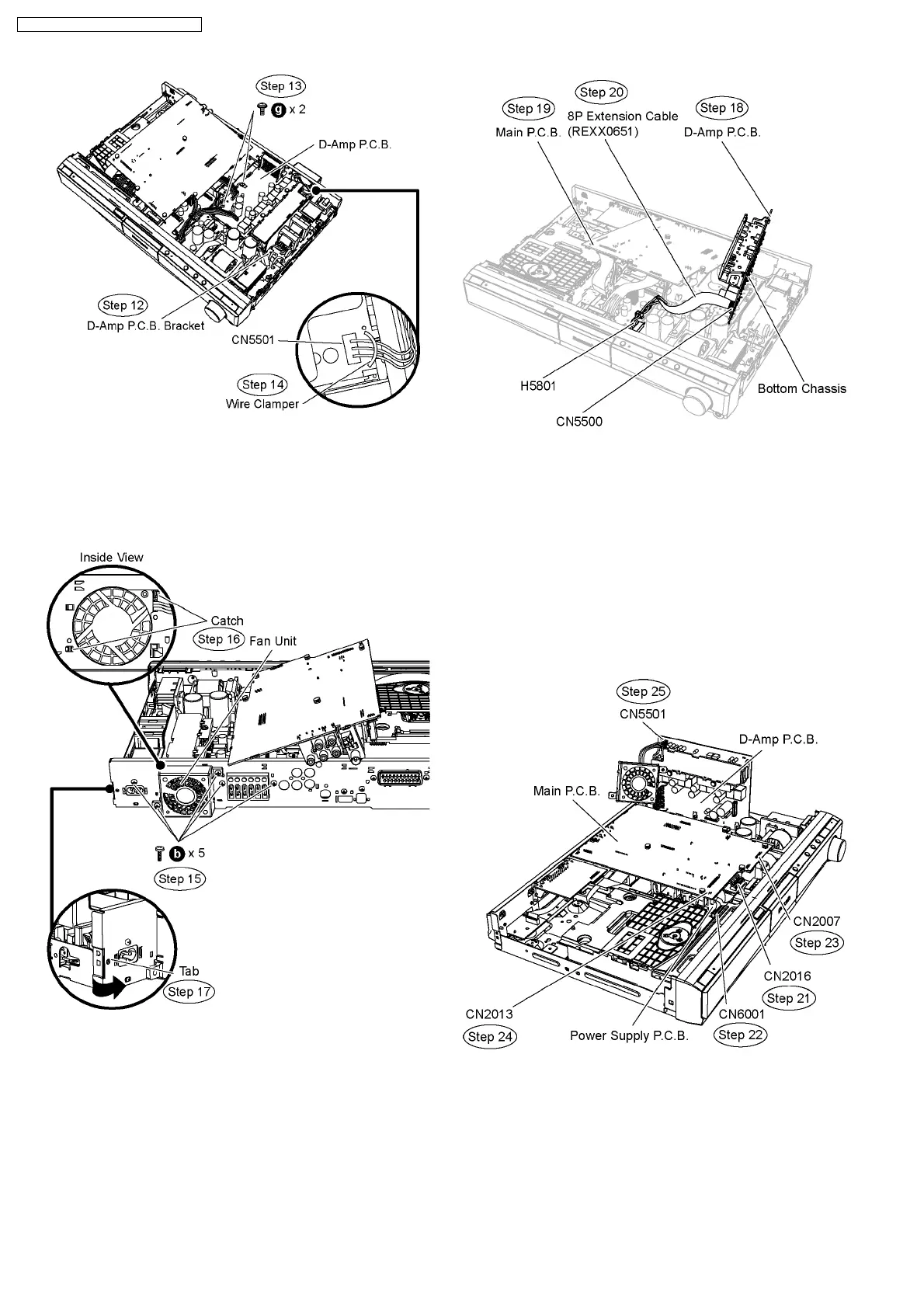
Step 15 Remove 5 screws at the rear panel.
Step 16 Release the catches and remove the fan unit.
Step 17 Release the tab of the rear panel in the direction of
arrow.
Step 18 Detach D-Amp P.C.B. from the bottom chassis and flip
it vertically.
Step 19 Position Main P.C.B. according to the diagram shown.
Step 20 Attach original cable with extension cable REXX0651.
(8P cable from H5801 to CN5500).
Caution Note: Ensure the cable is attached properly.
Step 21 Connect 13P cable at the connector (CN2016) on
Power Supply P.C.B.
Step 22 Connect 28P cable at the connector (CN6001) on
Power Supply P.C.B.
Step 23 Connect 17P cable at the connector (CN2007) on
Main P.C.B.
Step 24 Connect 4P cable at the connector (CN2013) on Main
P.C.B.
Step 25 Connect the fan unit at the connector (CN5501) on D-
Amp P.C.B.
Step 26 Position D-Amp P.C.B. according to the diagram
shown.
72
SA-PT860E / SA-PT860EB / SA-PT860EG



 To Next Page